Simsalabim — giving the iOS Simulator hardware powers
The iOS Simulator is a wonderfully fast place to build an app — right up to the moment the app needs something that belongs to the physical world.
Bluetooth discovery returns nothing, there’s no camera, Core NFC is unavailable, and a freshly created simulator has no contacts, appointments, reminders, or photos. At that point the usual development loop ends: find an iPhone, deploy, unlock it, grant permissions, put the right hardware or test data in front of it, and repeat after every small change.
Yes, yes, real-device testing is indispensable — but it’s a lousy substitute for a tight edit/build/run cycle.
That’s the problem Simsalabim (the german “abracadabra”, in case you wondered) is meant to solve. It’s a macOS menu-bar suite that gives simulated apps useful access to Bluetooth LE, cameras, NFC tags, and realistic personal data. Depending on the module, that can mean forwarding real hardware attached to the Mac, serving a deterministic mock, or filling the simulator’s own databases with fixtures.
I’m not trying to pretend that the simulator has become an iPhone. I just want to keep ordinary development in the simulator for much longer — without replacing the framework APIs, forking the app, or filling production code with test-only branches.
It started with Bluetooth
The first member of the family was ImpossiBLE. I wrote about its original bridge and mock provider in “ImpossiBLE — BLE back in the iOS Simulator”.
The irritation was simple: an app could compile against CoreBluetooth in the simulator, but it couldn’t do anything useful with it. CBCentralManager never reached a productive state, scans found no peripherals, and every UI or protocol change forced another trip to a physical device. (And no, Apple never bothered to explain why — see my earlier rant.)
ImpossiBLE keeps the app’s view of the world intact. The app still creates a CBCentralManager, scans, connects, discovers services and characteristics, reads, writes, subscribes, and receives the familiar delegate callbacks. A small library linked into the simulator build intercepts those CoreBluetooth entry points and sends the operations over a Unix domain socket to a native provider on the Mac.
The provider can answer in two ways:
- Passthrough translates the calls into real CoreBluetooth work using the Mac’s Bluetooth controller. The simulated app can communicate with the actual peripheral on the desk.
- Mock serves configurable virtual peripherals. Tests and development sessions can get the same services, values, notifications, pairing requirements, and failure states every time.
Passthrough answers “does this work with the thing?”, mock answers “does this work in every state I need to reproduce?” — and believe me, you need both.
ImpossiBLE can also capture nearby BLE devices into editable mock configurations, and a simulator app or test can upload an ephemeral fixture of its own. The fixture then lives with the code that depends on it instead of in somebody’s undocumented menu-bar selection.
Of course, none of this removes the need to test radio timing, pairing dialogs, background behavior, interference, reconnection, or device-specific quirks on hardware. What it does remove is the need to use hardware while polishing a scan list, validating a parser, exercising an error path, or taking a screenshot.
One pattern, several missing worlds
Once the Bluetooth bridge worked, it dawned on me that Bluetooth wasn’t an isolated simulator limitation at all. Camera and NFC apps hit the same wall, and empty system stores create a quieter version of the same problem.
Three modules share the transparent bridge model: an iOS-side library preserves the Apple framework API, a socket crosses the simulator boundary, and a Mac provider supplies either a mock or real hardware. The fourth, Simulacrum, does not need to intercept an API at all; it writes fixtures into the simulator’s real stores.
That common purpose became Simsalabim: one status item, one panel, four focused tools.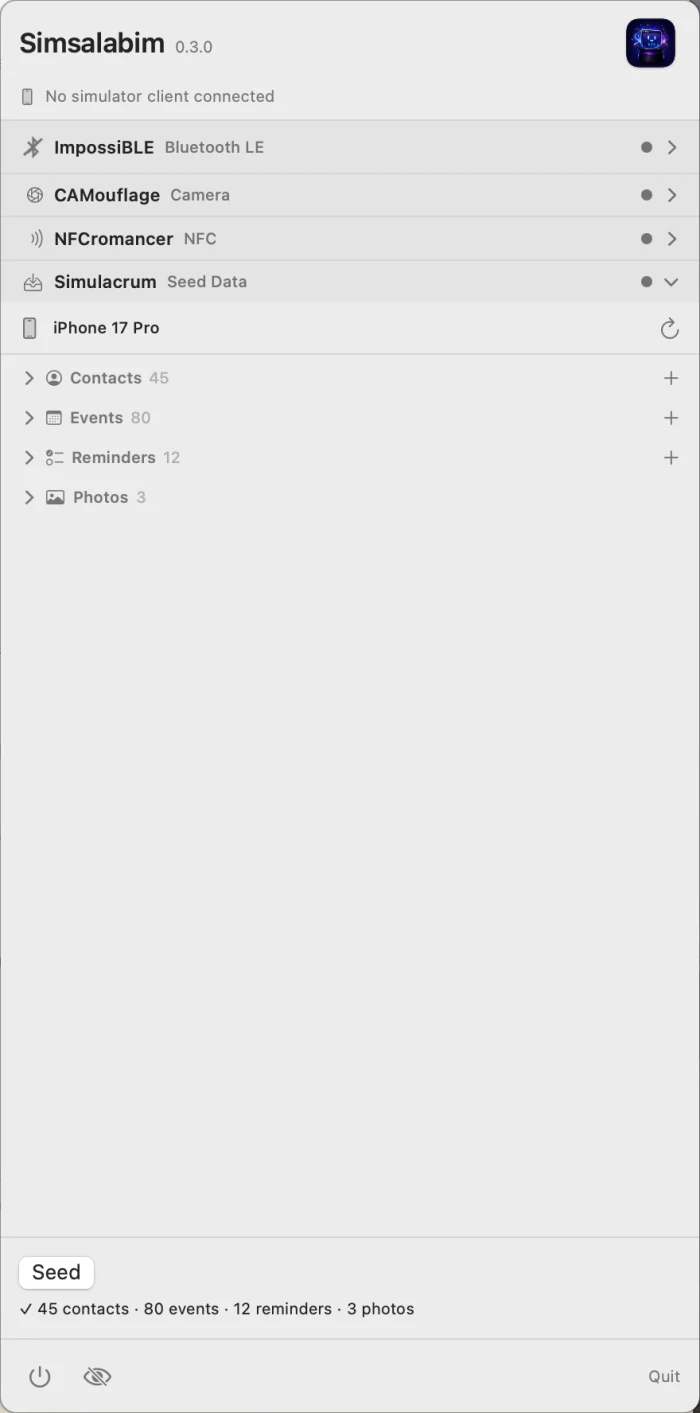
 ImpossiBLE: CoreBluetooth, real or invented
ImpossiBLE is the most mature and most complete expression of the idea. In passthrough mode it moves BLE central-role work onto the Mac while keeping the simulated app on the normal CoreBluetooth surface. In mock mode it provides editable peripherals down to advertisements, services, characteristics, descriptors, values, notifications, security behavior, RSSI, and L2CAP channels.
Its value is not merely that a scan returns something. It makes BLE scenarios controllable. A room can contain one heart-rate monitor or twelve noisy sensors. A characteristic can require encryption. A test can carry two expected peers and one distracting stranger. The physical lab becomes a reproducible fixture without making the application aware of a special testing backend.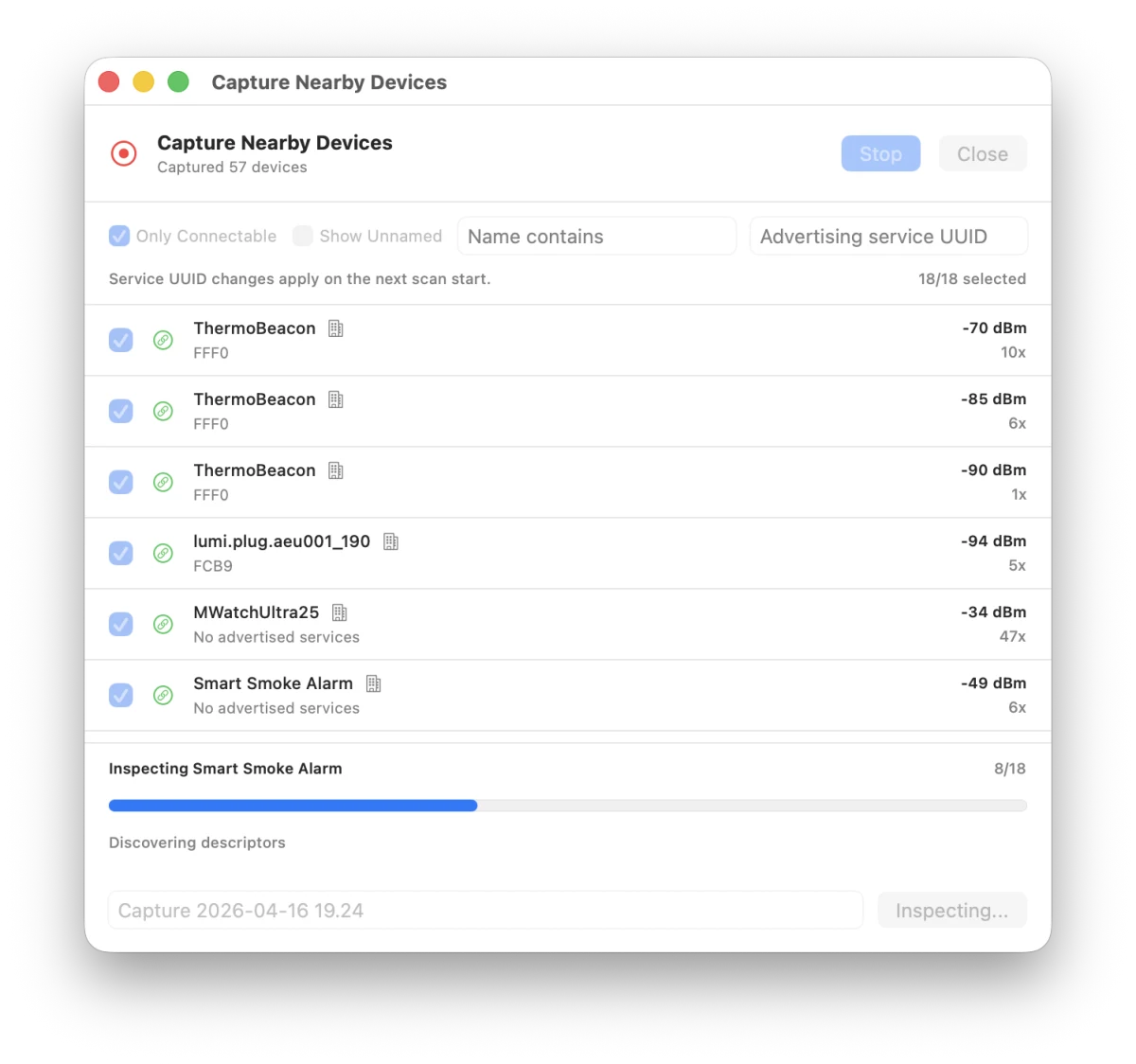
 CAMouflage: a camera where there is none
CAMouflage applies the same philosophy to AVFoundation capture. The simulator app still discovers AVCaptureDevice instances, builds an AVCaptureSession, displays an AVCaptureVideoPreviewLayer, receives sample buffers, captures photos, and scans QR codes or barcodes.
In mock mode, the camera can be a test pattern, a still image, a looping movie, or a test-owned machine-code fixture. In passthrough mode, it can be the Mac’s built-in camera, a USB webcam, or Continuity Camera. The provider sends the frames across a dedicated binary socket while session control travels separately.
That turns camera work from a physical performance into ordinary software development. A QR login flow can always see the same payload. A document scanner can be developed against a stable image. Empty, malformed, moving, and successful cases no longer depend on what happens to be in front of an iPhone at that moment.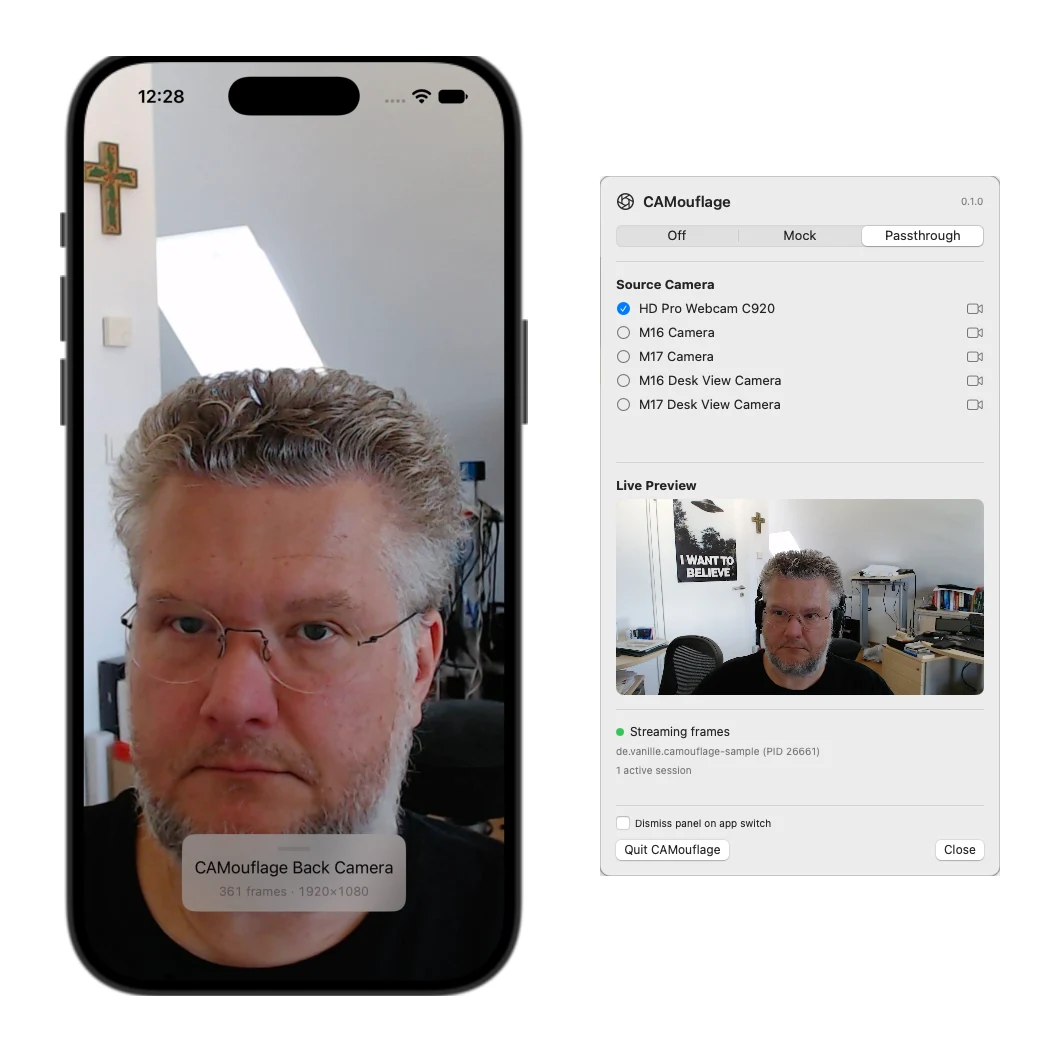
 NFCromancer: Core NFC without the phone ritual
NFCromancer brings Core NFC sessions to life. In passthrough mode it talks to a real NFC tag through an ACR122U or compatible USB reader connected to the Mac. In mock mode it serves a library of configurable tags.
The simulator app still works with Core NFC. NFCromancer reflects provider availability, delivers NDEF messages, and even recreates the otherwise missing “Ready to Scan” sheet while a session is active. A physical tag can be copied into the mock library, edited and replayed; compatible mock content can also be written back to a real Type 2 tag.
For provisioning, pairing, deep-link, inventory, or tag-management interfaces, this makes the difference between a repeatable workflow and waving a phone over a tag after every build.
 Simulacrum: make a fresh simulator look lived-in
Simulacrum solves a different class of absence. A new simulator has empty Contacts, Calendar, Reminders, and Photos libraries. That is technically correct and practically unhelpful when an app needs pickers, search results, avatars, event lists, attachments, or realistic screenshots.
One click seeds the booted simulator with fictional contacts, several weeks of events, dated reminders, and placeholder photos. Dates are generated relative to the current day, while phone numbers and email addresses use ranges reserved for examples.
There is no simulator-side package to link. Simulacrum installs a small seed agent into the booted simulator and uses the public Contacts and EventKit frameworks to write records; photos go through simctl. The result is real data in the real stores, visible to every app with permission to read it.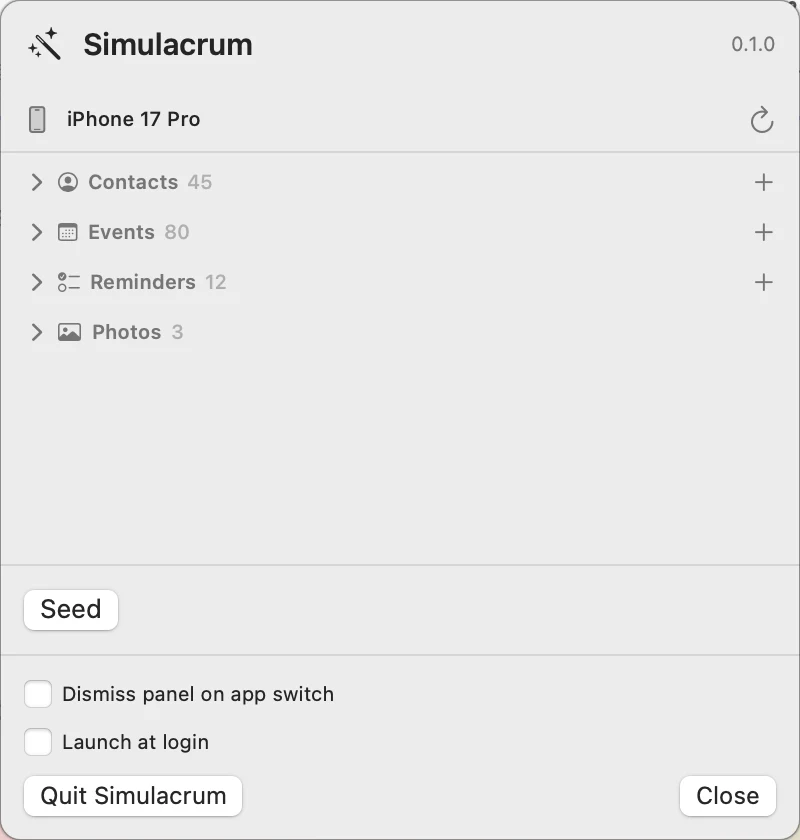
Why a suite — and why standalone tools still exist
Each module began as a complete tool because each one is useful on its own. A BLE developer shouldn’t have to install camera and NFC machinery. The repositories remain independently cloneable, buildable, and installable, with their own menu-bar apps.
Simsalabim embeds those same provider components rather than reimplementing them. The suite is for the increasingly common case where an app touches several physical or personal-data surfaces: scan a product over NFC, connect over BLE, capture a code with the camera, then attach a contact or photo.
There is deliberately no global Mock/Passthrough switch. ImpossiBLE, CAMouflage, and NFCromancer each keep their own mode. Forwarding a real BLE device while serving a deterministic camera fixture is perfectly reasonable. Simulacrum has no persistent mode at all: choose a booted simulator and seed it when needed.
The panel is an exclusive accordion. All four headers and their status indicators remain visible, while the selected module gets the full working area. The menu-bar icon combines the state of the active hardware bridges, so traffic and modes remain visible without four separate status items.
The common plumbing lives in SimBridgeKit: socket transport, provider ownership, connection state, and the shared menu-bar shell. A standalone provider and the suite never fight silently over the same socket. Whichever one is already serving keeps ownership; the other reports that it is blocked.
The code under test should stay honest
The most important design rule across the family is that an app should not acquire a second architecture merely because it runs in the simulator.
For ImpossiBLE, CAMouflage, and NFCromancer, the app keeps using Apple’s types and callbacks. The bridge code is active only in simulator builds and becomes inert on devices. Production behavior does not depend on a parallel “fake Bluetooth” or “test camera” protocol invented by the application team.
There are still intentional test hooks for supplying fixtures. Those hooks configure the world outside the app; they do not replace the app’s interaction with CoreBluetooth, AVFoundation, or Core NFC. This is a subtle but important boundary. The test may decide which peripheral, frame, or tag exists. The application still has to discover it and handle it through the real framework contract.
Simulacrum follows the same principle from the other direction: instead of faking Contacts or EventKit inside the app, it puts data into the stores those frameworks already expose.
Getting started
Simsalabim is open source and MIT-licensed. Clone it recursively, because the suite pins the four product repositories as submodules:
git clone --recursive https://github.com/mickeyl/Simsalabim.git
cd Simsalabim
make run
The individual tools are available from their own repositories if that is all a project needs. The bridge modules require their corresponding Swift package in the simulator app; Simulacrum does not. Passthrough needs the relevant Mac hardware and permissions, while every module remains useful without physical hardware through mocks or seeded fixtures.
Simsalabim doesn’t make the simulator physically accurate. It makes it useful again for the large, important part of hardware-adjacent development that is still software: interface states, sequencing, parsing, persistence, error handling, automated tests, demos, and screenshots.
The final hardware run still matters. It just no longer has to be every run.
As usual, feedback and pull requests are very welcome — I’m sure there are more missing worlds out there. Stay tuned :)