Two questions macOS should answer — lsaudio and lsusd
Some tools begin with a roadmap. Others — like these two — begin with a question you ask yourself often enough that irritation wins.
At my desk, two questions kept coming back:
- What is making that sound?
- What exactly is connected over USB?
macOS knows both answers. CoreAudio knows every process that is playing or recording. IOKit knows every USB device, where it sits in the physical topology, how fast it negotiated, and whether it exposes a serial device. But the system doesn’t present either answer at the level where I need it while debugging. I kept reaching for Activity Monitor, System Information, ioreg, shell pipelines, and small scripts that answered only today’s version of the question.
So I turned those private crutches into two proper tools: lsaudio and lsusd. Both started on the command line. Both now also have native macOS menu-bar companions. The source code is on GitHub, both projects are MIT-licensed, and both can be installed through Homebrew.
Who is making that sound?
Modern systems make a surprising amount of noise on behalf of something else. A browser tab plays through a WebKit helper. Notifications are brokered by a system sound server. A booted iOS Simulator can leave systemsoundserver-simd producing sounds on the host. And, yes, coding agents occasionally launch afplay, say, or a speech synthesizer to test something and forget to clean it up. *sigh*
The user-visible application is therefore not always the process that owns the audio session. That is why searching the obvious names in Activity Monitor often gets nowhere.
lsaudio asks CoreAudio instead:
$ lsaudio
  PID  Process                    Out  In  Devices
41841  afplay                       ▶   ·  Audioengine 2+
90963  Safari Graphics and Media    ▶   ·  Audioengine 2+
99075  corespeechd                  ▶   ·  Audioengine 2+
It uses the CoreAudio process-object API introduced in macOS 14 to enumerate clients registered with coreaudiod, then reads their process IDs, bundle identifiers, input and output state, and devices. There’s no private API involved and no guessing based on power usage. Watch mode is driven by CoreAudio property listeners, so it reports changes when they happen rather than polling the system every second.
Listing the culprit is only half the job. lsaudio kill afplay sends a polite SIGTERM, confirms before acting, supports other signals and dry runs, and can offer administrator authorization when a protected process belongs to another user. Plain-text and JSON output make the same discovery useful in scripts.
The native LSAudio for macOS app uses the same LSAudioCore module as the CLI. Its menu-bar label shows output and input activity at a glance. Open the panel and the abstract counts turn into the actual processes, their devices, and a quick way to terminate the offender. A separate process window exposes idle clients, search, executable paths, event history, details, export, and the full signal-delivery workflow.
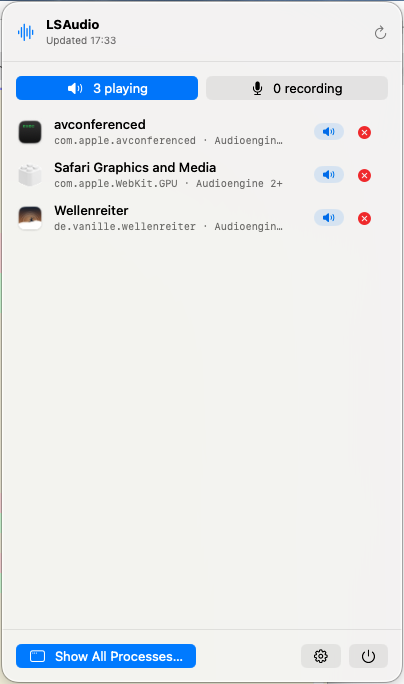
The important part is that the panel shows reality as CoreAudio sees it. In the screenshot, Safari is represented by Safari Graphics and Media, because that is the process actually holding the audio session. That distinction is exactly why the tool exists.
What exactly is connected over USB?
Two decades of embedded Linux have trained me to type lsusb whenever hardware behaves strangely. It’s a beautifully useful first question: did the device enumerate, which vendor and product ID did it report, and at what point in the tree did it appear?
The corresponding experience on macOS has always felt oddly indirect. System Information is nice to look at, but way too heavyweight for a quick bench check. Homebrew’s lsusb formula is nothing but a shell wrapper around system_profiler SPUSBDataType — and on newer macOS versions that data type happily returns no devices at all while the IOKit registry is full of them. Thanks, Apple. For serial hardware, the usual collection of /dev/cu.*, ioreg, and filtering commands adds another layer of ceremony.
lsusd gives me the direct answer I wanted:
$ lsusd
Bus  Device  USB Product     USB Vendor  VID:PID    Release  Speed
001  003     AX88179A        ASIX        0B95:1790  2.00     5G
002  013     USB JTAG/serial Espressif   303A:1001  1.01     12M
008  002     PSSD T7         Samsung     04E8:4001  1.00     10G
The CLI is a zero-dependency Python program for macOS and Linux. On macOS it reads the IOUSB registry plane; on Linux it reads sysfs. It reports bus and address, location, product and vendor, serial number, VID:PID, device release, and negotiated speed. --tree renders the physical topology, --hubs includes the infrastructure normally hidden from the flat list, and --serial maps USB devices to their serial device nodes.
Watch mode is push-driven on both platforms: IOKit first-match and termination notifications on macOS, kernel uevents through a netlink socket on Linux. That makes it useful for the familiar debugging ritual of unplugging a device, reconnecting it, and asking whether the machine noticed the same event you did.
The native LSUSD for macOS app is deliberately not a graphical wrapper around the Python executable. It talks to IOKit directly through a Swift core, builds the topology itself, and subscribes to IOUSBHostDevice and IOSerialBSDClient changes. The menu-bar label shows USB and serial counts; the compact panel switches between both lists and makes negotiated speed visible without opening a terminal. The full window adds expandable topology, device details, hubs, event history, and plain-text, CSV, and JSON export.
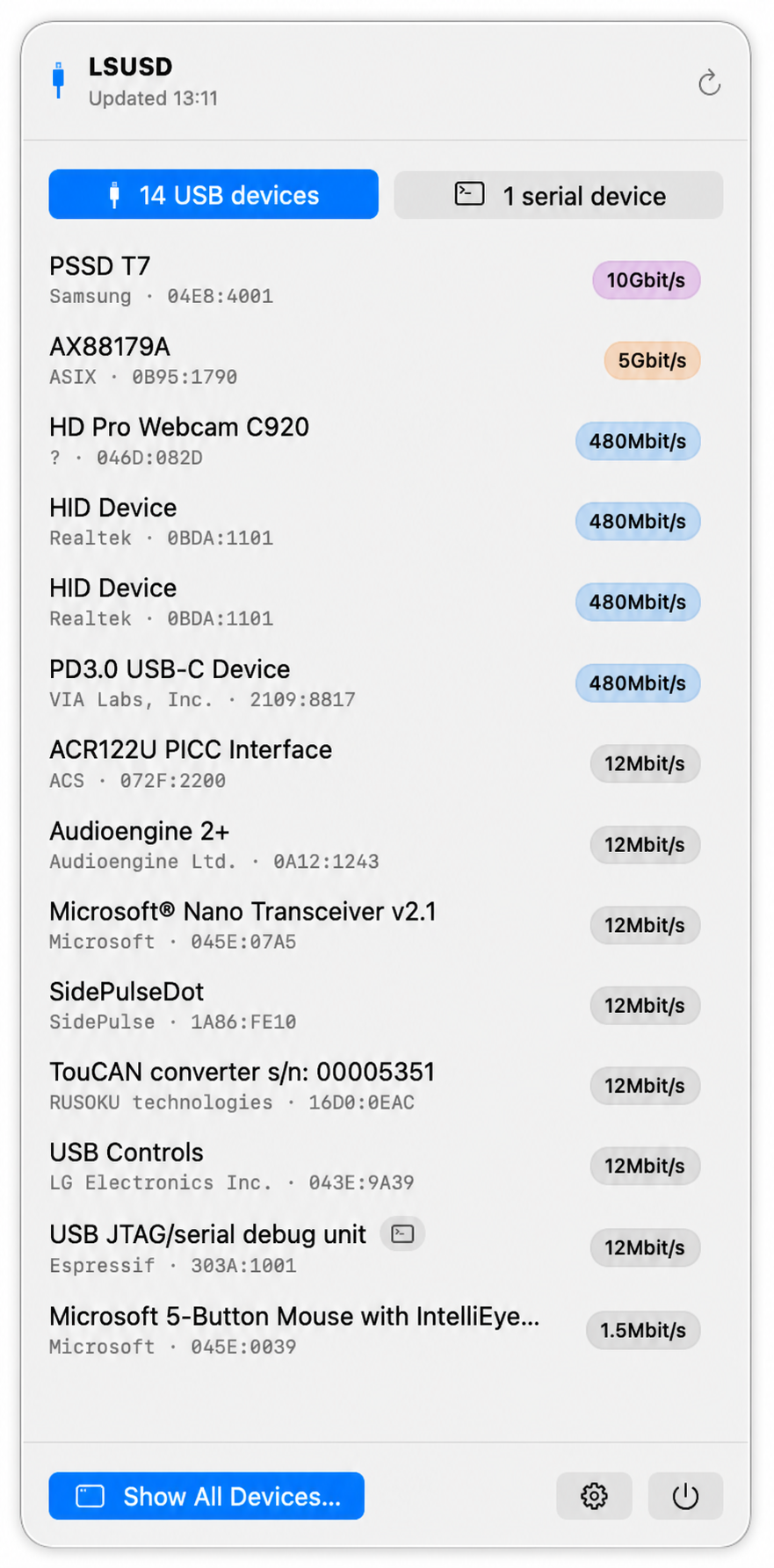
Speed is a small detail until it’s the answer. A storage device that should be at 10 Gbit/s but negotiated 480 Mbit/s tells a very different story from a device that did not enumerate at all. Putting that badge directly in the popover turns the menu-bar app from a prettier device list into a useful hardware diagnostic.
Why a CLI and a menu-bar app?
The command line is still the right surface when I already know the question. It composes with other tools, works over SSH, can produce stable machine-readable output, and can sit inside a test script. The menu bar solves a slightly different problem: it keeps the system’s state close enough to notice.
When a sound starts unexpectedly, I don’t want to remember a command before it stops. When I reconnect a USB-CAN adapter, an ESP32, or an audio interface, I want immediate confirmation that it returned with the identity and speed I expected. The two applets turn a diagnostic snapshot into ambient instrumentation.
Neither app polls just to keep its label alive. They listen to the platform services that own the state and refresh when those services report a change. That keeps the tools quiet, current, and cheap enough to leave running — exactly what a menu-bar utility should be.
The tools are available independently, so the terminal version doesn’t drag in an application and the application doesn’t require the CLI:
brew tap mickeyl/formulae

brew install lsaudio
brew install lsusd

brew install --cask lsaudio-menubar
brew install --cask lsusd-menubar
From private crutch to public tool
One final note that I don’t want to bury in a release checklist: without AI, neither of these projects would have reached public life in this form.
The itch was mine, the platform knowledge was mine, and I still decide what the tools should do and review the code that does it. But the distance between a command that works on my machine and a public project is mostly unglamorous work: handling awkward edge cases, keeping macOS and Linux behavior aligned, designing a native interface, writing tests and documentation, preparing Homebrew formulae and casks, signing, notarizing, and polishing all the small paths that only somebody else will take.
AI changed the economics of that last stretch. It made it reasonable to do the work around the idea, not only the interesting kernel of the idea. Without that leverage, lsaudio and lsusd would have remained what they began as: non-portable private crutches, useful on my machines and invisible to everybody else.
Anyway — give them a spin and tell me what’s missing. I hope they save you as much time as they saved me :)