ImpossiBLE — BLE back in the iOS Simulator
For a while, Bluetooth Low Energy in the iOS Simulator was one of those things that half-worked often enough to be useful. It was never a perfect substitute for a real device — Bluetooth never is — but it helped. You could at least keep the edit/build/run cycle on the Mac while working on UI, parsing, state machines, and the boring-but-important parts around the actual radio.
And then, at some point, it was gone.
No dramatic deprecation, no helpful replacement, no grand architectural explanation. Just the usual developer experience where something you had quietly relied on stops being there. CBCentralManager sits in a state that is not useful, scans do not discover anything, and you are back to launching on hardware for every little iteration. If your app talks to BLE hardware, the simulator becomes a very expensive screenshot viewer.
That annoyed me enough to build ImpossiBLE.
The bridge
The original idea is simple: keep your iOS app code unchanged, but intercept the CoreBluetooth calls in the simulator and forward them to a small macOS helper. The helper runs on the Mac, talks to the real Bluetooth controller via CoreBluetooth, and sends the results back over a Unix domain socket.
From the app’s point of view, it still uses CBCentralManager, CBPeripheral, services, characteristics, descriptors, notifications, RSSI, and L2CAP channels. Under the hood, ImpossiBLE swizzles the simulator-side CoreBluetooth entry points and shuttles newline-delimited JSON through /tmp/impossible.sock.
It is not magic. It is just a pragmatic tunnel around a missing feature.
There are a few details that make it pleasant in practice:
- Multiple
CBCentralManagerinstances are handled independently. - Service filters are enforced to match iOS behavior, even where macOS CoreBluetooth is more liberal.
CBManagerStatetracks the socket provider, so starting or stopping the helper produces a usefulpoweredOn/poweredOfftransition.- The simulator side auto-reconnects, so the provider can start before or after the app.
- The app code does not need a special ImpossiBLE mode.
For real hardware, that already gets a lot of day-to-day BLE work back into the simulator.
The mock provider
The new part is that the provider does not have to be real Bluetooth hardware anymore.
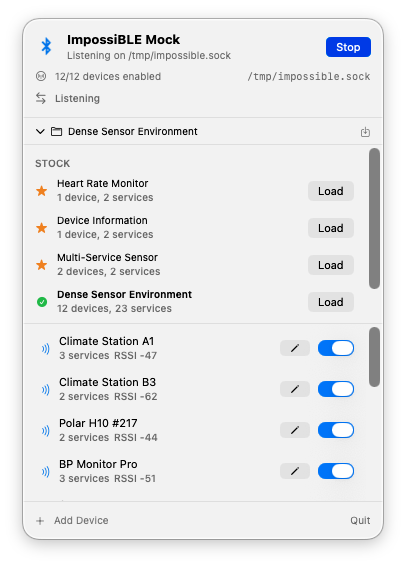
ImpossiBLE now ships with a macOS menu bar app called ImpossiBLE Mock. It listens on the same /tmp/impossible.sock socket as the forwarding helper, but instead of talking to the Mac’s Bluetooth hardware it serves virtual peripherals from an editable configuration.
That means the iOS app still does not know the difference. It scans, discovers, connects, reads, writes, subscribes, and receives delegate callbacks as usual. Only the provider behind the socket changes:
# Forwarding mode: simulator app -> real Mac Bluetooth hardware
make mock-stop
make run

# Mocking mode: simulator app -> virtual BLE devices
make stop
make mock-run
The mock app comes with a few stock configurations: a heart rate monitor, a device information peripheral, a multi-service sensor, and a dense sensor environment with a dozen devices. You can edit device names, RSSI, connectability, advertised service UUIDs, manufacturer data, services, characteristics, descriptors, characteristic properties, initial values, and simple pairing/security behavior. Custom configurations can be saved and restored.
This is especially useful for the parts of BLE development that are usually tedious to reproduce:
- testing scan result ordering and filtering without walking around the room;
- exercising UI states for empty, sparse, and crowded environments;
- checking descriptor discovery and notification setup;
- simulating devices that require pairing or encrypted characteristics;
- keeping a deterministic test setup for demos and screenshots.
The menu bar icon also flashes on socket traffic, which is a tiny thing, but very helpful when you are wondering whether the simulator is actually talking to the provider.
Installation
The repository is here:
https://github.com/mickeyl/ImpossiBLE
For Homebrew users:
brew install mickeyl/formulae/impossibleThat installs the helper and the mock menu bar app. This is a developer tool, so I am not trying to pretend it is a polished end-user product. The Homebrew formula builds it locally and signs the mock app ad-hoc; if you want a notarized distributable app bundle, the Makefile has the pieces for that as well.
If you prefer to work from the checkout:
git clone https://github.com/mickeyl/ImpossiBLE.git
cd ImpossiBLE
make install
make run        # real BLE forwarding
make mock-run   # virtual BLE provider
Only run one provider at a time. Both the real helper and the mock app own /tmp/impossible.sock.
Is this a replacement for device testing?
No.
Radio behavior is still radio behavior. Timing, connection stability, hardware quirks, pairing dialogs, background behavior, and all the lovely little platform-specific edge cases still need real devices. ImpossiBLE is not meant to remove that step.
What it does remove is the need to go to hardware for every small iteration. If I am polishing a scan UI, checking a parser, debugging a state machine, or testing how an app reacts to a dense BLE environment, I can now stay in the simulator. That is a big enough win to justify the tunnel, the swizzling, the socket protocol, and the slightly cheeky name.
Apple may have silently taken BLE away from the simulator. Fine. I put it back.