Blog
PNGuin — iPhone screenshots from the menu bar
For quite a while now, every screenshot of my iPhone went through a little shell script called iphone-screenshot. I need that a lot these days, because an AI agent that builds an iOS app should be able to look at what it just built, and “take a screenshot of my iPhone and have a look” has become one of the most frequent sentences in my terminal. The script itself was trivial. What it stood on wasn’t: a pymobiledevice3 tunneld running as a root LaunchDaemon, since you can’t talk to a modern device’s developer services without a tunnel.
That daemon had a habit. Once a phone told it that it “has not been unlocked recently”, it kept answering {} — forever, silently — and the only cure was sudo. You can imagine what that does to an agent that wants to check its work every couple of minutes. sigh
Xcode 27 finally ships xcrun devicectl device capture screenshot: no tunnel daemon, no root, no Python, about 0.7 seconds per shot. So I threw the old script away and wrote PNGuin, which is the same iphone-screenshot command (now in Swift) plus a menu-bar app around it. Say “penguin”: it delivers PNGs, and if you spot a nod to an old friend from the Linux days in there, you’re not wrong. As usual these days, with AI doing most of the typing.
Two front ends, one core
The CLI is made for scripts and agents. On success, stdout carries nothing but the path of the PNG; the exit codes tell the caller what to do next. 4 means the phone is locked, so ask the human to unlock it. 3 means there’s no clear candidate, so run iphone-screenshot list and ask which device is meant. That’s really all an agent needs, and I’m surprised how much nicer a tool gets when you design it for a reader that doesn’t guess.
The menu-bar app is for me. Click the icon and the panel lists every paired iPhone and iPad with its state (ready, locked, not reachable), shows a live preview of the selected one and saves a screenshot to the desktop with one click. Click the preview and it’s on the clipboard; drag it into Mail, a chat or a Finder window and it arrives as a properly named PNG. Rows are ordered by the device you last took something from, because that’s the one you’ll want again.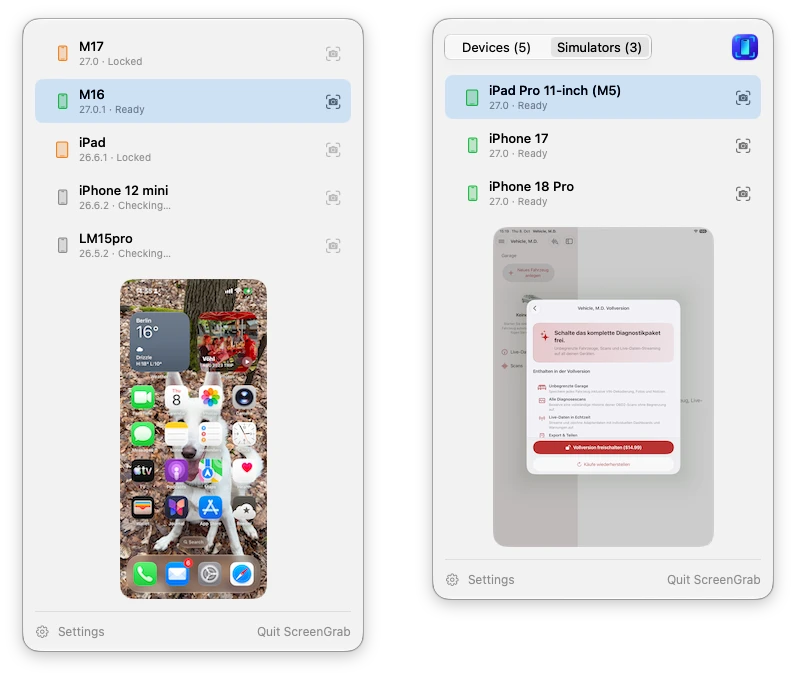
devicectl, the fine print
Of course it wasn’t quite as easy as calling devicectl. A few things I learned along the way:
devicectl list deviceslists every paired device, whether it’s lying on the desk or in a drawer three rooms away, and itstunnelStateonly tells you which tunnel was used last. To find out whether a phone can actually be captured, PNGuin asks each one for its lock state.- Don’t ask them all at once! Probing five paired devices in parallel works exactly once. From the second round on, CoreDevice wedges for everyone, and the iPhone that delivered a perfectly fine preview a second ago suddenly reports itself as unreachable. One at a time, selected device first, and the problem’s gone. It took a couple of stress-test runs before I believed it.
- My displays all run at 1x — yes, dear reader, I’m still one of those, with an LG ultrawide and two Dells in portrait mode — so a 1206×2622 screenshot shrinks to about 150×320 physical pixels in the panel. SwiftUI’s own downscaling turned that into colourful mush. I was convinced that no amount of resampling would make six-pixel text readable, and Codex, which I asked for a second opinion, called better interpolation “useful polish”. A quick Lanczos test proved us both wrong: same size, and suddenly “CAN 11B (500K)” was legible again.
Simulators, too
Once the panel existed, the obvious question was: why only real devices? Most of my screenshots for App Store pages, documentation and this blog come from the simulator anyway. Xcode has its own ways to grab those, but I wanted them in the same place as everything else, with the same click to copy. So there’s now a segmented control at the top, Devices and Simulators, the latter listing every booted iPhone and iPad simulator via simctl.
And since a simulator lets you cheat, PNGuin cheats with style. It can put the classic marketing status bar on the simulator (9:41, full bars, full battery) while it’s previewed and remove it again afterwards; if you’ve set status-bar overrides of your own, it keeps its hands off them. It can also give the screenshot transparent rounded corners, which is what you want for slides and docs. Both options apply to the preview as well, so whatever you drag out is exactly what you would have saved.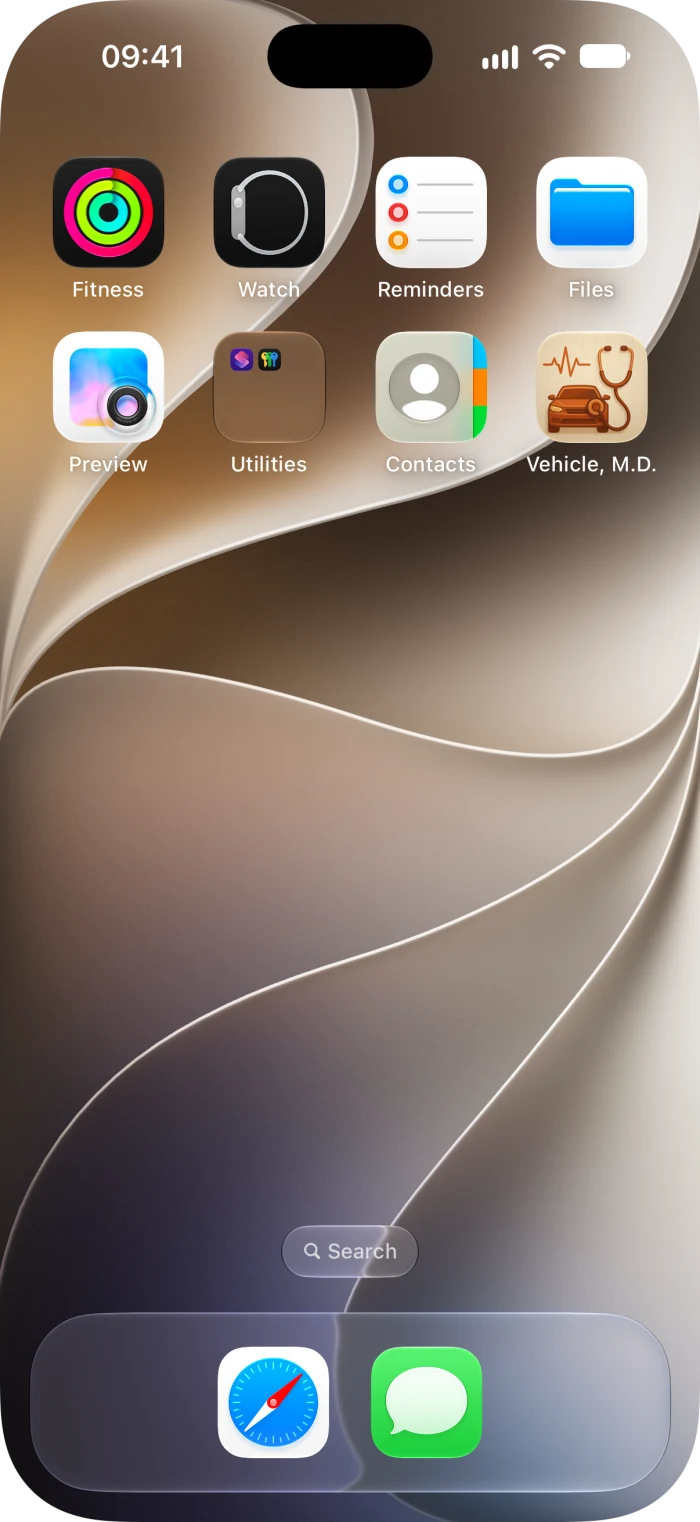
One more gotcha for the collection: a screenshot of a simulator that has just been shut down doesn’t fail. It hangs, for a full minute. PNGuin therefore gives simctl a ten-second timeout. Thanks, Apple :)
PNGuin belongs in the same drawer as Simsalabim, the toolkit that gives the iOS Simulator Bluetooth, cameras and NFC: small tools that each remove one specific annoyance from iOS development, and which I’d never have justified building a few years ago.
Getting it
The CLI is on Homebrew:
brew tap mickeyl/formulae
brew install iphone-screenshot

iphone-screenshot                                    # the only ready device, saved to ~/Desktop
iphone-screenshot --device "My iPhone"               # by name or UDID
iphone-screenshot --simulator --clean-status-bar --mask-corners
iphone-screenshot list                               # name, udid, state, OS version
For now, the menu-bar app builds from source (make install, with Xcode 27, XcodeGen and Shark installed). Everything is MIT-licensed and on GitHub.
If you read this post in its first hours: the app was called ScreenGrab back then, until I noticed that fastlane already has a screengrab, and that a family with Simsalabim, ImpossiBLE and NFCromancer in it deserves a better pun. The old links still work.
If you’re teaching your own agent to look at your phone, I’d love to hear how you use it. Cheers, :M:
Back to Metal: Repainting the garage
I’ve been spending the last couple of days on my forthcoming app Vehicle, M.D., the completely new successor to my popular OBD2 Expert, and recently I got distracted by the pictures in its garage. You can use your own vehicle photo, of course. But when you haven’t got one handy, a motorcycle deserves to look like a motorcycle, and a pick-up shouldn’t have to make do with a generic hatchback.
The app now has fifteen stock vehicle shapes, chosen from the VIN decoder’s body information where available, or by you. AI helped with the artwork, the code, and the typing here. Then I wanted to change their paint colours — which brought me back to Metal.
I’d already used it for RetroPlayer’s oscilloscope and the one in Paulinche, drawing audio waveforms with phosphor trails. This time I’m repainting vehicle illustrations. What surprised me was how little SwiftUI code it took :)
The wheels were coming along for the ride
My first attempt used SwiftUI’s hueRotation, saturation and brightness modifiers. Easy to write, easy to adjust, and rather disappointing once you look past the bodywork.
Turning the paint red also changed the glass. Choosing a dark colour dulled the headlamps and the chrome. Everything acquired that slightly cheap appearance of a picture with a coloured filter over it. SwiftUI was doing exactly what I’d asked: applying the transformation to the whole image.
I wanted to repaint the bodywork while retaining the tyres, seats, glass, lights and metal parts. A hue rotation has no idea which material a pixel belongs to. We had to give it that information.
A small material map
The stock illustrations share a pale teal paint colour and a transparent background. That common source colour gives us a useful starting point for finding the painted surfaces.
An offline Python tool generates an 8-bit paint mask for each illustration. White means “repaint this”, black means “keep the original”, and intermediate values soften the boundary. The tool combines hue, saturation, HSV value and opacity, so neutral chrome, dark rubber and the transparent silhouette tend to stay outside the selection.
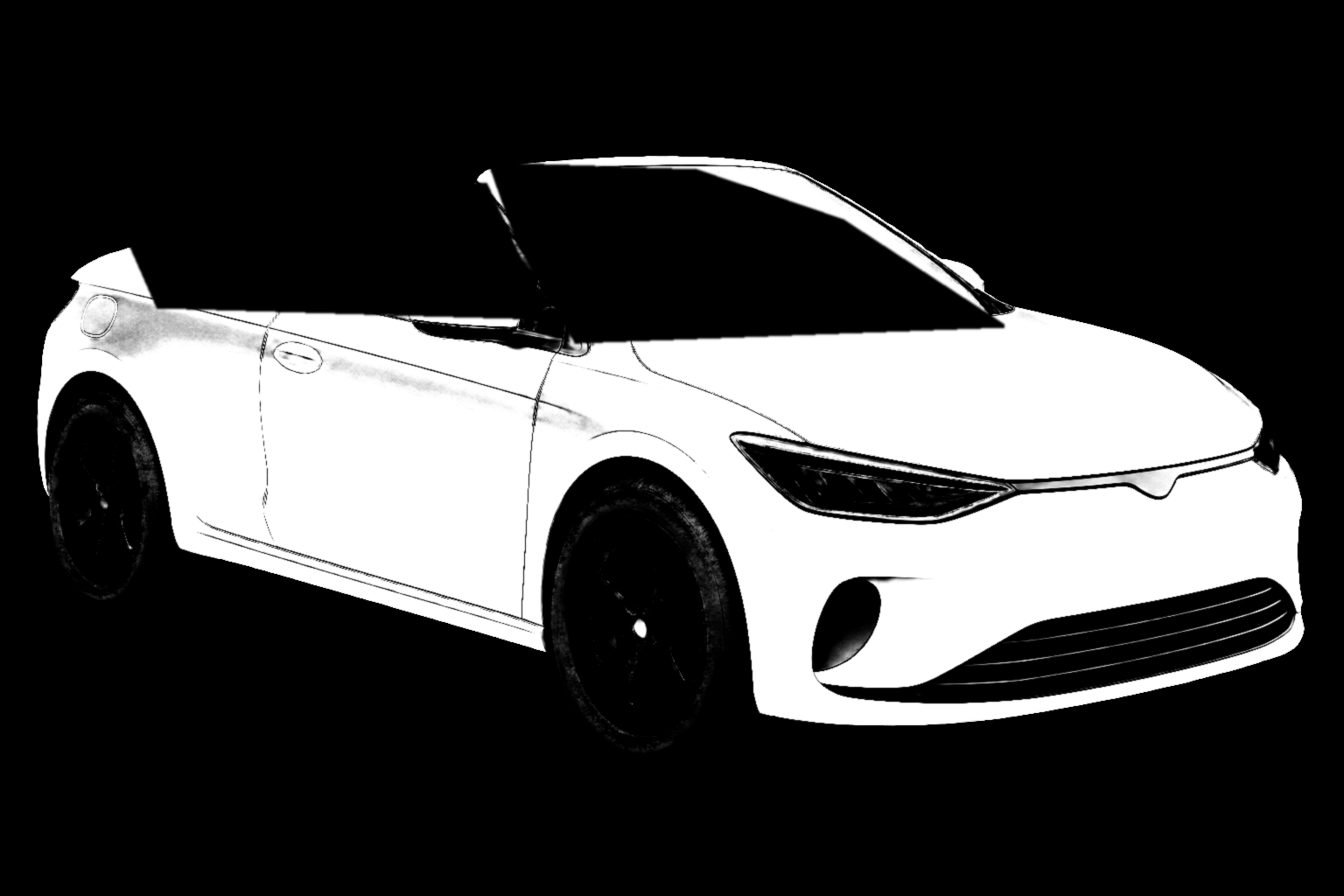

Colour alone still can’t distinguish a teal reflection in a window from teal paint. For the images with glass, we also review exclusion polygons to keep it out of the paint mask. The mask gets a little feathering, and the generator explicitly clears low-opacity edges again afterwards. I don’t want a coloured halo around a vehicle when the phone switches to Dark Mode.
The convertible’s windscreen keeps its original teal reflections even when the body is black; the mask deliberately leaves the glass alone.
All of this happens when preparing the assets. The app loads a finished mask; it doesn’t try to rediscover the bodywork every time you touch a colour swatch.
Keep the light, change the paint
Selecting the right pixels solves half the problem. Filling them with a solid colour would throw away the shading that makes the illustrations look three-dimensional.
For the other half, I used OKLab, Björn Ottosson’s perceptual colour space. It separates perceived lightness, L, from the two colour coordinates, a and b. That gives the shader a convenient way to change the paint colour while remapping its shadows and highlights.
Each illustration has a reference lightness: the median of its fully selected paint pixels. For the convertible, that’s 0.750595. The shader maps that reference to the lightness of the chosen swatch. Darker pixels scale below it; brighter pixels move towards white.
The core of the Metal function looks like this, with the colour-space conversions omitted:
float highlight = saturate(
    (sourceLab.x - paintLightness) / (1.0 - paintLightness)
);

float lightness = sourceLab.x <= paintLightness
    ? targetLab.x * sourceLab.x / paintLightness
    : mix(targetLab.x, 1.0, highlight);

float3 lab = float3(
    lightness,
    targetLab.yz * (1.0 - highlight)
);
That last line matters. As a reflection approaches white, its colourfulness decreases too. A bright reflection on a red bonnet can remain nearly white, and a black car can still have readable highlights. The lighting is already baked into the artwork; this mapping makes it useful for the new paint.
There’s one more detail: some combinations of lightness and saturated colour fall outside sRGB. The shader uses an eight-step binary search to reduce chroma until the colour fits, keeping its OKLab lightness and hue direction. Simply clipping the RGB channels could shift the colour we’re trying to preserve.
From MetalKit to a SwiftUI colour effect
In RetroPlayer, I hosted an MTKView in SwiftUI and managed the render pipelines, buffers and command encoding myself. For the garage illustrations, SwiftUI’s colour effects handle the rendering setup and let me provide the pixel function and its arguments. That’s the part I’d underestimated: a small image effect can be enough reason to use Metal.
The integration is an ordinary image view with one extra modifier:
let lab = color.perceptualColor

Image(illustration.paintAssetName)
    .resizable()
    .scaledToFit()
    .colorEffect(ShaderLibrary.vehiclePaint(
        .boundingRect,
        .image(Image(illustration.paintMaskAssetName)),
        .float3(lab.x, lab.y, lab.z),
        .float(illustration.paintLightness)
    ))
The Metal function is marked [[stitchable]]. SwiftUI supplies the pixel position and colour; we supply the image bounds, mask, target colour and reference lightness. The bounds let the shader sample the mask at the corresponding point, even when the same vehicle is shown as a large preview or a small garage thumbnail.
Pixels outside the mask return immediately. Selected pixels are unpremultiplied, converted from sRGB through linear RGB into OKLab, repainted, and converted back. The final blend uses the mask weight and restores the original alpha. That preserves the silhouette instead of painting over the antialiased edges.
Swift calculates the target’s three OKLab coordinates. Metal does the work for each displayed pixel. Changing a swatch changes the shader arguments; we don’t generate another bitmap on the CPU. Fifteen shapes and sixteen presets give us 240 combinations, with one source image and one mask per shape.
The rendering tests exercise all 240 combinations, compare unpainted materials against a reference rendering with an empty paint mask, and check the alpha handling. Where the surrounding mask is entirely clear, unpainted channels must stay within one 8-bit value of the original.
Your garage, your colours

The user-facing part is deliberately modest: pick a shape, scroll through sixteen colour suggestions, and apply. The automatic colour is a stable choice from the VIN and our palette, so your vehicle keeps its colour between app launches. You can override it, and your own photo takes precedence and stays untouched.
Meanwhile, my current motorcycle test vehicle is a simulation of BMW’s BMS-X engine ECU running in ECUmulator Studio on my test Mac. Recent work on that bench included making the ECUconnect Pro adapter deliver its identification data properly; the garage pictures were a rather welcome change of scenery after looking at CAN frames.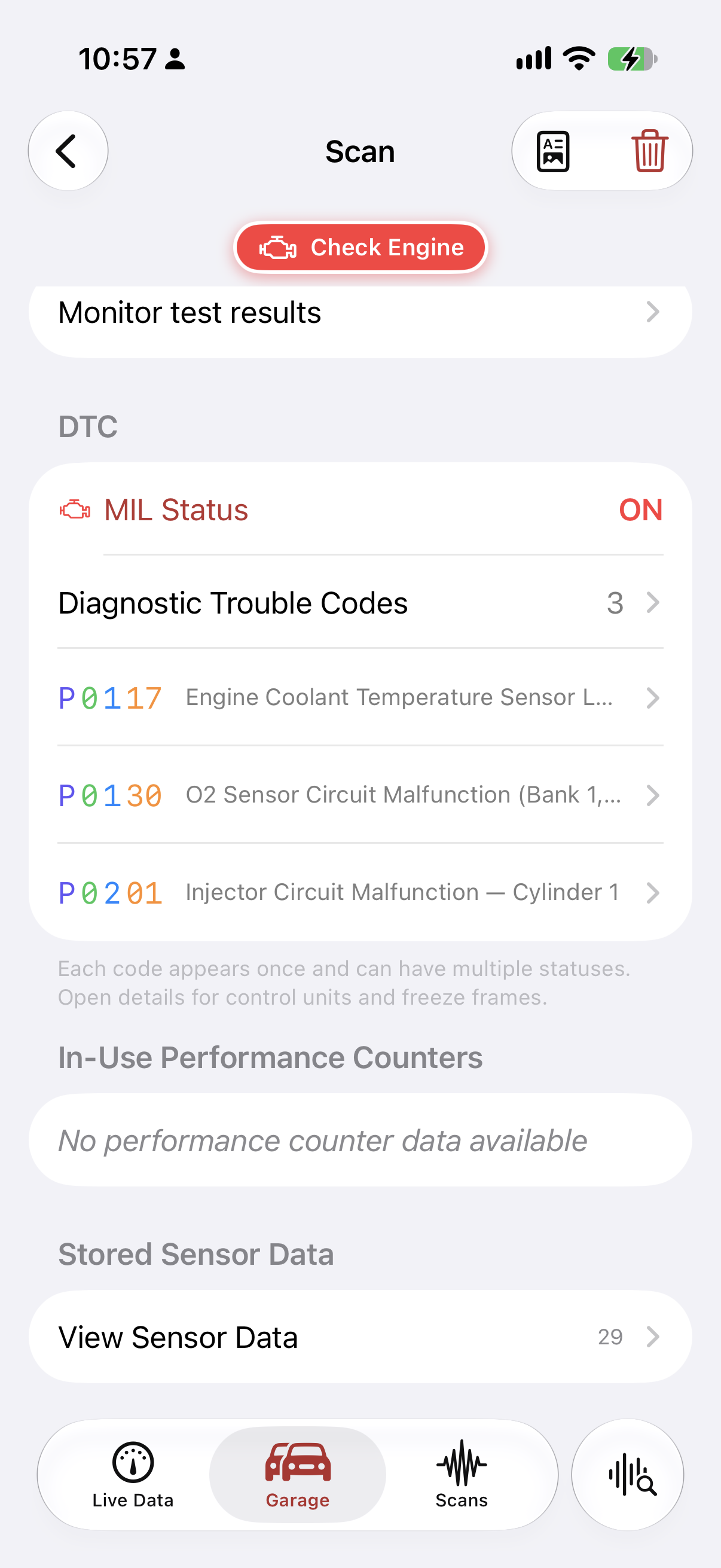
Vehicle, M.D. brings trouble codes, freeze frames, live dashboards, saved scans and recordings to iPhone and iPad, with PDF reports to take to the workshop. OBD2 Expert’s familiar purpose, with a new implementation and a much more personal garage. I’m preparing version 1.0 for release; it isn’t available yet. The product page has the practical details.
If you guys have been using OBD2 Expert, I’d love to hear what you’d want from its successor. And if you’ve been considering Metal for a small SwiftUI effect, I hope the garage gives you a useful place to start.
Cheers, :M:
The state of things in 2026
True readers of this column may remember the previous installment — all 66 words of it, written in February 2020, a few weeks before the world went sideways. The one before that, 2019, at least had proper paragraphs. Six and a half years is the longest gap between two of these I’ve ever had, and of course it covers the years where a lot of things changed.
So here’s the catch-up, in no particular order.
Family Dynamics

There’s no doubt that time passes fast (tempus fugit, as I love to say). My daughter Lara-Marie is 15 now — can you believe that? I certainly can’t, but every time I look at her, I’m reminded.
And as if my life wasn’t busy enough, we decided to add Flocke — a demanding White Swiss Shepherd — to the equation. That has changed our family dynamics quite a bit: you can only live properly with a dog like that if everyone is on the same page.
We‘re now a family of four – with all due consequences. And if for nothing else, at least she has been good for my health.
Programming Languages
For almost six years I lived the dream of using only a single programming language: In 2020 I went all-in on Swift. In 2026 I put the boundary back: Swift for everything Apple-native, Rust for systems work and the Linux bench, TypeScript for the web, C++2x on the ESP32, Python for glue. More stacks in my head, fewer fights with the wrong tool.
Automotive
What started as “let me decode one CAN frame” ten years ago is now most of what I do. I built my own adapter hardware (OEM for B2B, but a B2C version is coming next) with the great folks from TPE-Europe, a lot of proprietary automotive code, a Linux toolbox in Rust, and a USB driver that needed sixty lines of C (shock, horror) to reverse engineer. CANcorder became a real desktop product and is shipping later this year, CANsole and CarLab are also on the way. And since spring, an agent sits at the bench with me and reads VINs off my ECUs.
Apps
RetroPlayer finally shipped, only seventeen years after the first Sid Player. Wellenreiter got the other 90 percent and a menu-bar app. I caved and built a weather app. And the iOS Simulator got Bluetooth, cameras and NFC because Apple wouldn’t.
Open source
Not the middleware kind anymore. Small tools instead: lsaudio and lsusd (the story), ImpossiBLE and the rest of the Simsalabim family, mcanbus and socketcan-mcp, mcangen, mcandump, canconf, ELMterm, swift-repl, Soxmate — all on GitHub, most on Homebrew. Plus the ones that make no economic sense at all: an Amiga-style tracker and a driver stack for discontinued Native Instruments hardware. I wrote about why.
LLMs
The elephant in the room. Since 2025 most of my code and a good part of this blog are typed by a model and reviewed by me. It changed the economics of finishing things more than it changed the speed of writing them. It also, for a while, changed the voice of this blog into something that wasn’t mine — I’ve since fixed that, and there is now a thorough rulebook so it doesn’t happen again.
Music
Fabrique Noir kept going after Space Travel: the albums Colonization and Tales from Enwor (both 2021), Airlock (2022) and Abduction (2023), a handful of singles in between, and the newest release, Sirens & Whales (2026) — all of it here. More is on the way, but even LLMs can’t multiply my spare time. This year, because… Books!
Books

Here’s the one I’m actually proud of this year, and for once it isn’t a technical book. »Grenzverkehr — Wenn die Wirklichkeit nachgibt« is a collection of eight short stories (in german, sorry, dear international readers) about people whose carefully ordered reality gives way at one spot — not with a bang, but so casually that they first doubt themselves:
A map app that finds shortcuts that can’t exist. A city that reports in at 03:14 from inside an old system. An old woman at the gate who knows a physicist’s future because she is that future. Technically precise, dry, and — I hope — quietly unsettling.
404 pages (oh the irony), paperback and ebook. There’s a proper launch post, in german, with the whole story.
So why a non-technical book? I’ve been making up stories for as long as I’ve been programming — longer, actually; the C64’s “datasette” (tape drive) left plenty of time for it. What I never did was finish them. The 80:20 rule hit me harder here than anywhere else: the idea, the first scene, the twist were always there, the remaining eighty percent of sitting down and writing the unglamorous middle never happened, and the drafts folder grew for thirty years. What changed is the same thing that changed at the bench: talking it through with an LLM turned out to be the balance I was missing — I decide what happens and how it sounds, the model keeps me from stopping halfway. For me this is a really big deal. Bigger than any app I shipped this year.
And there’s more in the pipeline: a second collection is already in typesetting, there’s a very sweet children’s book with amazing illustrations, and — old habits die hard — finally a technical one on automotive diagnostics. All are built with Pandoc and LuaLaTeX and set in FF Meta Serif, the corporate font I’ve been going on about since 2009. Some things never change ;)
No third edition of the Vala book, by the way — Vala hasn’t moved enough, and neither have I.
Happy new year, or whatever is left of the old one. Stay tuned :)
Jetzt auch noch Belletristik?
A note for my international readers: this post is in german, because the book is — eight short stories of the fantastic, out now as paperback and ebook (amazon.de, but the ebook travels). A translation is not planned for the time being; the state of things post has a summary in english.
Ich habe früher angefangen, Geschichten zu erfinden, als ich programmieren gelernt habe. Das will etwas heißen, denn programmieren gelernt habe ich mit einem C64, dessen Datasette (Commodore Deutschland‘s ausgefallenes Wort für Kassettenlaufwerk) länger brauchte, um ein Spiel zu laden, als ich brauchte, um mir währenddessen ein ganz anderes auszudenken. Später kam ein Amiga 1000 dazu, und irgendwo zwischen Copper-Listen, Blitter-Minterms, MODs und Demos hat sich eine Gewohnheit eingeschlichen, die nie wieder verschwunden ist: Ich sehe ein System — ein Programm, eine Stadt, eine Abendrunde mit Flocke — und frage mich sofort, wo es brechen könnte.
Nur bin ich, grob zusammengefasst, vier Jahrzehnte lang der Frage lieber mit Code als mit Prosa nachgegangen. Ich habe Fachbücher geschrieben, über Programmiersprachen, grafische Oberflächen, Embedded Linux, verteilte mobile Systeme. Ich habe promoviert. Ich habe Artikel verfasst, die einen Sachverhalt exakt erklären wollten und froh waren, wenn am Ende kein Missverständnis übrig blieb. Ich finde das eine ehrenwerte Art zu schreiben. Sie verlangt Präzision, Geduld mit Details, und die Bereitschaft, einen Satz so lange umzustellen, bis er nur noch eine einzige Lesart zulässt.
Es ist aber auch eine langweilige Art zu schreiben – eine, die keinen Platz für die Frage lässt, die mich seit meinen frühesten Erinnerungen ebenfalls umtreibt: Was passiert, wenn die Wirklichkeit selbst anfängt, ungenau zu werden? Wenn die Route, die eine Karten-App vorschlägt, durch ein Haus führt, das es nicht geben dürfte? Wenn eine alte Frau am Gate eine Zukunft kennt, in der man selbst noch gar nicht angekommen ist?
Diese Fragen habe ich mir lange gestellt, oft auf Zugfahrten, manchmal beim Debuggen, wenn ein Fehler sich hartnäckig weigerte, dort zu sein, wo die Logik ihn vorhersagte. Aufgeschrieben habe ich sie nicht. Fachtexte hatten einen Auftrag und ein Ende. Geschichten wie diese hatten nur eine vage Ahnung von sich selbst und schienen mir zu unwahrscheinlich, um Zeit wert zu sein, die eigentlich für belegbare Aussagen reserviert war.
Angefangen habe ich sie trotzdem, immer wieder. Die Idee, die erste Szene, die Pointe — das war jedes Mal da. Was nie kam, war der Rest: die achtzig Prozent, in denen man sich hinsetzt und die unspektakuläre Mitte schreibt. Dreißig Jahre lang ist so ein Ordner mit Anfängen gewachsen, und mit jedem neuen Anfang wurde mir der Ordner ein bisschen peinlicher.
Was sich geändert hat, ist im Grunde banal, und ich sage es lieber selbst, bevor es jemand anderes tut: Ich habe angefangen, die Geschichten mit einem Sprachmodell durchzusprechen. Nicht, damit es sie schreibt — was passiert und wie es klingt, entscheide ich, und das merkt man den Texten hoffentlich an. Sondern weil die Zwiesprache mich an genau der Stelle festhält, an der ich früher aufgehört habe. Jemand fragt, wie es weitergeht, und dann muss man es eben sagen. Die erste Geschichte — ein Mann in Sitz 14A, der dem Fliegen misstraut und bald auch seiner eigenen Wahrnehmung — lag seit Jahren als halbe Seite herum (der Paranoia Rechnung tragend ist sie mir tatsächlich während der Startvorbereitungen auf einem FRA→FUE Flug eingefallen). Diesmal habe ich sie zu Ende erzählt, mit derselben Sturheit, mit der ich sonst einen Bug bis zur letzten Codezeile verfolge, nur dass am Ende kein Patch stand, sondern eine Pointe.
Aus der einen Geschichte wurden acht. Sie alle folgen demselben Prinzip, das mir inzwischen vertrauter ist als jede Programmiersprache: Das Unmögliche kommt selten mit großem Getöse. Es kommt leise, an einer Stelle, an der man es nicht erwartet — als Abkürzung, die es nicht geben kann, als Zeile in einem Protokoll aus einer Stadt, die nicht existiert. Und das eigentlich Interessante beginnt erst danach: bei der Frage, was ein Mensch mit diesem Riss anfängt, wenn ihm niemand mehr abnimmt, sich zu entscheiden.
So ist Grenzverkehr entstanden — acht Geschichten vom Riss im Gewöhnlichen, technisch genau, trocken-komisch und, wie ich hoffe, manchmal etwas unheimlich. Kein Ausstieg aus dem, was ich vorher geschrieben habe, sondern die Fortsetzung derselben Frage mit anderen Mitteln: Wo bricht das System, und was macht jemand, der genau hinsieht?
Ab heute ist das Buch da draußen. Ich bin gespannt, wo Ihr die Risse findet.
Grenzverkehr — Wenn die Wirklichkeit nachgibt – ab sofort bei Amazon erhältlich, als Taschenbuch und als eBook.
The software I could never justify building — and why LLMs changed that
I recently made the mistake of asking GitHub and GitLab what I had worked on during the previous twelve months.
The answer was ridiculous: sixty GitHub repositories with my commits, forty-two GitLab project IDs with activity, and enough overlap, mirrors, experiments, libraries and product work to make the raw list almost meaningless. Some of it was paid work. Some of it maintained software I would have maintained anyway. Neither category says much about artificial intelligence.
The interesting part was the remainder: software that made no economic sense at all.
A command that tells me which process is making a sound. A proper lsusb for macOS. A CAN frame generator that notices when the controller is lying. A bridge that gives the iOS Simulator Bluetooth, cameras and NFC hardware. An Amiga-style tracker with a real-time playback engine. A userspace driver stack for music hardware that its manufacturer has long since moved on from. A family chat that doesn’t need a server. A weather app with no ads, no account and no business plan.
These aren’t startup ideas. Most of them will never earn enough to pay for the signing certificates, never mind the time. I built them anyway — and, more importantly, I built them to a point where somebody else can use them. Without LLMs, I probably wouldn’t have.
The economics, not the intelligence
The usual argument about AI and programming is about speed: how many lines it can write, how much faster a ticket closes, whether one developer can now do the work of two. I understand why companies care about that. It is also the least interesting part of the change for me.
I have never had a shortage of ideas, and the interesting kernel of a small tool is rarely what kills it. The first version of lsaudio can ask CoreAudio for its process objects and print a table. The first version of mcangen can open a SocketCAN socket and send frames. The first version of a camera bridge can move a buffer through a Unix domain socket.
Then comes the other 90 percent: error handling, cancellation, reconnects, tests, a second platform, a native interface, accessibility, documentation, examples, packaging, Homebrew, signing, notarisation, screenshots, release automation and all the small paths only another person will take.
For commercial software, that work can be weighed against revenue — true readers of this column may remember that I spent a good part of the 2010s doing exactly that arithmetic on fixed-price app projects, and how little fun that was. For a personal tool whose total addressable market may be twelve people with the same USB adapter, the rational decision is not to begin. The opportunity cost is too high. The idea stays in a notes file, or survives as a brittle script that works on one machine.
LLMs changed that calculation. They did not make the work disappear. They made the long, cross-disciplinary tail cheap enough that finishing became reasonable. That’s why I’m excited.
Private crutches can become public tools
The cleanest examples are lsaudio and lsusd, which I wrote about in “Two questions macOS should answer”.
Both began as annoyances. What process is playing audio? What serial device did I just plug in? macOS knows the answers, but makes me dig through Activity Monitor, System Information, ioreg and shell pipelines to find them.
Without AI, I would have solved each irritation once. There would have been a script in ~/bin, a few hard-coded assumptions and no reason to show it to anybody. Instead, both became real command-line tools. They handle awkward system cases, produce machine-readable output, have tests and man pages, install through Homebrew and now have native menu-bar companions built on the same core libraries.
The idea and the platform knowledge were mine. So were the product decisions: which process is the source of truth, when killing it is appropriate, what belongs in the menu-bar panel and what belongs in the full window. The LLM supplied persistence at the parts where my enthusiasm would normally have evaporated. It kept moving through Linux compatibility, stale devices, authorisation, package metadata and documentation while I kept deciding whether the result was correct.
That distinction matters. AI did not invent a need. It let a need survive contact with everything required to make it useful.
Small tools now pass that threshold all the time. Soxmate makes SoX friendlier. swift-repl launches a Swift REPL with modules from local packages (I’ve been praising REPLs as the #1 missing feature of compiled languages for years). canconf turns a pile of SocketCAN incantations into configuration, health monitoring and an interactive ECU terminal. None of them deserves a quarterly roadmap, but all of them deserve to exist.
Hardware powers for a simulator
The more dramatic example is Simsalabim.
The iOS Simulator has no useful Bluetooth radio, camera or NFC reader, and a fresh simulator has none of the personal data that makes a real phone look lived-in. I wanted simulated apps to keep using CoreBluetooth, AVFoundation, Core NFC, Contacts and EventKit while a Mac-side provider supplied the missing world.
That became four projects:
ImpossiBLEforwards real Bluetooth hardware or serves deterministic virtual peripherals.CAMouflageprovides cameras, photos and machine-readable codes.NFCromancerconnects Core NFC sessions to real USB readers or mock tags.Simulacrumseeds the simulator’s real stores with useful fictional lives.
Simsalabim brings them together in one menu-bar suite. A shared package handles sockets, provider ownership and the shell around them.
No sensible solo developer looks at that list — API interception, binary streaming, Apple framework emulation, USB readers, menu-bar UI, test fixtures, packaging and documentation — and says, “Yes, this is a small unpaid side project.” Each individual bridge is plausible. Turning four of them into a coherent product family is where the arithmetic stops working.
LLMs made the breadth possible. I could stay at the architectural boundary — the application must keep using the honest Apple API; fixtures configure the world outside it — while delegating enough scaffolding, protocol glue, repetitive UI and test construction to keep momentum. I still had to test the hardware, spot bad abstractions and reject implementations that were merely plausible. But I no longer had to personally type every unsurprising line between one hard problem and the next.
The bench became conversational
My automotive bench produced another cluster of economically unreasonable tools: mcangen, mcandump, canconf, a J2534 bridge and a Windows DLL tester called Jester.
They exist because the standard tools were always almost right for the question in front of me. I wanted a generator that could produce a deterministic million-frame run, survive BUS-OFF, and imitate the traffic shape of an ECU flash. I wanted a logger that could verify sequence integrity and remain pleasant during a long interactive session. I wanted old 32-bit PassThru DLLs isolated from the process using them. Each wish is useful; none is a business.
The loop closed with mcanbus and socketcan-mcp. Instead of making an agent drive candump and parse terminal text, I gave it typed SocketCAN and ISO-TP tools. I then watched it read a VIN from a real Scania ECU from inside a chat, first by performing ISO-TP flow control itself and then through a purpose-built primitive. That changed the texture of bench work for me: the model was no longer autocomplete attached to an editor, but a colleague inside the investigative loop.
The amusing recursion is that AI helped me build tools that make AI better at helping me. Every structured boundary replaces a page of terminal transcript with a typed result. The model spends less context on plumbing and more on the actual diagnostic question. Better tools make the agent sharper; the sharper agent makes the next tool cheaper to build.
Hobbies can be technically unreasonable again
The projects that delight me most are the ones nobody can defend in a planning meeting.
Paulinche — the demo-scene kid in me never really left — is a native macOS Amiga-style tracker with real-time MIDI recording, sample and wavetable instruments, a playback engine, classic OCS export and cycle-budget tracing against the original hardware.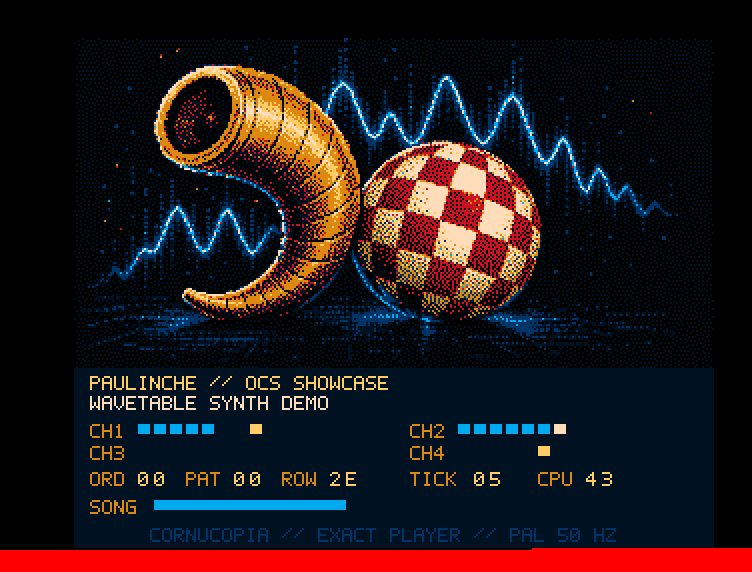
CompleteControl is a Swift/libusb stack for discontinued Native Instruments keyboards and controllers: privileged daemon, displays, LEDs, encoders, MIDI, simulators, the lot. (I’ve been a Native Instruments customer since 2009, so there’s a bit of history here.) It also gives Paulinche a physical control surface rather more ambitious than the project has any economic right to possess.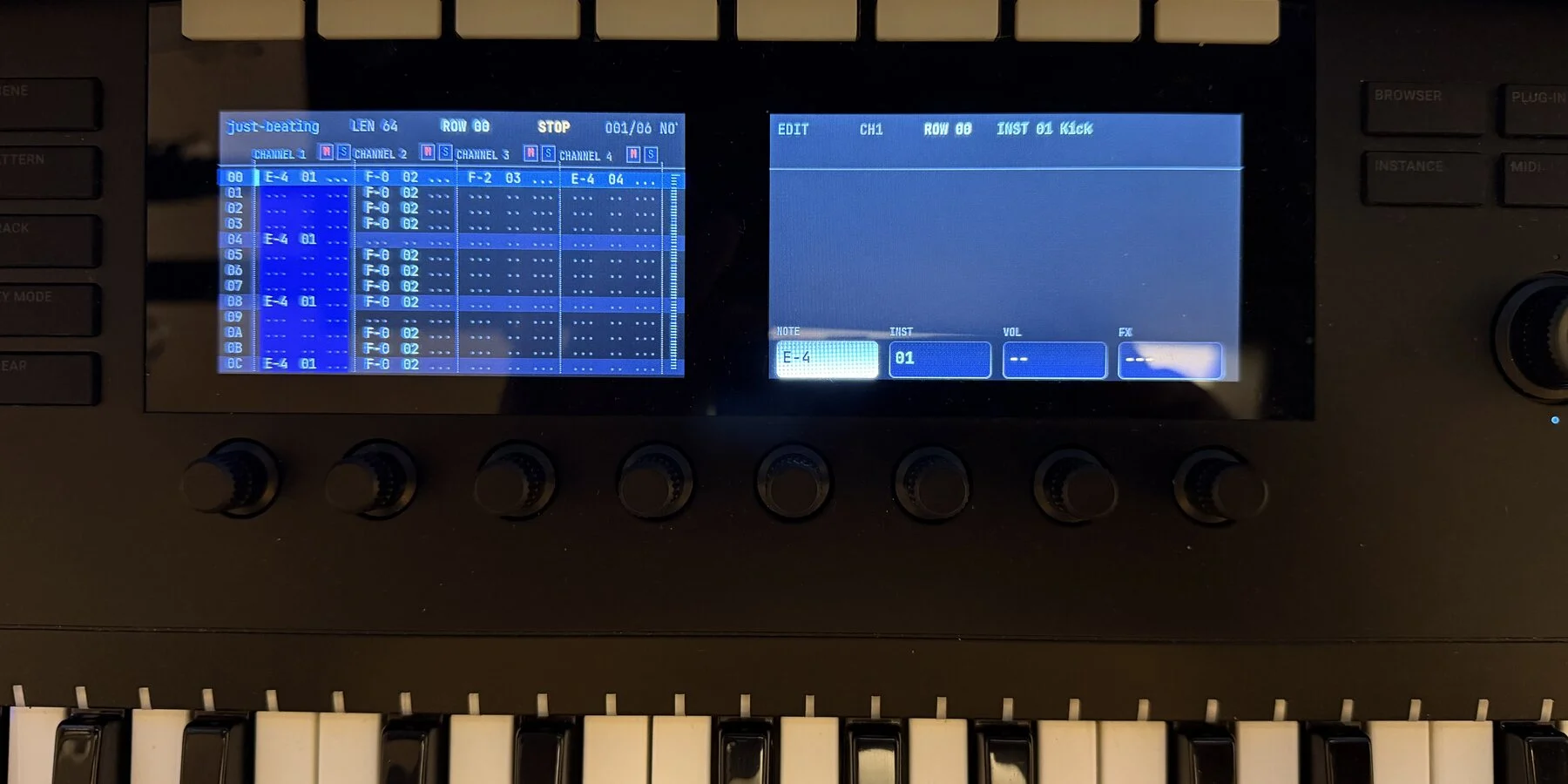
A separate hardware lab grew from reverse engineering an unsuitable controller into a C++20 Stream Deck driver, renderer and simulator. CompleteControl got its own virtual keyboard as well, so the whole surface can be exercised without occupying the instrument.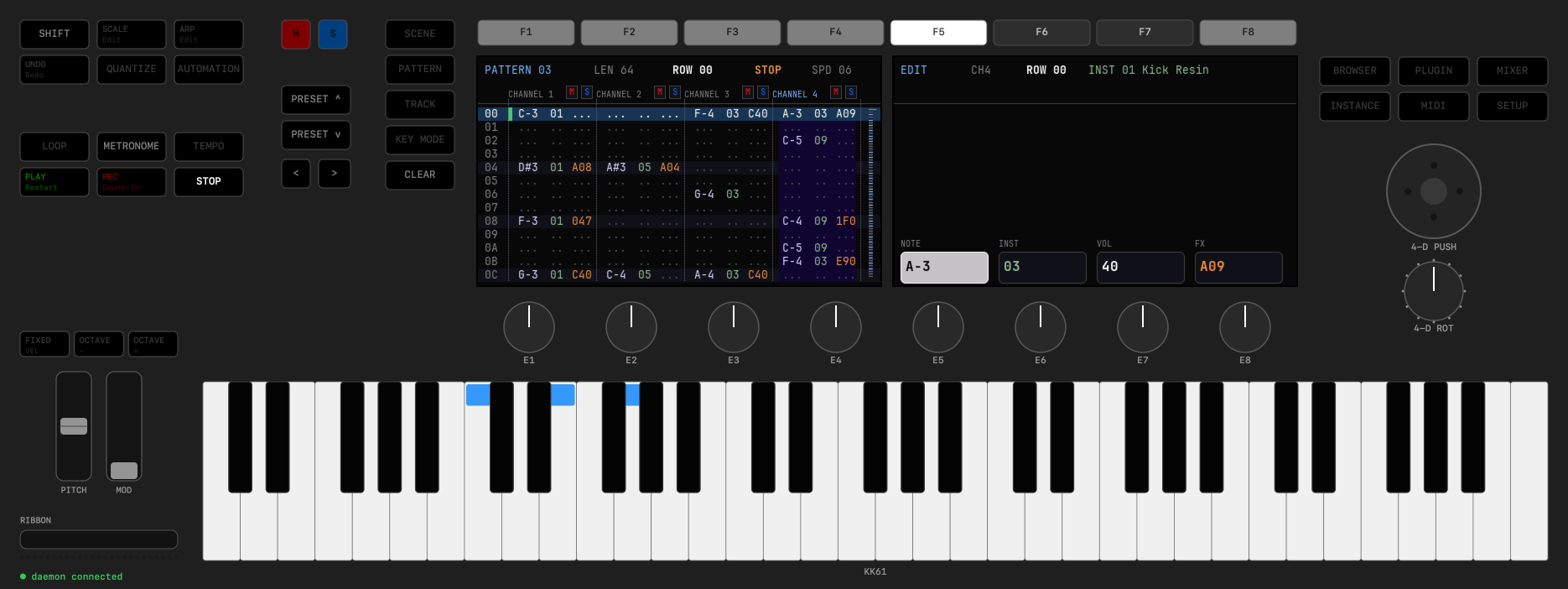
These projects are full of the kind of work that traditionally makes a hobby collapse under its own ambition. Audio, USB, real-time constraints, pixel formats, old hardware, modern Swift concurrency, C and C++, app UI, daemons and hardware-free test rigs all meet in the same repository tree. The expected revenue is approximately irrelevant. The personal value is enormous.
The same is true of the revived Retroplayer ecosystem, a Space Taxi-inspired game, a SID studio and a blink(1) LED that somehow became a library, CLI and menu-bar app with an audio VU meter and an on-air mode. I’m not building a company around any of them. I’m learning, preserving old machines, making tools I want and enjoying the craft.
Before LLMs, I rationed that kind of ambition. I chose one stack, one platform and one hard problem, because every additional surface multiplied the maintenance. Now I can follow the shape of the idea further before the carrying cost wins.
That feels less like automation and more like permission.
Software no longer needs a business case
Some projects are valuable because their audience is exactly one family.
I built a private peer-to-peer travel chat where every device, including the watch, is a proper member. I split my recipe collection into a real app with iCloud, a watch shopping list, multiple stores and suggestions learned from what we actually buy. I started writing and illustrating books with automated typesetting. I finally built the weather app I had resisted for twenty years and made it free, without accounts, advertising or tracking.
None of those ideas needed a pitch deck. What they needed was for implementation cost to stop dominating personal value.
This may be the most important change LLMs bring to software: more software can be local, specific, strange and humane. Six years ago I felt like Don Quixote, fighting wars that couldn’t be won. This is the first time in a long while that the windmills seem to be turning in my direction. It can fit one workshop, one instrument, one family or one person’s way of thinking. It does not have to grow until venture capital can see it. It does not even have to become a subscription.
The web once did something similar for publishing. Suddenly a text did not need a printing press and a viable print run to deserve an audience. LLM-assisted development lowers a comparable threshold for software. Not to zero — software still has consequences — but low enough that many more ideas can cross it.
What the model does not provide
Don’t get me wrong, though.
An LLM does not know which product should exist. It does not own the taste that says a failed station change should leave the old music playing, or that a simulator bridge must preserve the production framework API. It does not feel a CAN controller go bus-off, hear an audio click, notice that a menu-bar panel is awkward, or understand why a particular shortcut matters after twenty years with trackers.
It can also be confidently wrong. It invents APIs, chooses abstractions that compile but do not belong, misses real-time constraints and declares victory at the edge of the simulator. Hardware has been an excellent antidote to AI credulity: either the LED lights, the frame reaches the wire and the audio plays, or it doesn’t — and hardware doesn’t care about plausible-sounding explanations ;)
My job has moved upward and outward. I spend more time defining contracts, choosing boundaries, constructing tests, reviewing behaviour and deciding what “finished” means. I spend less time writing boilerplate I already understand or translating the same model through a fifth layer by hand. That’s not less engineering, it’s just a different kind of engineering.
And responsibility does not move at all. I may accept a patch from a model, but I still ship it under my name.
The measure that matters
I don’t know how to turn the repository inventory into a productivity percentage. Commit counts are a terrible unit of thought, generated lines are worse, and “hours saved” assumes the alternative was doing the same project more slowly.
Often the real alternative was not doing it.
That is the counterfactual hidden by every benchmark. lsaudio would have remained a private command. Simsalabim would have been one Bluetooth proof of concept. The CAN tools would have stayed shell fragments. The Amiga tracker, hardware drivers and family software would still be notes headed “someday”.
The output I care about is not more code. It is more ideas allowed to exist — especially the useful, joyful, economically irrational ones.
That’s why I’m so excited about LLMs. And a little uneasy — but I’ve written about that already. Anyway… back to the bench :)
Simsalabim — giving the iOS Simulator hardware powers
The iOS Simulator is a wonderfully fast place to build an app — right up to the moment the app needs something that belongs to the physical world.
Bluetooth discovery returns nothing, there’s no camera, Core NFC is unavailable, and a freshly created simulator has no contacts, appointments, reminders, or photos. At that point the usual development loop ends: find an iPhone, deploy, unlock it, grant permissions, put the right hardware or test data in front of it, and repeat after every small change.
Yes, yes, real-device testing is indispensable — but it’s a lousy substitute for a tight edit/build/run cycle.
That’s the problem Simsalabim (the german “abracadabra”, in case you wondered) is meant to solve. It’s a macOS menu-bar suite that gives simulated apps useful access to Bluetooth LE, cameras, NFC tags, and realistic personal data. Depending on the module, that can mean forwarding real hardware attached to the Mac, serving a deterministic mock, or filling the simulator’s own databases with fixtures.
I’m not trying to pretend that the simulator has become an iPhone. I just want to keep ordinary development in the simulator for much longer — without replacing the framework APIs, forking the app, or filling production code with test-only branches.
It started with Bluetooth
The first member of the family was ImpossiBLE. I wrote about its original bridge and mock provider in “ImpossiBLE — BLE back in the iOS Simulator”.
The irritation was simple: an app could compile against CoreBluetooth in the simulator, but it couldn’t do anything useful with it. CBCentralManager never reached a productive state, scans found no peripherals, and every UI or protocol change forced another trip to a physical device. (And no, Apple never bothered to explain why — see my earlier rant.)
ImpossiBLE keeps the app’s view of the world intact. The app still creates a CBCentralManager, scans, connects, discovers services and characteristics, reads, writes, subscribes, and receives the familiar delegate callbacks. A small library linked into the simulator build intercepts those CoreBluetooth entry points and sends the operations over a Unix domain socket to a native provider on the Mac.
The provider can answer in two ways:
- Passthrough translates the calls into real CoreBluetooth work using the Mac’s Bluetooth controller. The simulated app can communicate with the actual peripheral on the desk.
- Mock serves configurable virtual peripherals. Tests and development sessions can get the same services, values, notifications, pairing requirements, and failure states every time.
Passthrough answers “does this work with the thing?”, mock answers “does this work in every state I need to reproduce?” — and believe me, you need both.
ImpossiBLE can also capture nearby BLE devices into editable mock configurations, and a simulator app or test can upload an ephemeral fixture of its own. The fixture then lives with the code that depends on it instead of in somebody’s undocumented menu-bar selection.
Of course, none of this removes the need to test radio timing, pairing dialogs, background behavior, interference, reconnection, or device-specific quirks on hardware. What it does remove is the need to use hardware while polishing a scan list, validating a parser, exercising an error path, or taking a screenshot.
One pattern, several missing worlds
Once the Bluetooth bridge worked, it dawned on me that Bluetooth wasn’t an isolated simulator limitation at all. Camera and NFC apps hit the same wall, and empty system stores create a quieter version of the same problem.
Three modules share the transparent bridge model: an iOS-side library preserves the Apple framework API, a socket crosses the simulator boundary, and a Mac provider supplies either a mock or real hardware. The fourth, Simulacrum, does not need to intercept an API at all; it writes fixtures into the simulator’s real stores.
That common purpose became Simsalabim: one status item, one panel, four focused tools.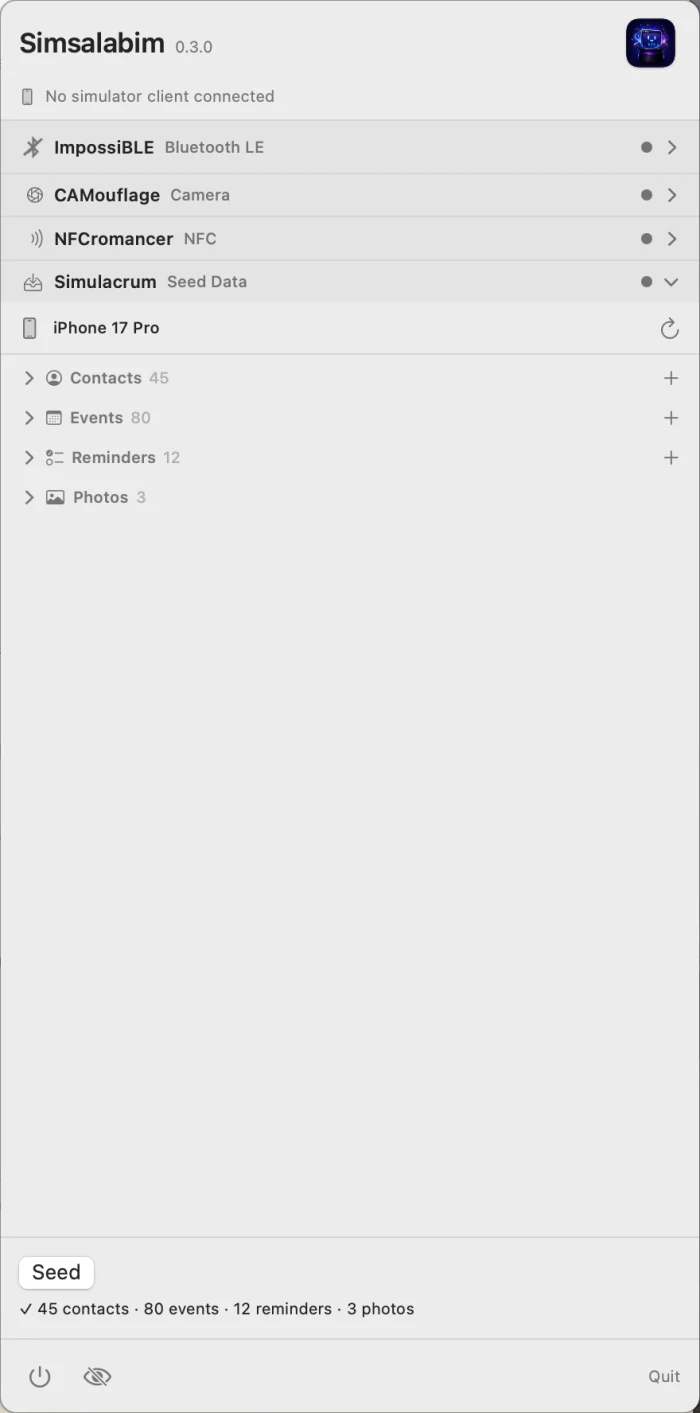
 ImpossiBLE: CoreBluetooth, real or invented
ImpossiBLE is the most mature and most complete expression of the idea. In passthrough mode it moves BLE central-role work onto the Mac while keeping the simulated app on the normal CoreBluetooth surface. In mock mode it provides editable peripherals down to advertisements, services, characteristics, descriptors, values, notifications, security behavior, RSSI, and L2CAP channels.
Its value is not merely that a scan returns something. It makes BLE scenarios controllable. A room can contain one heart-rate monitor or twelve noisy sensors. A characteristic can require encryption. A test can carry two expected peers and one distracting stranger. The physical lab becomes a reproducible fixture without making the application aware of a special testing backend.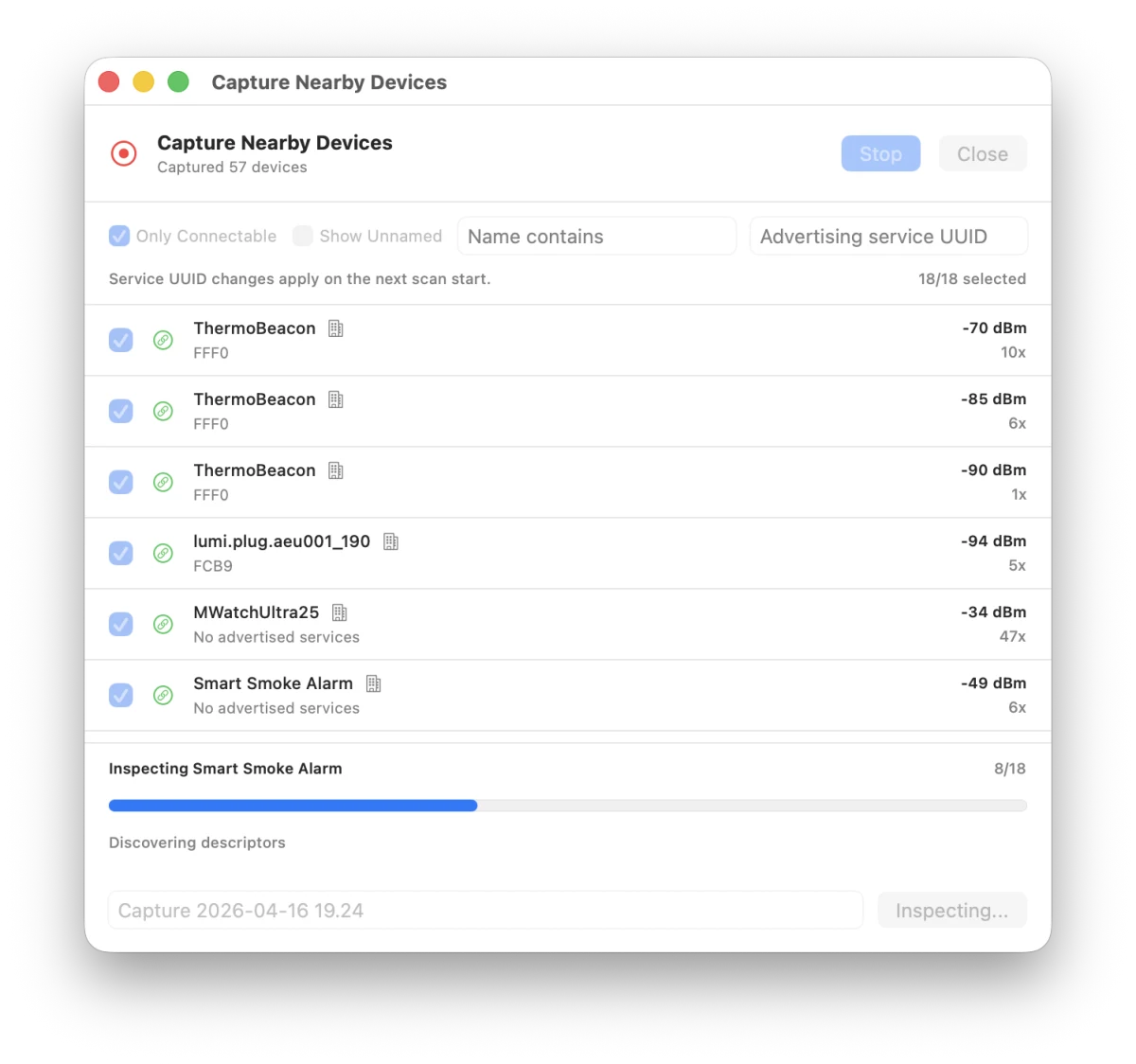
 CAMouflage: a camera where there is none
CAMouflage applies the same philosophy to AVFoundation capture. The simulator app still discovers AVCaptureDevice instances, builds an AVCaptureSession, displays an AVCaptureVideoPreviewLayer, receives sample buffers, captures photos, and scans QR codes or barcodes.
In mock mode, the camera can be a test pattern, a still image, a looping movie, or a test-owned machine-code fixture. In passthrough mode, it can be the Mac’s built-in camera, a USB webcam, or Continuity Camera. The provider sends the frames across a dedicated binary socket while session control travels separately.
That turns camera work from a physical performance into ordinary software development. A QR login flow can always see the same payload. A document scanner can be developed against a stable image. Empty, malformed, moving, and successful cases no longer depend on what happens to be in front of an iPhone at that moment.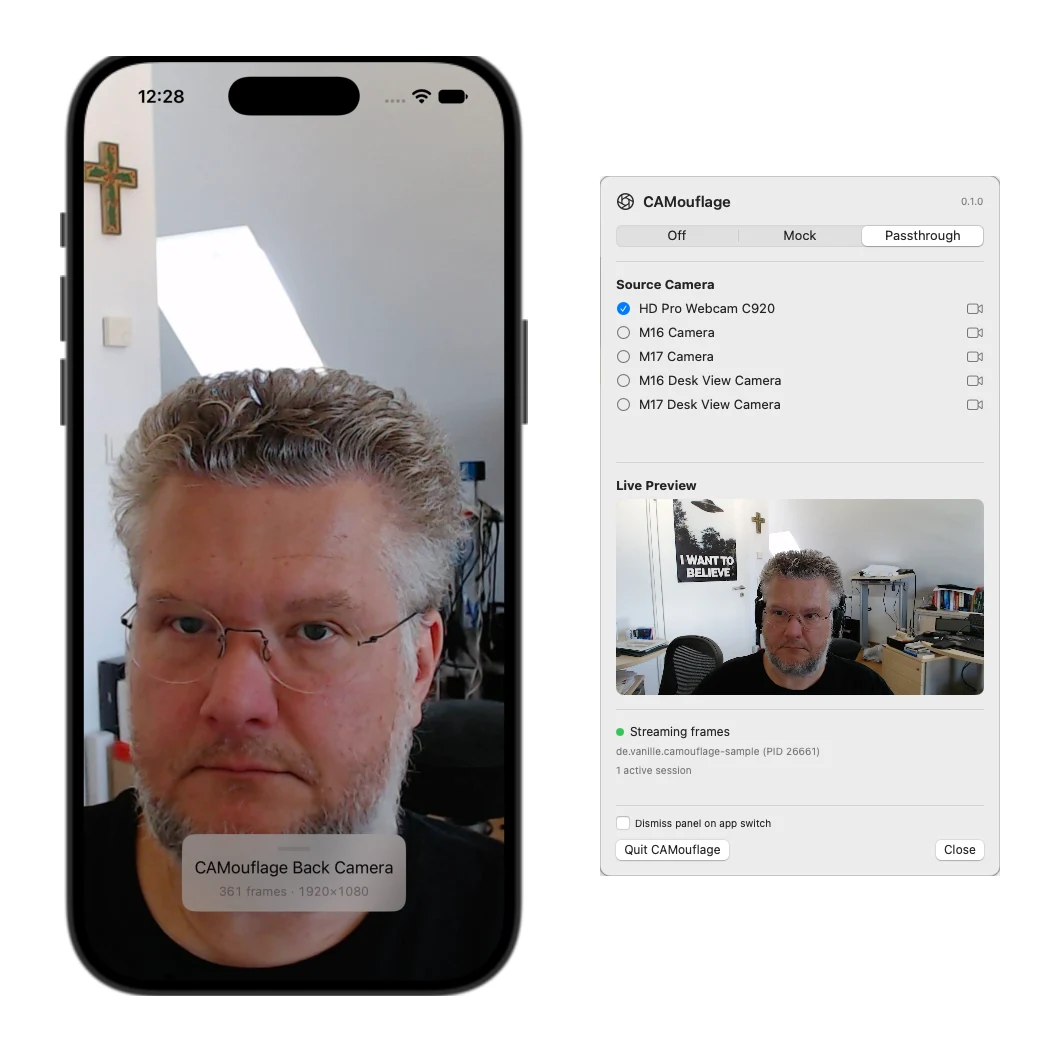
 NFCromancer: Core NFC without the phone ritual
NFCromancer brings Core NFC sessions to life. In passthrough mode it talks to a real NFC tag through an ACR122U or compatible USB reader connected to the Mac. In mock mode it serves a library of configurable tags.
The simulator app still works with Core NFC. NFCromancer reflects provider availability, delivers NDEF messages, and even recreates the otherwise missing “Ready to Scan” sheet while a session is active. A physical tag can be copied into the mock library, edited and replayed; compatible mock content can also be written back to a real Type 2 tag.
For provisioning, pairing, deep-link, inventory, or tag-management interfaces, this makes the difference between a repeatable workflow and waving a phone over a tag after every build.
 Simulacrum: make a fresh simulator look lived-in
Simulacrum solves a different class of absence. A new simulator has empty Contacts, Calendar, Reminders, and Photos libraries. That is technically correct and practically unhelpful when an app needs pickers, search results, avatars, event lists, attachments, or realistic screenshots.
One click seeds the booted simulator with fictional contacts, several weeks of events, dated reminders, and placeholder photos. Dates are generated relative to the current day, while phone numbers and email addresses use ranges reserved for examples.
There is no simulator-side package to link. Simulacrum installs a small seed agent into the booted simulator and uses the public Contacts and EventKit frameworks to write records; photos go through simctl. The result is real data in the real stores, visible to every app with permission to read it.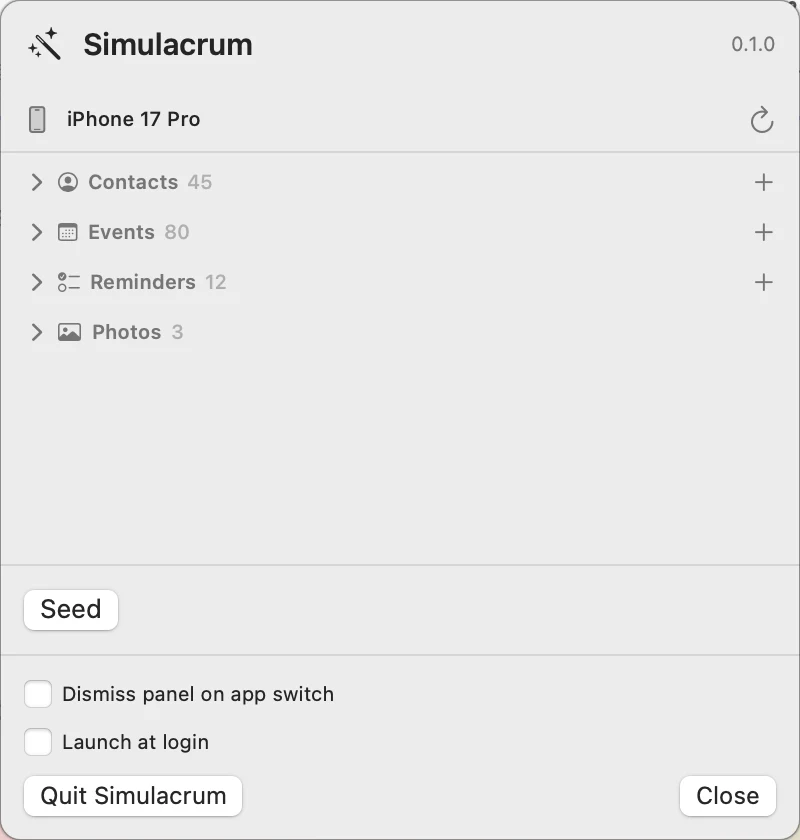
Why a suite — and why standalone tools still exist
Each module began as a complete tool because each one is useful on its own. A BLE developer shouldn’t have to install camera and NFC machinery. The repositories remain independently cloneable, buildable, and installable, with their own menu-bar apps.
Simsalabim embeds those same provider components rather than reimplementing them. The suite is for the increasingly common case where an app touches several physical or personal-data surfaces: scan a product over NFC, connect over BLE, capture a code with the camera, then attach a contact or photo.
There is deliberately no global Mock/Passthrough switch. ImpossiBLE, CAMouflage, and NFCromancer each keep their own mode. Forwarding a real BLE device while serving a deterministic camera fixture is perfectly reasonable. Simulacrum has no persistent mode at all: choose a booted simulator and seed it when needed.
The panel is an exclusive accordion. All four headers and their status indicators remain visible, while the selected module gets the full working area. The menu-bar icon combines the state of the active hardware bridges, so traffic and modes remain visible without four separate status items.
The common plumbing lives in SimBridgeKit: socket transport, provider ownership, connection state, and the shared menu-bar shell. A standalone provider and the suite never fight silently over the same socket. Whichever one is already serving keeps ownership; the other reports that it is blocked.
The code under test should stay honest
The most important design rule across the family is that an app should not acquire a second architecture merely because it runs in the simulator.
For ImpossiBLE, CAMouflage, and NFCromancer, the app keeps using Apple’s types and callbacks. The bridge code is active only in simulator builds and becomes inert on devices. Production behavior does not depend on a parallel “fake Bluetooth” or “test camera” protocol invented by the application team.
There are still intentional test hooks for supplying fixtures. Those hooks configure the world outside the app; they do not replace the app’s interaction with CoreBluetooth, AVFoundation, or Core NFC. This is a subtle but important boundary. The test may decide which peripheral, frame, or tag exists. The application still has to discover it and handle it through the real framework contract.
Simulacrum follows the same principle from the other direction: instead of faking Contacts or EventKit inside the app, it puts data into the stores those frameworks already expose.
Getting started
Simsalabim is open source and MIT-licensed. Clone it recursively, because the suite pins the four product repositories as submodules:
git clone --recursive https://github.com/mickeyl/Simsalabim.git
cd Simsalabim
make run
The individual tools are available from their own repositories if that is all a project needs. The bridge modules require their corresponding Swift package in the simulator app; Simulacrum does not. Passthrough needs the relevant Mac hardware and permissions, while every module remains useful without physical hardware through mocks or seeded fixtures.
Simsalabim doesn’t make the simulator physically accurate. It makes it useful again for the large, important part of hardware-adjacent development that is still software: interface states, sequencing, parsing, persistence, error handling, automated tests, demos, and screenshots.
The final hardware run still matters. It just no longer has to be every run.
As usual, feedback and pull requests are very welcome — I’m sure there are more missing worlds out there. Stay tuned :)
Two questions macOS should answer — lsaudio and lsusd
Some tools begin with a roadmap. Others — like these two — begin with a question you ask yourself often enough that irritation wins.
At my desk, two questions kept coming back:
- What is making that sound?
- What exactly is connected over USB?
macOS knows both answers. CoreAudio knows every process that is playing or recording. IOKit knows every USB device, where it sits in the physical topology, how fast it negotiated, and whether it exposes a serial device. But the system doesn’t present either answer at the level where I need it while debugging. I kept reaching for Activity Monitor, System Information, ioreg, shell pipelines, and small scripts that answered only today’s version of the question.
So I turned those private crutches into two proper tools: lsaudio and lsusd. Both started on the command line. Both now also have native macOS menu-bar companions. The source code is on GitHub, both projects are MIT-licensed, and both can be installed through Homebrew.
Who is making that sound?
Modern systems make a surprising amount of noise on behalf of something else. A browser tab plays through a WebKit helper. Notifications are brokered by a system sound server. A booted iOS Simulator can leave systemsoundserver-simd producing sounds on the host. And, yes, coding agents occasionally launch afplay, say, or a speech synthesizer to test something and forget to clean it up. *sigh*
The user-visible application is therefore not always the process that owns the audio session. That is why searching the obvious names in Activity Monitor often gets nowhere.
lsaudio asks CoreAudio instead:
$ lsaudio
  PID  Process                    Out  In  Devices
41841  afplay                       ▶   ·  Audioengine 2+
90963  Safari Graphics and Media    ▶   ·  Audioengine 2+
99075  corespeechd                  ▶   ·  Audioengine 2+
It uses the CoreAudio process-object API introduced in macOS 14 to enumerate clients registered with coreaudiod, then reads their process IDs, bundle identifiers, input and output state, and devices. There’s no private API involved and no guessing based on power usage. Watch mode is driven by CoreAudio property listeners, so it reports changes when they happen rather than polling the system every second.
Listing the culprit is only half the job. lsaudio kill afplay sends a polite SIGTERM, confirms before acting, supports other signals and dry runs, and can offer administrator authorization when a protected process belongs to another user. Plain-text and JSON output make the same discovery useful in scripts.
The native LSAudio for macOS app uses the same LSAudioCore module as the CLI. Its menu-bar label shows output and input activity at a glance. Open the panel and the abstract counts turn into the actual processes, their devices, and a quick way to terminate the offender. A separate process window exposes idle clients, search, executable paths, event history, details, export, and the full signal-delivery workflow.
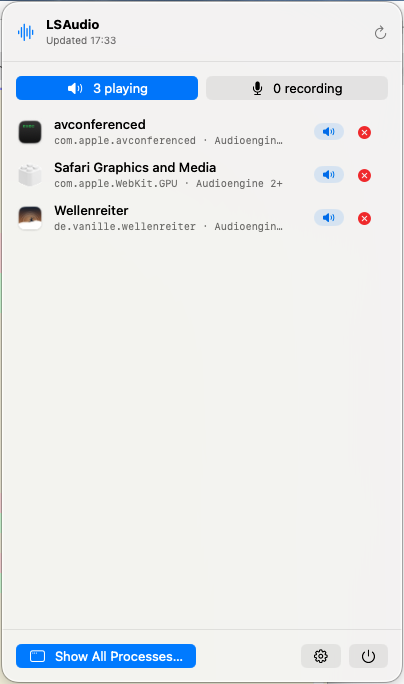
The important part is that the panel shows reality as CoreAudio sees it. In the screenshot, Safari is represented by Safari Graphics and Media, because that is the process actually holding the audio session. That distinction is exactly why the tool exists.
What exactly is connected over USB?
Two decades of embedded Linux have trained me to type lsusb whenever hardware behaves strangely. It’s a beautifully useful first question: did the device enumerate, which vendor and product ID did it report, and at what point in the tree did it appear?
The corresponding experience on macOS has always felt oddly indirect. System Information is nice to look at, but way too heavyweight for a quick bench check. Homebrew’s lsusb formula is nothing but a shell wrapper around system_profiler SPUSBDataType — and on newer macOS versions that data type happily returns no devices at all while the IOKit registry is full of them. Thanks, Apple. For serial hardware, the usual collection of /dev/cu.*, ioreg, and filtering commands adds another layer of ceremony.
lsusd gives me the direct answer I wanted:
$ lsusd
Bus  Device  USB Product     USB Vendor  VID:PID    Release  Speed
001  003     AX88179A        ASIX        0B95:1790  2.00     5G
002  013     USB JTAG/serial Espressif   303A:1001  1.01     12M
008  002     PSSD T7         Samsung     04E8:4001  1.00     10G
The CLI is a zero-dependency Python program for macOS and Linux. On macOS it reads the IOUSB registry plane; on Linux it reads sysfs. It reports bus and address, location, product and vendor, serial number, VID:PID, device release, and negotiated speed. --tree renders the physical topology, --hubs includes the infrastructure normally hidden from the flat list, and --serial maps USB devices to their serial device nodes.
Watch mode is push-driven on both platforms: IOKit first-match and termination notifications on macOS, kernel uevents through a netlink socket on Linux. That makes it useful for the familiar debugging ritual of unplugging a device, reconnecting it, and asking whether the machine noticed the same event you did.
The native LSUSD for macOS app is deliberately not a graphical wrapper around the Python executable. It talks to IOKit directly through a Swift core, builds the topology itself, and subscribes to IOUSBHostDevice and IOSerialBSDClient changes. The menu-bar label shows USB and serial counts; the compact panel switches between both lists and makes negotiated speed visible without opening a terminal. The full window adds expandable topology, device details, hubs, event history, and plain-text, CSV, and JSON export.
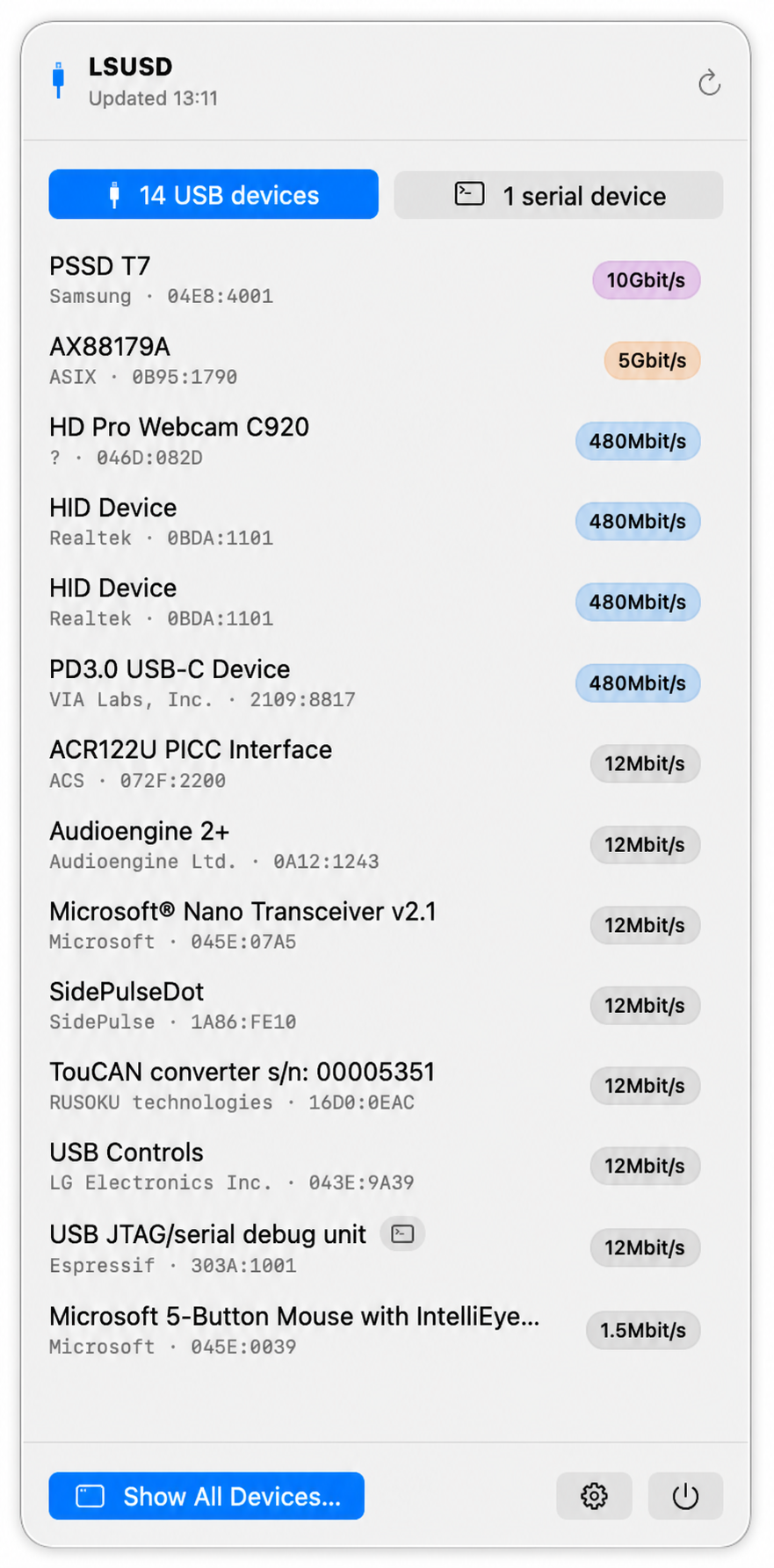
Speed is a small detail until it’s the answer. A storage device that should be at 10 Gbit/s but negotiated 480 Mbit/s tells a very different story from a device that did not enumerate at all. Putting that badge directly in the popover turns the menu-bar app from a prettier device list into a useful hardware diagnostic.
Why a CLI and a menu-bar app?
The command line is still the right surface when I already know the question. It composes with other tools, works over SSH, can produce stable machine-readable output, and can sit inside a test script. The menu bar solves a slightly different problem: it keeps the system’s state close enough to notice.
When a sound starts unexpectedly, I don’t want to remember a command before it stops. When I reconnect a USB-CAN adapter, an ESP32, or an audio interface, I want immediate confirmation that it returned with the identity and speed I expected. The two applets turn a diagnostic snapshot into ambient instrumentation.
Neither app polls just to keep its label alive. They listen to the platform services that own the state and refresh when those services report a change. That keeps the tools quiet, current, and cheap enough to leave running — exactly what a menu-bar utility should be.
The tools are available independently, so the terminal version doesn’t drag in an application and the application doesn’t require the CLI:
brew tap mickeyl/formulae

brew install lsaudio
brew install lsusd

brew install --cask lsaudio-menubar
brew install --cask lsusd-menubar
From private crutch to public tool
One final note that I don’t want to bury in a release checklist: without AI, neither of these projects would have reached public life in this form.
The itch was mine, the platform knowledge was mine, and I still decide what the tools should do and review the code that does it. But the distance between a command that works on my machine and a public project is mostly unglamorous work: handling awkward edge cases, keeping macOS and Linux behavior aligned, designing a native interface, writing tests and documentation, preparing Homebrew formulae and casks, signing, notarizing, and polishing all the small paths that only somebody else will take.
AI changed the economics of that last stretch. It made it reasonable to do the work around the idea, not only the interesting kernel of the idea. Without that leverage, lsaudio and lsusd would have remained what they began as: non-portable private crutches, useful on my machines and invisible to everybody else.
Anyway — give them a spin and tell me what’s missing. I hope they save you as much time as they saved me :)
The part of the app that should not ship with the app
Some years ago, over the course of a weekend, a big public internet radio provider went offline — and with it, a major part of my hand-curated directory broke.
I used to think of the remote station catalogs in Wellenreiter as data. That was the first mistake — and yours truly has been building radio apps since 2010, so I really should have known better.
A hand-curated station list is data: names, stream URLs, artwork, maybe a few tags. A remote catalog maintained by somebody else is different. It’s somebody else’s product boundary leaking into yours.
At first, the distinction doesn’t matter. You add a native source, decode a JSON endpoint, map a few fields, and the feature works. Then the endpoint changes. Then the artwork field moves. Then the provider adds regional variants. Then your app is still correct in principle, but wrong in production.
The uncomfortable part is that none of this feels like a product problem at the time. It feels like maintenance. A little parser change here, a new field there, a release with no user-visible feature attached to it. But if the app depends on those catalogs feeling alive, then keeping them alive is product work. It just happens to be product work with an awkward release cycle.
The obvious implementation
Imagine a fictional service called Metro Wave. It runs a few dozen themed streams: City Nights, Analog Gold, Basement Club, Late Drive. The streams are real internet radio streams, but the station list comes from Metro Wave’s own catalog endpoint.
The first implementation is obvious:
- write a
MetroWaveSourcein the app; - fetch
https://catalog.example.invalid/channels.json; - decode the response into a few native structs;
- map each channel into the app’s internal station model.
That implementation isn’t wrong. It’s probably the fastest way to get the feature out of the door, and if you’re building the first version of the app, that’s what you should do. Shipping beats architecture cosplay.
The problem appears later, when the external catalog starts behaving like a living system. stations becomes channels. The artwork URL moves from image to images.square. The stream URL is now an array because the provider added quality levels. The slug you used as a stable identifier gets renamed during a website redesign.
None of these changes are conceptually hard. All of them are operationally expensive. A provider changed a JSON shape on Tuesday; your fix now needs a native app release, a review window, a staged rollout, and some amount of user pain in between.
That’s the wrong coupling. The app’s release machinery should not be the emergency repair path for somebody else’s catalog format.
The split
So what I did instead was to separate the stable part from the volatile part.
The host app owns the things that are actually product-critical and should not be reinvented per source: the player, caching, search, favourites, editorial collections, artwork loading, progress reporting, error isolation, and the internal station schema. It also owns the runtime contract: what a dynamic source is allowed to do, how HTTP requests work, what a valid station looks like, and how failures are contained.
The plugin owns the one thing that changes whenever the remote source changes: translating somebody else’s catalog into the app’s station model.
In the Metro Wave example, the whole provider-specific part can be this small:
registerPlugin({
  id: "metro-wave",

  loadCollections(api) {
    return [{
      id: "metro-wave",
      title: "Metro Wave",
      stationIDs: []
    }];
  },

  loadStations(api, collectionID) {
    if (collectionID !== "metro-wave") return [];

    const catalog = api.getJSON("https://catalog.example.invalid/channels.json");

    return catalog.channels.map(channel => ({
      id: "metro-wave:" + channel.slug,
      name: channel.title,
      streamURL: channel.streams.high,
      homepage: channel.pageURL,
      imageURL: channel.images.square,
      tags: channel.tags || []
    }));
  }
});
That is not a lot of code. More importantly, it is not a lot of responsibility. There’s no player state, UI state, image cache, persistence, navigation, now-playing integration, or search index anywhere in there. The plugin doesn’t know what a tab bar is, has never heard of CarPlay, and doesn’t even know whether the app is running on a phone, a desktop, or inside a command line tool.
It only knows how to turn Metro Wave’s idea of a station into the app’s idea of a station — and that is the entire point of the exercise.
Why the new code got smaller
The surprising part of this kind of refactor is that the plugin code is often shorter than the native code it replaces.
At first that feels suspicious. Surely moving something out of the app should add machinery. And it does: there is a small runtime, an editor, a test runner, a persistence layer, a deployment path. But that machinery is shared. It is paid once.
The old native source paid the integration cost every time. Each source tended to grow its own little version of the same concerns: request handling, error mapping, defensive decoding, progress updates, fallback behaviour, sometimes even ad-hoc logging. None of that code expressed the provider’s shape. It expressed the absence of a proper boundary.
Once the host owns the boundary, the plugin becomes almost embarrassingly direct. Fetch the remote document. Pick the fields. Normalize the names. Return stations.
The code didn’t get shorter because JavaScript is magic (it isn’t, believe me). It got shorter because most of the old code wasn’t about the source at all.
What makes it hold
This split only works if the plugin system is treated as a runtime boundary, not as a convenience script.
A plugin must be testable before it ships. Not “the editor accepted the text”, but the whole chain: compile it, run it, fetch the remote catalog through the same HTTP surface the app will expose, validate every returned station, and try representative streams. If the test fails, the broken change should stay in the editor, not travel to every installed app.
A plugin must also fail small. A syntax error in one dynamic source should not take down the catalog. A timeout should not block editorial stations. A remote provider returning garbage should not poison the app’s stable data. The host needs to be able to say: this source failed, skip it, keep the rest of the product working.
There is a subtle design pressure here. The plugin API should be small on purpose. A tiny HTTP helper. A way to return collections. A way to return stations. Maybe text and JSON helpers. Very little else.
Every extra capability is tempting. Every extra capability also increases the amount of host behaviour that can leak into provider-specific code. The point is not to let plugins become little apps. The point is to let volatile catalog knowledge live somewhere that can be edited, tested, and deployed at the speed of the volatility.
Parallel, but isolated
There is another trap in dynamic catalogs: sequencing. Once sources are external, it is tempting to load them one after the other because that makes progress reporting easy. First source, second source, third source. The logs look tidy; the user stares at a progress bar that stalls on whichever provider is slow today.
From the user’s side, remote catalogs are independent. If Metro Wave is slow, it should not hold up a completely unrelated collection. The host can run the dynamic sources in parallel, collect their results as they finish, and update progress in completion order. The progress bar still tells the truth; it just no longer serializes the world for the convenience of the implementation.
This matters because dynamic sources fail in the real world. They time out, throttle, redirect, return empty lists, or take a long scenic route through a CDN. The architecture should assume that and stay pleasant: a dead source is one missing collection, not a stuck app.
In short
Stable stuff — playback, persistence, favourites, the station schema — belongs in the app. The exact shape of somebody else’s JSON this week doesn’t, and the two don’t move at the same speed, so they shouldn’t have to ship together. That’s all there is to it; the rest of this post was the plumbing.
P.S. There is one uncomfortable wrinkle here, especially in the Apple universe.
Apple has never been fond of apps that change their own functional scope after review — ask me how I know: back in 2013 the relevant rules were 2.7 and 2.8, and they cost me three apps. Today it’s guideline 2.5.2, which forbids downloading code that changes features or functionality — with one explicit exception: scripts run by WebKit or JavaScriptCore, as long as they don’t significantly change the app’s primary purpose. My plugins do run in JavaScriptCore and cannot do anything but turn a catalog into stations, which is exactly why the API is as small as it is. The technical boundary and the review boundary are the same line, on purpose.
So yes: this split is useful. It’s also one of those things you implement with your teeth slightly clenched, hoping the review gods read the same guideline as you do. *sigh*
If you’ve solved this differently in your apps, I’d love to hear about it.
The weather app I swore I’d never write
There is a short list of apps every developer is contractually obliged to build at least once: a to-do list, a Markdown editor, a podcast player, and — the final boss of clichés — a weather app. I held the line for twenty years. This is the confession of how I finally caved.
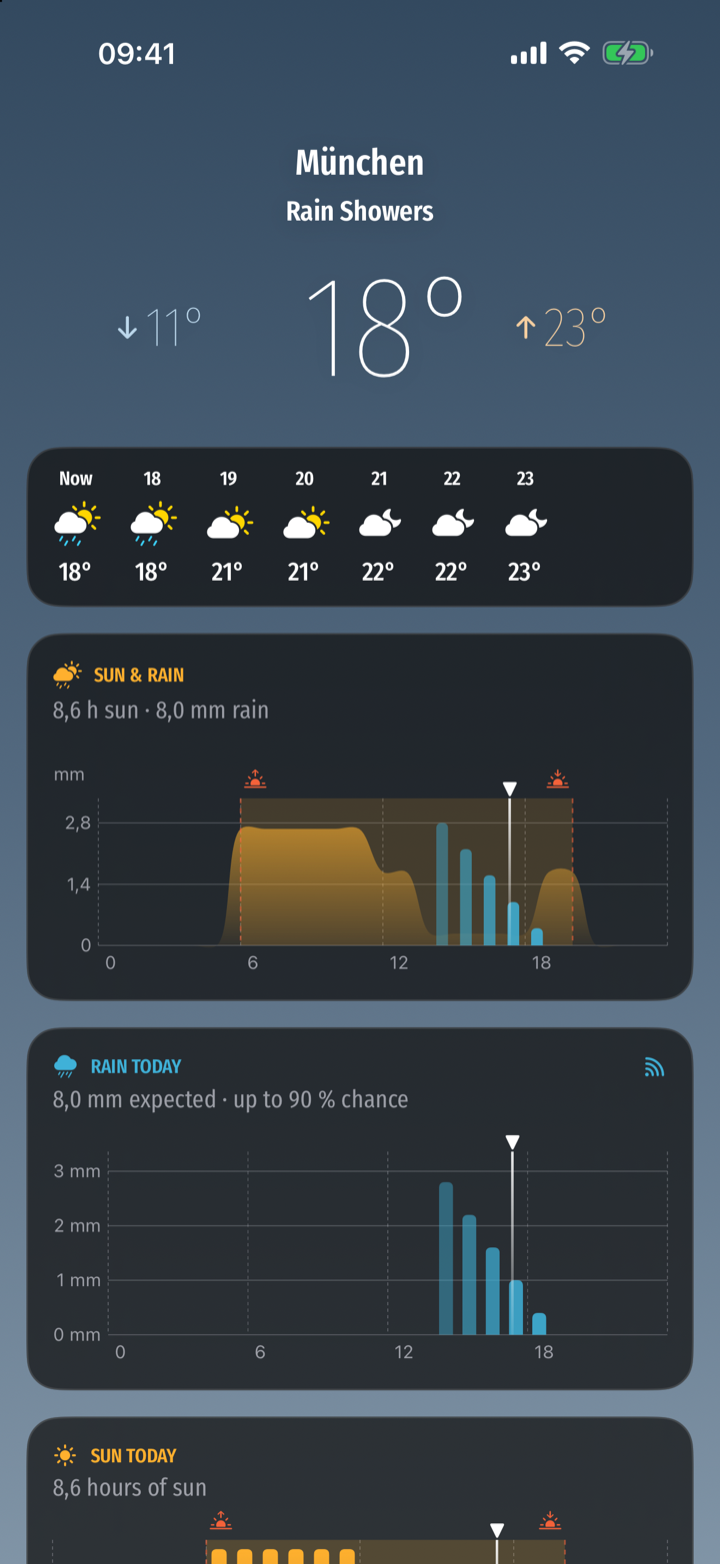
For most of those twenty years I didn’t have to, because I had WeatherPro. It wasn’t the very first app I bought — but it was one of the early ones, and it has been on the App Store since 2009, which in App Store years is roughly the Pleistocene. For the better part of seventeen years it did exactly one thing and did it beautifully: it told me whether to take a jacket. We grew old together. The trouble is that only one of us aged gracefully. Somewhere along the line of modern iOS releases it started to feel like a museum piece running behind glass — slow to launch, occasionally confused about where I am, visibly held together by the heroic but finite patience of whoever still maintains it. Every update was a small prayer that it would survive the next one.
So I did the reasonable thing first: I went looking for a replacement. I’ll spare you the full ethnography of the modern weather-app store, but the highlights were an app that wanted an account to show me the temperature, one that had grown a chat assistant nobody asked for, and several that were, structurally, a banner ad with a thin film of meteorology on top. I wanted the sky at a glance. The market offered me a loyalty programme.
You know exactly what happened next, because you would have done the same. I thought the four most expensive words in software — how hard can it be? — and opened Xcode.
It is, of course, harder than it looks
The data was the easy part. Open-Meteo serves genuinely good forecast data, for free, with no key and no account, under a friendly licence. That alone removed about 80% of the reasons the other apps are the way they are. The remaining 20% was the part I actually cared about: making the sky legible.
The centrepiece is a chart that puts the two things you actually want to know — is it sunny, and is it going to rain — into one picture: sunshine as a soft area, rain as bars, framed by sunrise and sunset, with a marker for now.
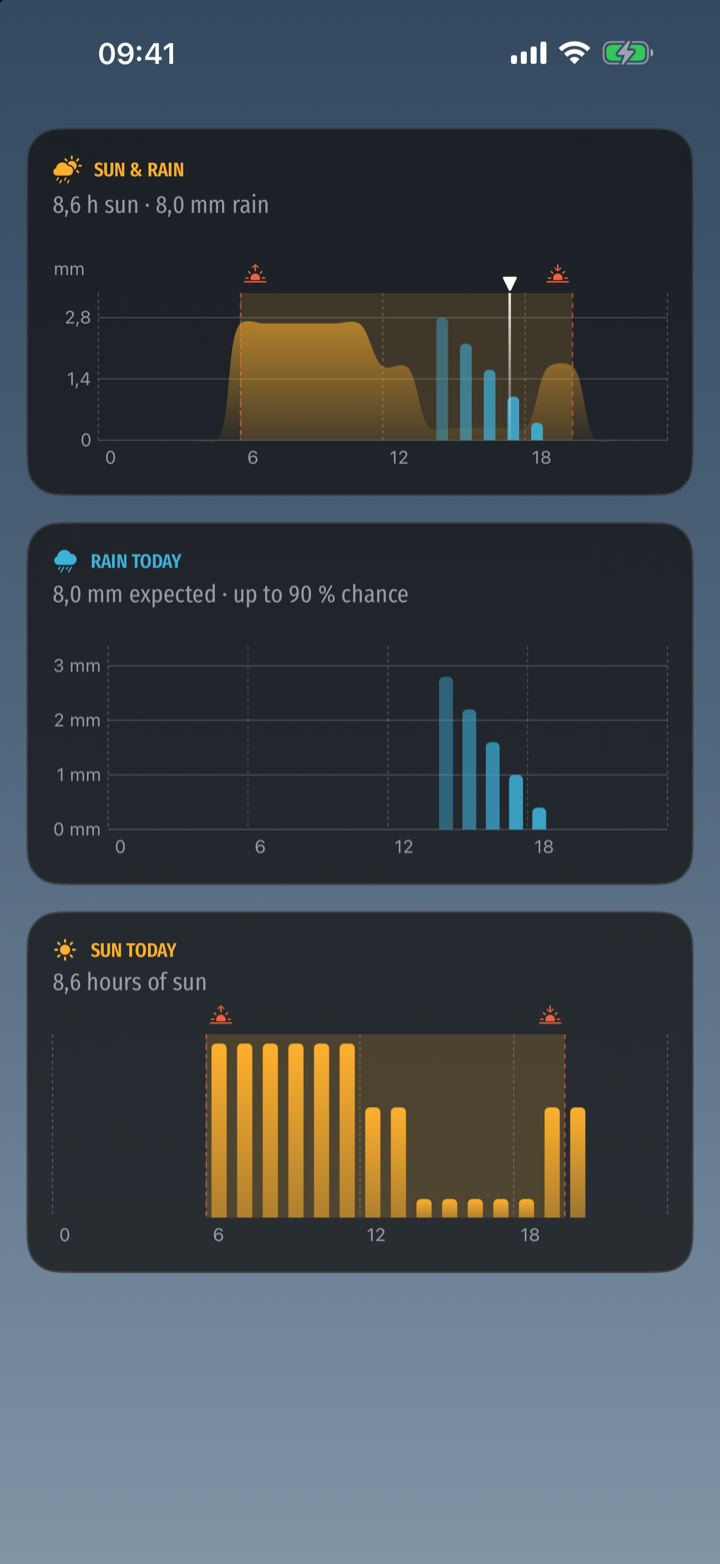
I must admit there’s a small, knowing crime in that chart: the y-axis is labelled in millimetres of rain, and the sunshine curve cheerfully shares it without having any honest business being measured against it. I went back and forth on this for an embarrassingly long time before deciding that a glance card is allowed to be impressionistic, and that meteorological honesty can live ten pixels lower in the two detail charts. This is, as ever, the other 90 percent of the work: nobody will ever see the afternoon I spent on the smoothness of one shoulder of one curve.
One forecast, four screens
Because I’ve apparently learned nothing, SunDog isn’t just an iPhone app. It’s also on iPad, where the extra room earns a proper two-column layout:
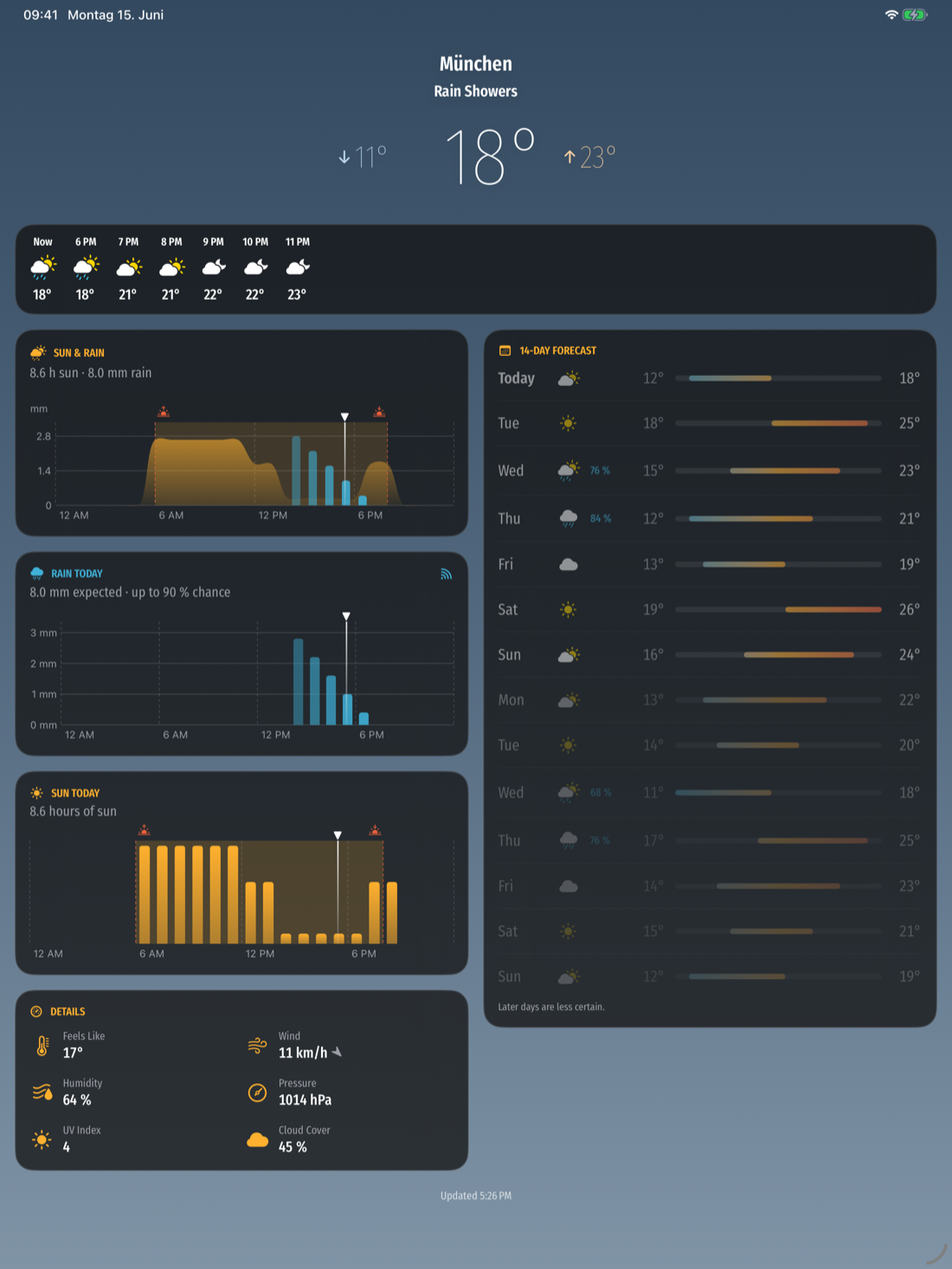
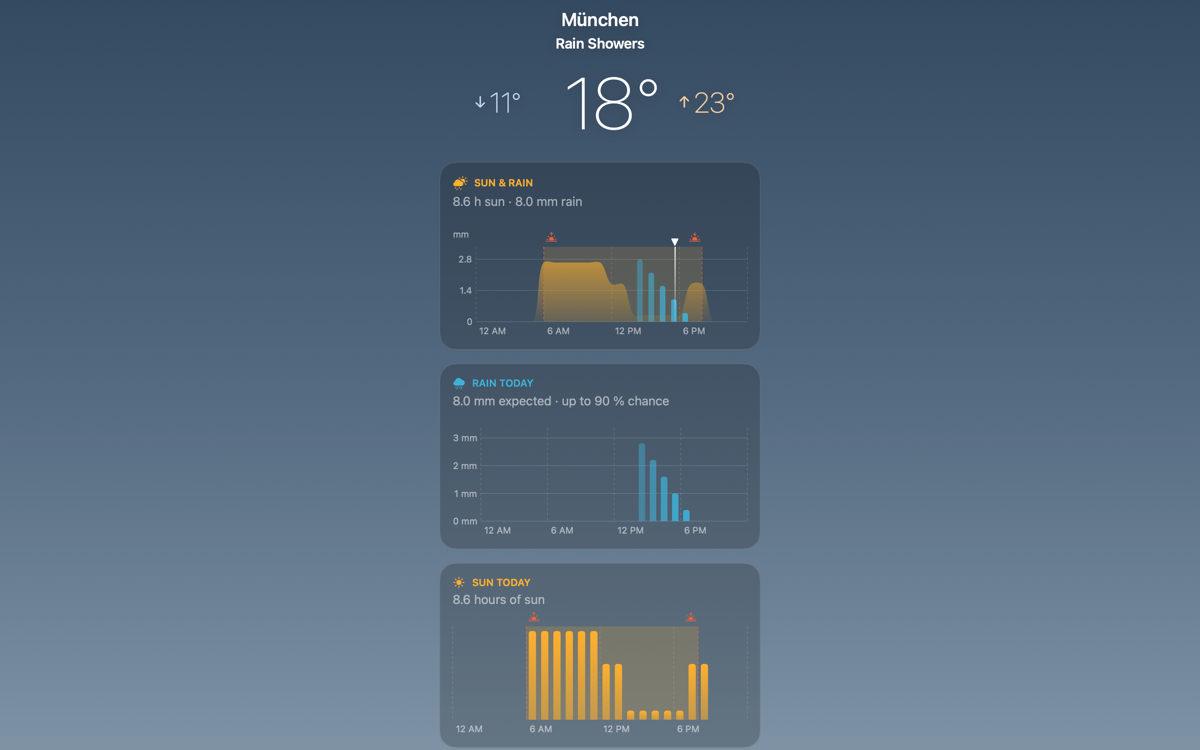
…on the Mac, as a menu-bar app that drops the whole forecast into a popover, because the natural habitat of a weather check is the corner of your screen, not a Dock icon:
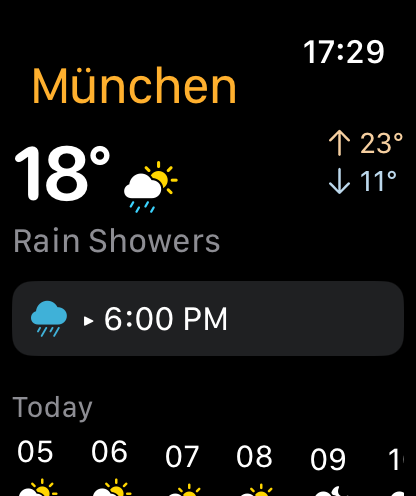
…and on the Apple Watch, reduced to the one question a wrist is good for — what is it doing now, and what’s it about to do:
About the name
A sundog — a parhelion — is a real thing: two bright spots that flank the sun when light refracts through ice crystals high in the sky. It’s the kind of small, easy-to-miss wonder you only catch if something nudges you to look up. When the conditions are right, the app quietly suggests exactly that. It seemed like a fitting name for software whose entire ambition is to make you glance at the sky and then put the phone away.
SunDog is free, has no account, no ads, and no tracking, and it will stay that way. It’s in TestFlight now while I sand down the last of that 90 percent; the public release follows once I trust it with your jacket decisions — stay tuned!
And WeatherPro? It’s still on my home screen. Some loyalties you keep even after you’ve replaced the thing they were for :)
The other 90 percent — polishing notes from a streaming-radio app

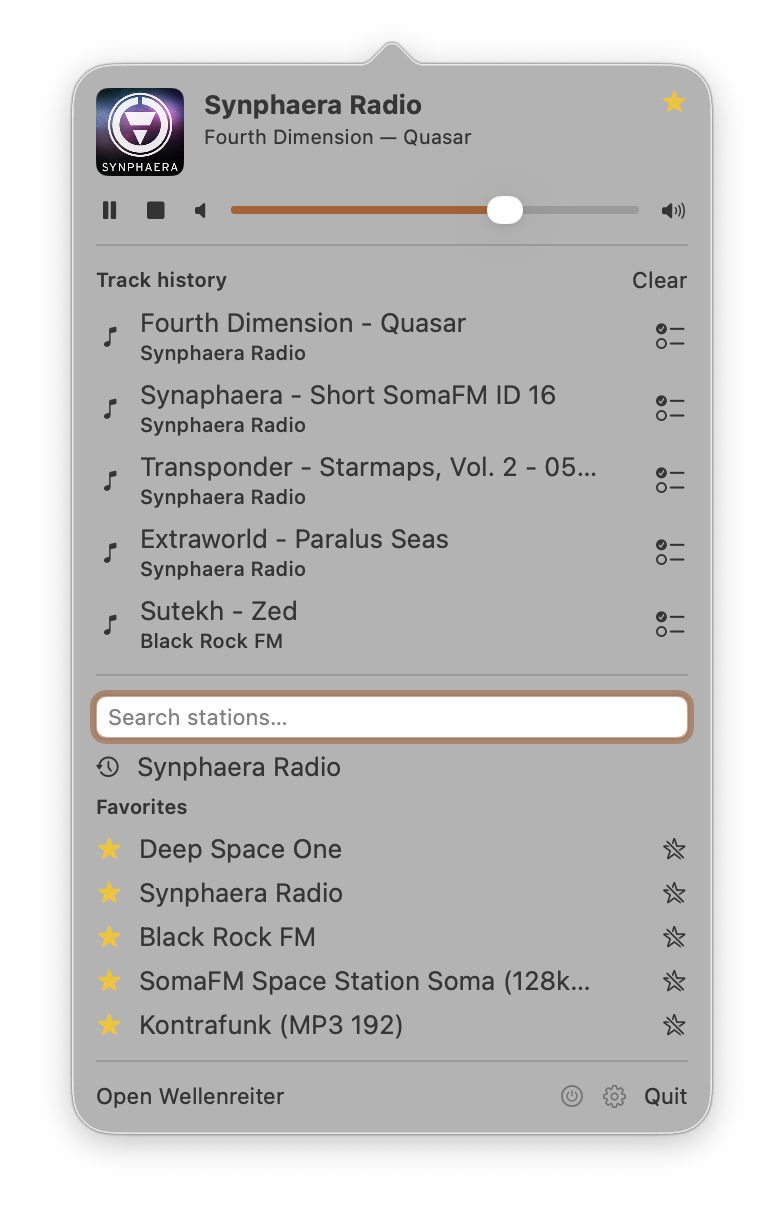
I have been polishing Wellenreiter — my streaming-radio app for iOS, iPadOS, macOS, and CarPlay (and the successor of Volksradio, which some of you might remember — “only a bare minimum of features, but those supersolid” was the plan back in 2015, and it took me a decade to deliver on the second half) — for the better part of a year. The newest addition is a standalone macOS menu-bar app: the whole experience in a popover that opens on a global hotkey. The feature list is short and unremarkable: it plays internet radio, has favourites, has search. That part took a few weeks. Almost everything since has been the other 90 percent — the work that never shows up on a feature comparison but that you feel the moment you start using the app every day.
A working definition: polish is making the app behave the way the user expects, even when the easy implementation behaves differently. None of the patterns below made the feature list. Most took an hour or two. Together they are what separates an app you delete after a week from one you keep on the dock.
Don’t cut where you can fade
Switching stations is the most frequent thing the user does, and the default implementation is a hard cut: stop the engine, tear down the connection, spin up a new one, resolve the playlist, buffer, play. The user hears audio, silence, audio — half a second of nothing on a fast network, more on a slow one. Every station change is a small punishment for changing your mind.
The obvious optimisation is to make each step faster. It helps, but the silence never goes away — it just gets shorter. There is always a moment where the old stream is dead and the new one has not arrived, and the user lives inside that moment.
What actually helps is not shrinking the gap, but overlapping it. Wellenreiter runs two audio engines in parallel during a change. The old one keeps playing at full volume; the new one starts silently and connects in the background. Once it is actually producing audio, an equal-power curve ramps the old engine down and the new one up over about a second.
The shape matters. A linear cross-mix drops the perceived loudness by about 3 dB at the cross-over, because two uncorrelated signals do not add coherently. The cosine/sine pair keeps it flat — the same trick every DJ mixer uses.
private func applyRampVolumes(progress: Double) {
    let old = cos(progress * .pi / 2)   // 1 → 0
    let new = sin(progress * .pi / 2)   // 0 → 1
    primary.engine.mainMixerNode.outputVolume    = Float(old)
    secondary?.engine.mainMixerNode.outputVolume = Float(new)
}
The more interesting half is what happens when the new station does not connect — rotted URL, dead server, a network blink. The straightforward implementation has already torn down the old station, so a failure leaves the user with silence and an error dialog. Wellenreiter instead changes nothing the user can see until the new audio is actually flowing. The active station, the LIVE pill, the track title, the lock-screen artwork all keep reflecting the station that is, in fact, still playing. The only hint is a small CONNECTING pill on the tapped row. If the connection succeeds the crossfade begins and the UI follows the audio; if it fails the pill quietly disappears. Failure becomes a non-event.
That leaves one question — when does the UI commit to the new station?
- When the user tapped. Too early; the connection might never come, and the UI is now lying.
- At the end of the ramp. Too late; the new audio already dominates while the pill and artwork still read as the old station.
- At the mid-point. Just right. The moment the new stream becomes louder than the old,
currentStationflips, the metadata observer switches engines, and the lock-screen info updates — all in a single SwiftUI tick. Audio leads, UI follows.
There is one bug that only surfaces after you ship this. For ~500 ms after the flip the old engine is still emitting events as it fades. Its ICY metadata keeps arriving, and without protection it would stamp the old station’s track title onto the new one — a crossfade-shaped state bleed. The fix is small: every audio event carries the identity of the engine it came from, and events whose engine no longer matches the current station are dropped.
private func handlePrimary(_ event: AudioPlayerEvent, from sender: ObjectIdentifier) {
    // The primary slot outlives its station for ~500 ms after a mid-ramp
    // flip. Drop late events so the new station doesn't inherit the old title.
    guard sender == primary.id, primary.station == currentStation else { return }
    apply(event)
}
The pattern generalises beyond audio. Whenever two states have to replace each other — two screens, two contexts — let them overlap, commit when reality reports back, and roll the swap back without fuss when it doesn’t. The cut is a worst case, not a default.
The contract beats the convention
Internet radio servers can embed the current song title in the audio stream, but only if you ask — one header line, Icy-MetaData: 1, on the request. Apple’s AVPlayer had a documented way to inject that header. On iOS 26 it silently stopped including it — no deprecation, no warning, not even a console message. Thanks, Apple. *sigh* Audio plays fine; titles never arrive, because the server was never asked. The bug is invisible unless you compare against the station’s own website.
“File a radar and wait” isn’t an option — the fix would be nine months away in the next major OS, if it came at all. So I named the contract the app actually depends on — track titles flow from the server into the app — and replaced whatever platform piece was failing to honour it. Wellenreiter’s engine is no longer AVPlayer; it is a third-party Icecast client (dimitris-c/AudioStreaming) that controls every byte of the request and demuxes the metadata itself. Not free — there is plumbing I now own — but the feature no longer hangs off an API that broke its promise in silence.
The menu-bar app is the same lesson in a different place. SwiftUI offers MenuBarExtra, the obvious, conventional way to build a menu-bar app. But it cannot be opened programmatically, and the whole point of this app is a popover that springs open under a global hotkey (⌃⌥W). So the shell is not pure SwiftUI (and yes, that’s AppKit — the toolkit I once claimed I could never motivate myself to learn; never say never): it is an AppKit NSStatusItem driving an NSPopover, with the hotkey registered through Carbon’s RegisterEventHotKey — the SwiftUI view lives inside the popover, but the things SwiftUI cannot do are done by the frameworks that can. The convention was MenuBarExtra; the contract was open on a hotkey, and the contract won.
In short: a contract is what the app promises the user, a convention is just how you happened to build it — and when they conflict, the contract wins.
Honor what the user meant, not what they tapped
There is one gesture on a station row: tap. But its meaning depends on context. Tap a station that is not playing — play this. Tap the one already playing — show me what is playing (the user already hears audio; they almost never mean start over). Tap a station you just tapped while it is still connecting — play this and take me to the player.
The lazy implementation treats every tap as play, so tapping the active station triggers a 1.5-second audible re-buffer and feels like the app didn’t believe you. Adding a real double-click gesture is worse: now every single tap waits a quarter-second to see if a second one is coming, and the 95% who never double-tap pay for the 5% who do. Wellenreiter reads the second tap in context instead: if it lands on the active station while it is still connecting, the app remembers the user wants the player and slides it in the moment audio starts — no recogniser, no latency, same behaviour whether you tap fast or slow.
The menu-bar popover applies the same respect to a different input. A menu-bar app lives under the cursor, but a good one never requires it: ⌃⌥W opens the popover with the search field already focused, arrow keys move through results, Return plays the selection and dismisses. You can switch stations without your hands leaving the keyboard.
There are only a handful of gestures, but dozens of things the user wants to express — you bridge that gap with state and timing, not by inventing new gestures.
The engine is the source of truth
Wellenreiter’s “Recently played” tab can sort by most listened to, which needs a truthful number of seconds. The obvious count — play tapped to pause tapped, summed — is wrong in three invisible ways. Connection time is not listening time (a station can take five seconds to buffer). Network hiccups are not listening time (the engine refills its buffer mid-song). Pauses are certainly not listening time (Date() - sessionStart hands a station an hour of false credit while the user is away).
You can patch each with extra state, until the next edge case shows up. Then again, somebody already knows when audio is flowing: the engine. It exposes a state machine (they’re your friend, as I learned the hard way in 2008) — idle, buffering, playing, paused, failed — and playing is the only state where sound reaches the speaker. Open a stopwatch when the state enters playing, close it when it leaves. Every segment is honest by construction; connection, hiccup and pause all exit playing on their own. (One guard: the state flickers buffering → playing → buffering for ~200 ms while the audio unit settles, so segments under a second are discarded.)
The same reflex answers a different question — whether to record at all. When the user taps a station, the naive code writes “played this” to the recents list and then connects. If the stream is dead, the list now recommends things you tried to play. So the recents entry waits for the engine to confirm playback; failed streams leave no trace.
In any app with a state machine — playback, downloads, sync — questions of “how long” and “did this happen” belong to the engine’s states, not the UI events that triggered it. UI events are intent, engine state is reality, and when they disagree, the engine is right.
Performance is felt, not measured
Users don’t read profiler graphs. They feel two things: whether scrolling is smooth and whether taps respond. A stutter while flicking through 250 stations is not a millisecond budget — it is a vibe: this app is heavy.
When the app downloads a station logo, the JPEG bytes are decompressed into pixels lazily — not on load, but the first time the image is drawn. Scroll fast and a dozen fresh covers decode at once, on the very thread trying to keep the scroll smooth. The fix is to decode up front, on the background thread that already has the bytes, via UIImage.preparingForDisplay(), so it never ambushes the scroll. Two companions: keep a thumbnail-sized copy of each cover so a 1024×1024 logo is never composited into a 60×60 cell at scroll time, and recompute the alphabetical sort only when its inputs change, not every redraw. None of this is better in any way the user can point to — it just stops being subtly bad.
So “move it off the main thread” is only half the answer. The other half is “and don’t run it again next frame for no reason”.
Clean the data you did not author
Internet radio metadata is a museum of horrors, and Shoutcast/Icecast operators keep adding new exhibits. (The station catalogs are a museum of their own — that got its own post.) Stations named __WACKENRADIO__, names that are 90% comma-separated genre tags, titles in all-caps with stray punctuation. Displaying the source verbatim looks lazy even when it is technically correct. Wellenreiter normalises every station name before showing it: underscores become spaces, clutter is stripped, whitespace collapses. __WACKENRADIO__ shows as WACKENRADIO and sorts under W. The cleaning happens silently, every time.
The same field that carries song titles — ICY StreamTitle — is also where stations push ads, jingles, station IDs, and “now playing on…” promos. Surface those as the live track and the track history fills with junk. So a small heuristic decides whether a StreamTitle actually names a song before it reaches the now-playing surfaces or the history. It is deliberately conservative — it rejects only on positive junk signals (URLs, the station’s own name, promo phrasing, a bare single-word ID) and keeps anything that plausibly reads as a title, because dropping a real song is worse than letting the odd promo slip through. That is why the menu-bar history in the screenshot above is all music and no station chatter.
Long titles get one more touch. A name like “Concerto for Violin and Orchestra in D major, K. 218, II. Andante cantabile — Anne-Sophie Mutter, Berliner Philharmoniker” would either wrap and make the layout jump every song, or truncate and lose information. Instead short titles sit centred under the artwork and long ones scroll gently, after a two-second pause so you can read the start.
Cleaning data at render time is a form of respect — it’s what makes an app look finished rather than merely functional.
Remember what the user was doing
SwiftUI rebuilds aggressively, and every rebuild is a forgetting waiting to happen. The non-obvious case: when the mini-player slides in over the tab bar as audio starts, the tab bar’s container lays out again, and the default behaviour resets each tab’s navigation stack — so a user three screens deep in the SomaFM list gets bounced to the root the instant audio starts. Tap, listen, lose your place. The fix is to hold each tab’s NavigationPath in a parent object that lives outside the part of the hierarchy that rebuilds. Selected tab, scroll position, search query, expanded sections — each is a separate fix, invisible when it works and infuriating when it doesn’t.
Why bother
Reading these back, a few things recur. Polish is usually about removing, not adding (I preached that when the iPad came out in 2010, and I still believe it) — latency, forgetting, ceremony, the gap between intent and behaviour; a surprising amount of it makes the code shorter. The bug almost always lives in the gap between two systems — audio and network, view hierarchy and lifecycle, decoder and scroll engine. And the user has the simpler mental model; honour it — they are consistently right, and the easy implementation is consistently wrong. Most of these reproduce only on real hardware, on real networks, in the car — never in the simulator.
None of this is in the App Store description, and most users will never consciously notice a single pattern, because the point is that they don’t. Polish is the gap between “the app does the thing” and “the app does the thing the way I expected,” and that gap is where people decide whether the icon stays on the dock. The list isn’t closed — it never is. Anyway, that’s the actual job, most days; the feature list was the easy part. If you have a favourite polishing pattern of your own, drop me a line — and stay tuned, the list will grow.