ImpossiBLE — BLE back in the iOS Simulator
For a while, Bluetooth Low Energy in the iOS Simulator was one of those things that half-worked often enough to be useful. It was never a perfect substitute for a real device — Bluetooth never is — but it helped. You could at least keep the edit/build/run cycle on the Mac while working on UI, parsing, state machines, and the boring-but-important parts around the actual radio.
And then, at some point, it was gone.
Apple didn’t bother with a deprecation notice, a replacement, or an explanation — it just stopped working, the way things you quietly rely on tend to do. *sigh* CBCentralManager sits in a state that is not useful, scans do not discover anything, and you are back to launching on hardware for every little iteration. If your app talks to BLE hardware, the simulator becomes a very expensive screenshot viewer.
That annoyed me enough (and yours truly annoys easily) to build ImpossiBLE.
The bridge
The original idea is simple: keep your iOS app code unchanged, but intercept the CoreBluetooth calls in the simulator and forward them to a small macOS helper. The helper runs on the Mac, talks to the real Bluetooth controller via CoreBluetooth, and sends the results back over a Unix domain socket.
From the app’s point of view, it still uses CBCentralManager, CBPeripheral, services, characteristics, descriptors, notifications, RSSI, and L2CAP channels. Under the hood, ImpossiBLE swizzles the simulator-side CoreBluetooth entry points and shuttles newline-delimited JSON through /tmp/impossible.sock.
It’s not magic, just a pragmatic tunnel around a missing feature.
There are a few details that make it pleasant in practice:
- Multiple
CBCentralManagerinstances are handled independently. - Service filters are enforced to match iOS behavior, even where macOS CoreBluetooth is more liberal.
CBManagerStatetracks the socket provider, so starting or stopping the helper produces a usefulpoweredOn/poweredOfftransition.- The simulator side auto-reconnects, so the provider can start before or after the app.
- The app code does not need a special ImpossiBLE mode.
For real hardware, that already gets a lot of day-to-day BLE work back into the simulator.
The mock provider
The new part is that the provider doesn’t have to be real Bluetooth hardware anymore. With ImpossiBLE Mock 2.0.0, the menu bar app has also grown into the control surface I wanted it to be: still small enough to live in the menu bar, but explicit about what is running and what the simulator is doing.
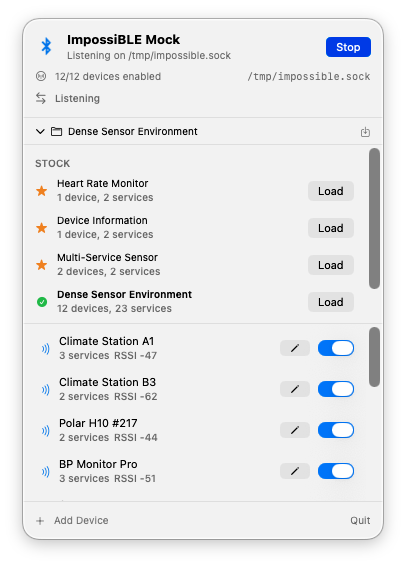
ImpossiBLE ships with a macOS menu bar app called ImpossiBLE Mock. It listens on the same /tmp/impossible.sock socket as the forwarding helper, but instead of talking to the Mac’s Bluetooth hardware it serves virtual peripherals from an editable configuration.
A segmented Off / Mock / Passthrough control at the top switches between modes. Selecting one automatically stops the other, so you never have to worry about which provider is running. The menu bar icon changes to match: a strikethrough Bluetooth symbol when off, the plain symbol when forwarding real hardware, and a dot-badged variant when mocking.
The panel is now a persistent, borderless menu bar window rather than a regular transient menu. It stays open while you switch to the simulator or Xcode, can be toggled from the status item, and remains centered under the menu bar icon. If you prefer classic menu behavior, a Dismiss on Switch setting brings that back.
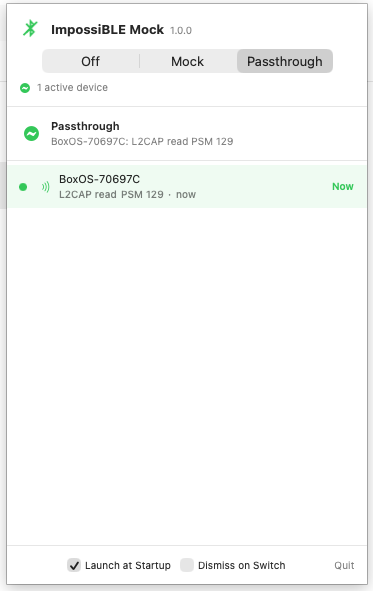
In passthrough mode, the mock device list is replaced by a dedicated status view — no clutter from irrelevant configuration UI. It now shows the devices the simulator app actually talks to. Discovery alone is deliberately not enough to enter the list; a device appears only after real GATT or L2CAP activity such as reads, writes, subscriptions, or channel traffic. If multiple devices are active, the currently communicating one is highlighted with its latest operation and a small Now marker.
The same activity also drives the menu bar icon pulse, so forwarding no longer looks static while real work is happening behind the socket.
In mock mode, the full device editor and configuration management are available.
The iOS app still doesn’t know the difference. It scans, discovers, connects, reads, writes, subscribes, and receives delegate callbacks as usual. Only the provider behind the socket changes.
The mock app comes with a few stock configurations: a heart rate monitor, a device information peripheral, a multi-service sensor, and a dense sensor environment with a dozen devices. You can edit device names, RSSI, connectability, advertised service UUIDs, manufacturer data, services, characteristics, descriptors, characteristic properties, initial values, and simple pairing/security behavior. Custom configurations can be saved and restored. A Launch at Startup checkbox in the footer installs a LaunchAgent, so the app can start automatically at login regardless of where it is installed.
This is especially useful for the parts of BLE development that are usually tedious to reproduce:
- testing scan result ordering and filtering without walking around the room;
- exercising UI states for empty, sparse, and crowded environments;
- checking descriptor discovery and notification setup;
- simulating devices that require pairing or encrypted characteristics;
- keeping a deterministic test setup for demos and screenshots.
The menu bar icon also flashes on socket traffic, which is a tiny thing, but very helpful when you’re wondering whether the simulator is actually talking to the provider.
Capturing real devices into mock configurations
Building mock configurations by hand is fine when you know exactly what services and characteristics your target device exposes. But sometimes you just want to grab what’s already in the air and turn it into a test fixture.
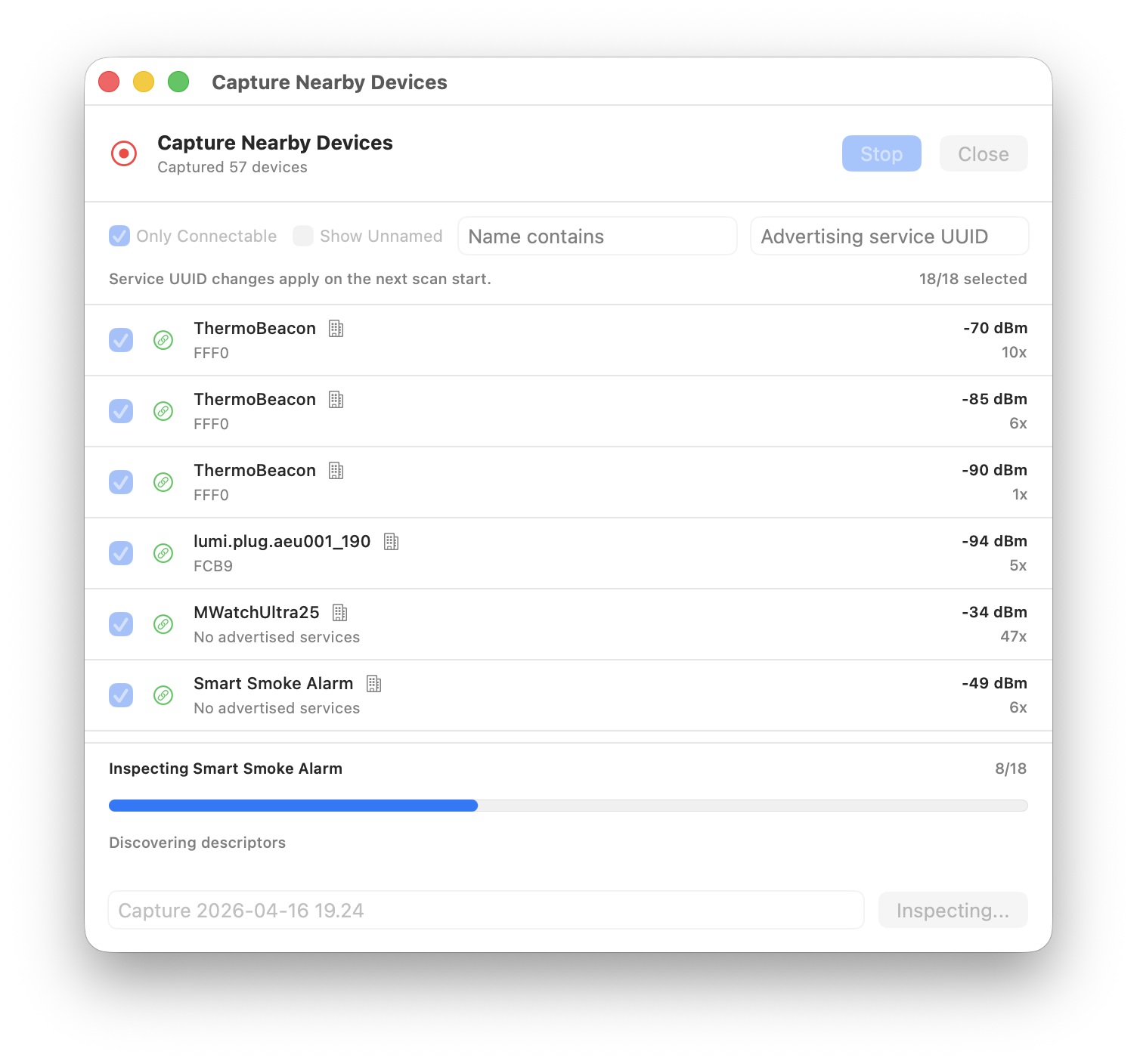
The mock app now includes a Capture mode that scans for nearby BLE advertisements and lets you cherry-pick devices to include in a new configuration. The scan results are sorted by likely usefulness — devices with more advertised services, names, connectability, and manufacturer data float to the top. Unnamed devices are hidden by default to cut through the noise, but you can reveal them when needed.
When you save a capture, ImpossiBLE goes a step further for connectable devices: it connects to each selected device, discovers its full GATT tree — services, characteristics, descriptors — and reads any values that CoreBluetooth allows. The result is a mock configuration that mirrors what the real device actually exposes, not just what it advertises. Devices that are not connectable or fail to connect are still saved from their advertisement data alone.
This closes a nice loop: scan the room, pick the interesting devices, save, and immediately test against a faithful replica without needing the real hardware powered on.
Installation
The repository is here:
https://github.com/mickeyl/ImpossiBLE
For Homebrew users:
brew install mickeyl/formulae/impossibleThat installs the helper and the mock menu bar app. This is a developer tool, so I’m not trying to pretend it’s a polished end-user product. The Homebrew formula builds it locally and signs the mock app ad-hoc; if you want a notarized distributable app bundle, the Makefile has the pieces for that as well.
If you prefer to work from the checkout:
git clone https://github.com/mickeyl/ImpossiBLE.git
cd ImpossiBLE
make install
make run        # real BLE forwarding
make mock-run   # virtual BLE provider
make mock-relaunch  # rebuild and reopen the mock menu bar app during development
Only run one provider at a time. Both the real helper and the mock app own /tmp/impossible.sock.
Is this a replacement for device testing?
No.
Radio behavior is still radio behavior. Timing, connection stability, hardware quirks, pairing dialogs, background behavior, and all the lovely little platform-specific edge cases still need real devices. ImpossiBLE is not meant to remove that step.
What it does remove is the need to go to hardware for every small iteration. If I’m polishing a scan UI, checking a parser, debugging a state machine, or testing how an app reacts to a dense BLE environment, I can now stay in the simulator. That’s a big enough win to justify the tunnel, the swizzling, the socket protocol, and the slightly cheeky name (sorry, couldn’t resist ;)).
Apple may have silently taken BLE away from the simulator. Fine. I put it back :D
If you’re doing BLE work and something is missing, let me know — I’m all ears.
ImpossiBLE has since become the first member of a larger family. “Simsalabim — giving the iOS Simulator hardware powers” explains how the same idea now covers cameras, NFC, and realistic simulator data in one menu-bar suite.