The other 90 percent — polishing notes from a streaming-radio app

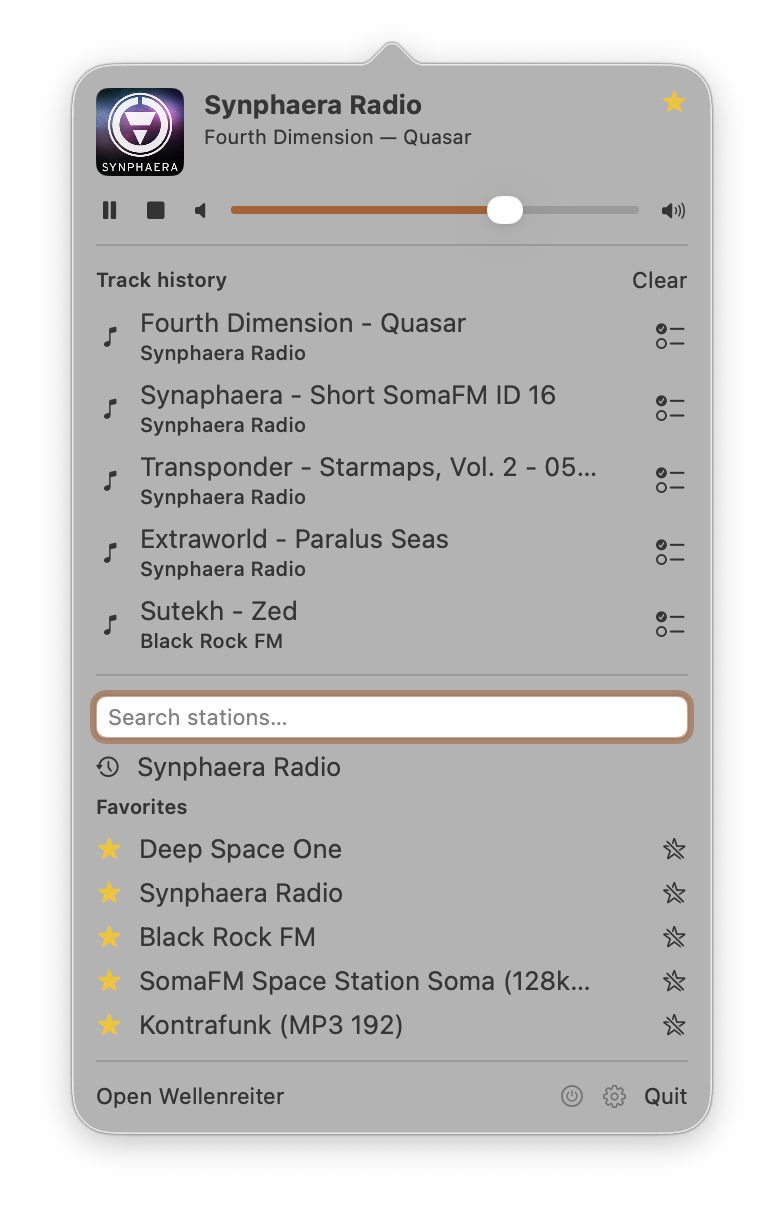
I have been polishing Wellenreiter — my streaming-radio app for iOS, iPadOS, macOS, and CarPlay (and the successor of Volksradio, which some of you might remember — “only a bare minimum of features, but those supersolid” was the plan back in 2015, and it took me a decade to deliver on the second half) — for the better part of a year. The newest addition is a standalone macOS menu-bar app: the whole experience in a popover that opens on a global hotkey. The feature list is short and unremarkable: it plays internet radio, has favourites, has search. That part took a few weeks. Almost everything since has been the other 90 percent — the work that never shows up on a feature comparison but that you feel the moment you start using the app every day.
A working definition: polish is making the app behave the way the user expects, even when the easy implementation behaves differently. None of the patterns below made the feature list. Most took an hour or two. Together they are what separates an app you delete after a week from one you keep on the dock.
Don’t cut where you can fade
Switching stations is the most frequent thing the user does, and the default implementation is a hard cut: stop the engine, tear down the connection, spin up a new one, resolve the playlist, buffer, play. The user hears audio, silence, audio — half a second of nothing on a fast network, more on a slow one. Every station change is a small punishment for changing your mind.
The obvious optimisation is to make each step faster. It helps, but the silence never goes away — it just gets shorter. There is always a moment where the old stream is dead and the new one has not arrived, and the user lives inside that moment.
What actually helps is not shrinking the gap, but overlapping it. Wellenreiter runs two audio engines in parallel during a change. The old one keeps playing at full volume; the new one starts silently and connects in the background. Once it is actually producing audio, an equal-power curve ramps the old engine down and the new one up over about a second.
The shape matters. A linear cross-mix drops the perceived loudness by about 3 dB at the cross-over, because two uncorrelated signals do not add coherently. The cosine/sine pair keeps it flat — the same trick every DJ mixer uses.
private func applyRampVolumes(progress: Double) {
    let old = cos(progress * .pi / 2)   // 1 → 0
    let new = sin(progress * .pi / 2)   // 0 → 1
    primary.engine.mainMixerNode.outputVolume    = Float(old)
    secondary?.engine.mainMixerNode.outputVolume = Float(new)
}
The more interesting half is what happens when the new station does not connect — rotted URL, dead server, a network blink. The straightforward implementation has already torn down the old station, so a failure leaves the user with silence and an error dialog. Wellenreiter instead changes nothing the user can see until the new audio is actually flowing. The active station, the LIVE pill, the track title, the lock-screen artwork all keep reflecting the station that is, in fact, still playing. The only hint is a small CONNECTING pill on the tapped row. If the connection succeeds the crossfade begins and the UI follows the audio; if it fails the pill quietly disappears. Failure becomes a non-event.
That leaves one question — when does the UI commit to the new station?
- When the user tapped. Too early; the connection might never come, and the UI is now lying.
- At the end of the ramp. Too late; the new audio already dominates while the pill and artwork still read as the old station.
- At the mid-point. Just right. The moment the new stream becomes louder than the old,
currentStationflips, the metadata observer switches engines, and the lock-screen info updates — all in a single SwiftUI tick. Audio leads, UI follows.
There is one bug that only surfaces after you ship this. For ~500 ms after the flip the old engine is still emitting events as it fades. Its ICY metadata keeps arriving, and without protection it would stamp the old station’s track title onto the new one — a crossfade-shaped state bleed. The fix is small: every audio event carries the identity of the engine it came from, and events whose engine no longer matches the current station are dropped.
private func handlePrimary(_ event: AudioPlayerEvent, from sender: ObjectIdentifier) {
    // The primary slot outlives its station for ~500 ms after a mid-ramp
    // flip. Drop late events so the new station doesn't inherit the old title.
    guard sender == primary.id, primary.station == currentStation else { return }
    apply(event)
}
The pattern generalises beyond audio. Whenever two states have to replace each other — two screens, two contexts — let them overlap, commit when reality reports back, and roll the swap back without fuss when it doesn’t. The cut is a worst case, not a default.
The contract beats the convention
Internet radio servers can embed the current song title in the audio stream, but only if you ask — one header line, Icy-MetaData: 1, on the request. Apple’s AVPlayer had a documented way to inject that header. On iOS 26 it silently stopped including it — no deprecation, no warning, not even a console message. Thanks, Apple. *sigh* Audio plays fine; titles never arrive, because the server was never asked. The bug is invisible unless you compare against the station’s own website.
“File a radar and wait” isn’t an option — the fix would be nine months away in the next major OS, if it came at all. So I named the contract the app actually depends on — track titles flow from the server into the app — and replaced whatever platform piece was failing to honour it. Wellenreiter’s engine is no longer AVPlayer; it is a third-party Icecast client (dimitris-c/AudioStreaming) that controls every byte of the request and demuxes the metadata itself. Not free — there is plumbing I now own — but the feature no longer hangs off an API that broke its promise in silence.
The menu-bar app is the same lesson in a different place. SwiftUI offers MenuBarExtra, the obvious, conventional way to build a menu-bar app. But it cannot be opened programmatically, and the whole point of this app is a popover that springs open under a global hotkey (⌃⌥W). So the shell is not pure SwiftUI (and yes, that’s AppKit — the toolkit I once claimed I could never motivate myself to learn; never say never): it is an AppKit NSStatusItem driving an NSPopover, with the hotkey registered through Carbon’s RegisterEventHotKey — the SwiftUI view lives inside the popover, but the things SwiftUI cannot do are done by the frameworks that can. The convention was MenuBarExtra; the contract was open on a hotkey, and the contract won.
In short: a contract is what the app promises the user, a convention is just how you happened to build it — and when they conflict, the contract wins.
Honor what the user meant, not what they tapped
There is one gesture on a station row: tap. But its meaning depends on context. Tap a station that is not playing — play this. Tap the one already playing — show me what is playing (the user already hears audio; they almost never mean start over). Tap a station you just tapped while it is still connecting — play this and take me to the player.
The lazy implementation treats every tap as play, so tapping the active station triggers a 1.5-second audible re-buffer and feels like the app didn’t believe you. Adding a real double-click gesture is worse: now every single tap waits a quarter-second to see if a second one is coming, and the 95% who never double-tap pay for the 5% who do. Wellenreiter reads the second tap in context instead: if it lands on the active station while it is still connecting, the app remembers the user wants the player and slides it in the moment audio starts — no recogniser, no latency, same behaviour whether you tap fast or slow.
The menu-bar popover applies the same respect to a different input. A menu-bar app lives under the cursor, but a good one never requires it: ⌃⌥W opens the popover with the search field already focused, arrow keys move through results, Return plays the selection and dismisses. You can switch stations without your hands leaving the keyboard.
There are only a handful of gestures, but dozens of things the user wants to express — you bridge that gap with state and timing, not by inventing new gestures.
The engine is the source of truth
Wellenreiter’s “Recently played” tab can sort by most listened to, which needs a truthful number of seconds. The obvious count — play tapped to pause tapped, summed — is wrong in three invisible ways. Connection time is not listening time (a station can take five seconds to buffer). Network hiccups are not listening time (the engine refills its buffer mid-song). Pauses are certainly not listening time (Date() - sessionStart hands a station an hour of false credit while the user is away).
You can patch each with extra state, until the next edge case shows up. Then again, somebody already knows when audio is flowing: the engine. It exposes a state machine (they’re your friend, as I learned the hard way in 2008) — idle, buffering, playing, paused, failed — and playing is the only state where sound reaches the speaker. Open a stopwatch when the state enters playing, close it when it leaves. Every segment is honest by construction; connection, hiccup and pause all exit playing on their own. (One guard: the state flickers buffering → playing → buffering for ~200 ms while the audio unit settles, so segments under a second are discarded.)
The same reflex answers a different question — whether to record at all. When the user taps a station, the naive code writes “played this” to the recents list and then connects. If the stream is dead, the list now recommends things you tried to play. So the recents entry waits for the engine to confirm playback; failed streams leave no trace.
In any app with a state machine — playback, downloads, sync — questions of “how long” and “did this happen” belong to the engine’s states, not the UI events that triggered it. UI events are intent, engine state is reality, and when they disagree, the engine is right.
Performance is felt, not measured
Users don’t read profiler graphs. They feel two things: whether scrolling is smooth and whether taps respond. A stutter while flicking through 250 stations is not a millisecond budget — it is a vibe: this app is heavy.
When the app downloads a station logo, the JPEG bytes are decompressed into pixels lazily — not on load, but the first time the image is drawn. Scroll fast and a dozen fresh covers decode at once, on the very thread trying to keep the scroll smooth. The fix is to decode up front, on the background thread that already has the bytes, via UIImage.preparingForDisplay(), so it never ambushes the scroll. Two companions: keep a thumbnail-sized copy of each cover so a 1024×1024 logo is never composited into a 60×60 cell at scroll time, and recompute the alphabetical sort only when its inputs change, not every redraw. None of this is better in any way the user can point to — it just stops being subtly bad.
So “move it off the main thread” is only half the answer. The other half is “and don’t run it again next frame for no reason”.
Clean the data you did not author
Internet radio metadata is a museum of horrors, and Shoutcast/Icecast operators keep adding new exhibits. (The station catalogs are a museum of their own — that got its own post.) Stations named __WACKENRADIO__, names that are 90% comma-separated genre tags, titles in all-caps with stray punctuation. Displaying the source verbatim looks lazy even when it is technically correct. Wellenreiter normalises every station name before showing it: underscores become spaces, clutter is stripped, whitespace collapses. __WACKENRADIO__ shows as WACKENRADIO and sorts under W. The cleaning happens silently, every time.
The same field that carries song titles — ICY StreamTitle — is also where stations push ads, jingles, station IDs, and “now playing on…” promos. Surface those as the live track and the track history fills with junk. So a small heuristic decides whether a StreamTitle actually names a song before it reaches the now-playing surfaces or the history. It is deliberately conservative — it rejects only on positive junk signals (URLs, the station’s own name, promo phrasing, a bare single-word ID) and keeps anything that plausibly reads as a title, because dropping a real song is worse than letting the odd promo slip through. That is why the menu-bar history in the screenshot above is all music and no station chatter.
Long titles get one more touch. A name like “Concerto for Violin and Orchestra in D major, K. 218, II. Andante cantabile — Anne-Sophie Mutter, Berliner Philharmoniker” would either wrap and make the layout jump every song, or truncate and lose information. Instead short titles sit centred under the artwork and long ones scroll gently, after a two-second pause so you can read the start.
Cleaning data at render time is a form of respect — it’s what makes an app look finished rather than merely functional.
Remember what the user was doing
SwiftUI rebuilds aggressively, and every rebuild is a forgetting waiting to happen. The non-obvious case: when the mini-player slides in over the tab bar as audio starts, the tab bar’s container lays out again, and the default behaviour resets each tab’s navigation stack — so a user three screens deep in the SomaFM list gets bounced to the root the instant audio starts. Tap, listen, lose your place. The fix is to hold each tab’s NavigationPath in a parent object that lives outside the part of the hierarchy that rebuilds. Selected tab, scroll position, search query, expanded sections — each is a separate fix, invisible when it works and infuriating when it doesn’t.
Why bother
Reading these back, a few things recur. Polish is usually about removing, not adding (I preached that when the iPad came out in 2010, and I still believe it) — latency, forgetting, ceremony, the gap between intent and behaviour; a surprising amount of it makes the code shorter. The bug almost always lives in the gap between two systems — audio and network, view hierarchy and lifecycle, decoder and scroll engine. And the user has the simpler mental model; honour it — they are consistently right, and the easy implementation is consistently wrong. Most of these reproduce only on real hardware, on real networks, in the car — never in the simulator.
None of this is in the App Store description, and most users will never consciously notice a single pattern, because the point is that they don’t. Polish is the gap between “the app does the thing” and “the app does the thing the way I expected,” and that gap is where people decide whether the icon stays on the dock. The list isn’t closed — it never is. Anyway, that’s the actual job, most days; the feature list was the easy part. If you have a favourite polishing pattern of your own, drop me a line — and stay tuned, the list will grow.