Seventeen Characters: Designing VIN Entry for When You Cannot Scan
Scanning a barcode is the happy path. Point the camera, hear the beep, done. But in an automotive diagnostics app the camera is not always an option: the VIN sticker is peeled off, the car is on a lift in bad light, the value arrives over a diagnostic link and a human has to confirm it by hand — or there simply is no camera at all. Then you’re back to the oldest interaction in computing: a person typing characters into a field.
This post is about one of those fields. Not a glamorous one — the Vehicle Identification Number. Seventeen characters of dense, error-prone, standardized nonsense. It turns out that “type 17 characters” hides a surprising amount of UX, and chasing it took me through three quite different designs, each one moving the rules of the domain a little deeper into the moment of input.
What makes a VIN nasty
A VIN looks like free text and behaves like a protocol. ISO 3779 fixes the length at exactly 17 characters. ISO 3780 carves it into three sections: the WMI (positions 1–3, who built it), the VDS (positions 4–9, what it is), and the VIS (positions 10–17, which exact one). Position 9 is a check digit computed from all the others. The letters I, O and Q are forbidden, precisely because they are too easy to confuse with 1, 0 and 0.
So the value is not free text at all. It has hard syntax, a built-in integrity check, and a fixed shape. Every one of those facts is a chance to help the user — or, if you ignore them, a chance to let them fail silently.
Stage 0: the plain TextField
Here is the version you write in thirty seconds, the one that is mechanically correct and does nothing wrong by the compiler’s standards:
TextField("VIN", text: $vin)
Count the ways this betrays the poor soul in the workshop. It offers autocapitalization and autocorrect, which mangle a VIN. It happily accepts I, O and Q. It accepts the 18th character without a word. It gives no hint that the value is 17 long, no sense of progress, no feedback that what was typed is even plausible. The user finds out it was wrong later, somewhere else, from an error that no longer points at the field. The field knew the rules and kept them to itself.
Stage 1: a field that understands VINs
The first real iteration moved the domain rules into the field. The same text input underneath, but now it normalizes to uppercase, strips I/O/Q and anything past 17 characters as you type, runs the ISO check-digit algorithm, and shows its understanding live: a status pill, a character count, and a breakdown into WMI / VDS / VIS with the detected model year.
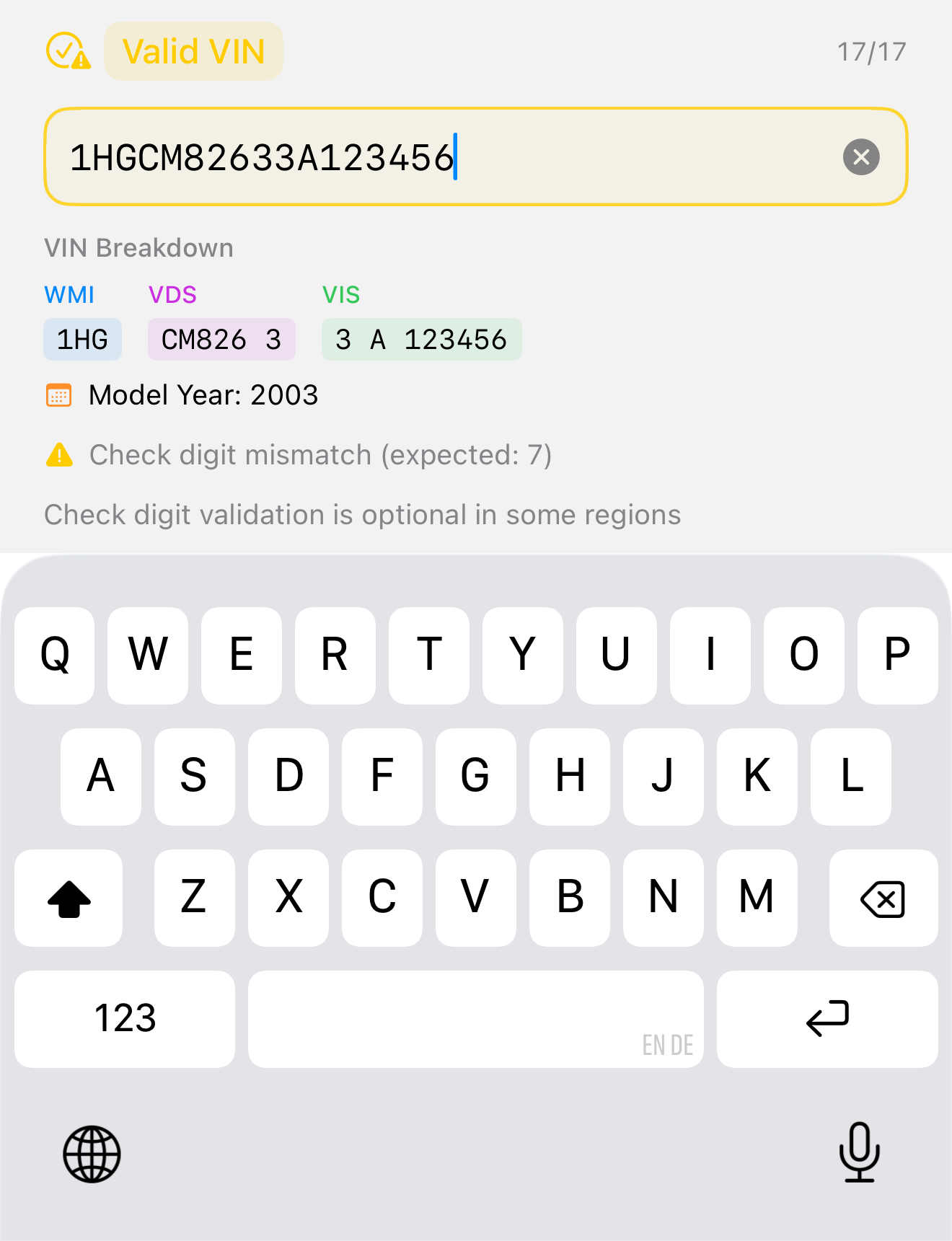
The important shift isn’t the parsing — it’s the timing. The field tells you what it thinks while you type, not after you submit. When the check digit does not match it is surfaced as a gentle warning rather than a hard rejection, because outside North America the check digit is genuinely optional and a false “this is wrong” is worse than no opinion. When the input is malformed, the field says so, in place, immediately:
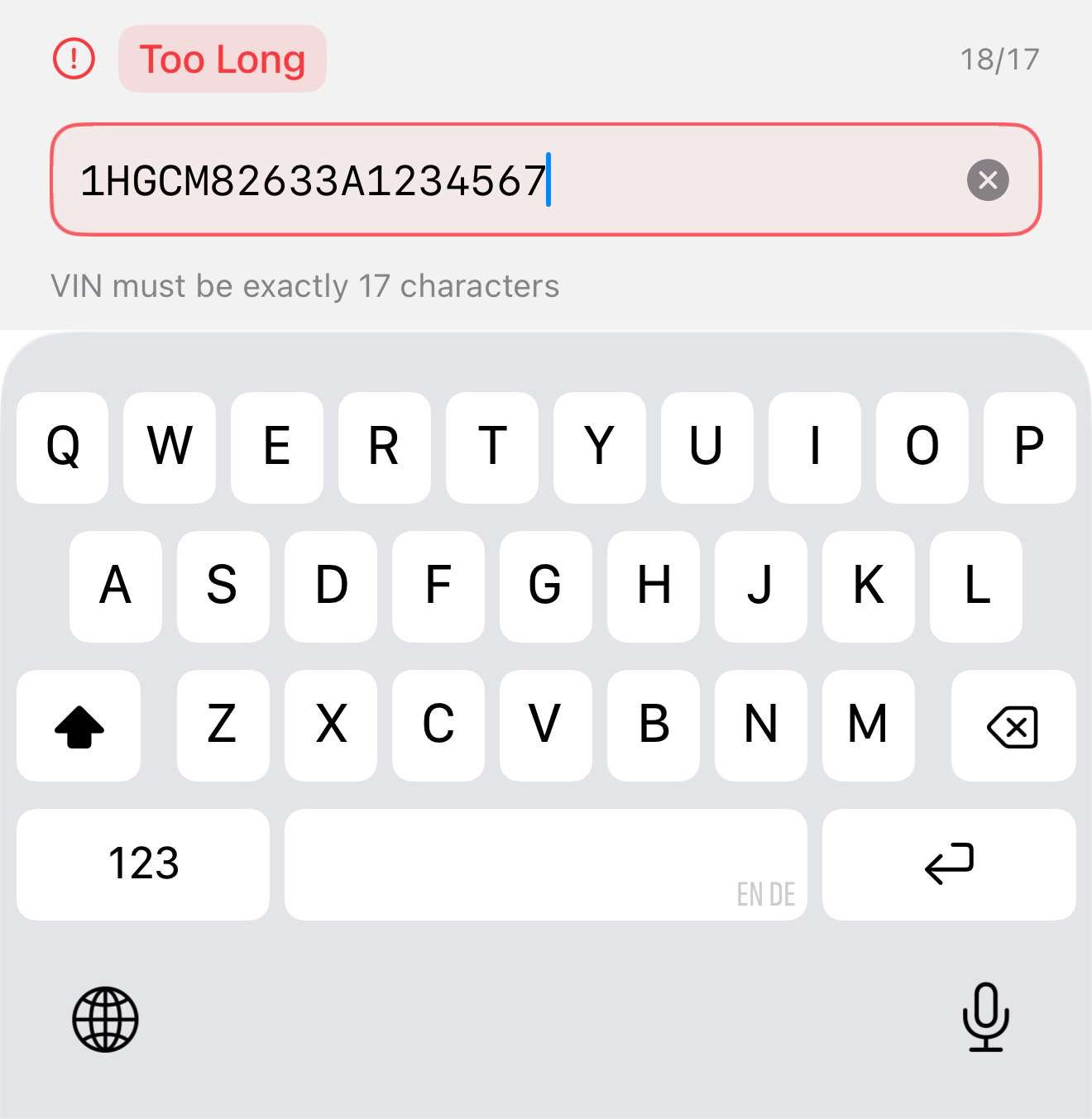
This is already a good control. For many apps it’s the right answer, and it’s the one I’d still reach for inside a Form. But it inherits the system keyboard, and the system keyboard couldn’t care less about our rules. It shows the letters I, O and Q. It shows punctuation that can never be valid. On a small screen, in a workshop, with gloves on, the keyboard fights the field.
Stage 2: a keyboard that only speaks VIN
The last iteration asked an uncomfortable question: if the input is a small domain-specific protocol, why are we using a general-purpose keyboard at all?
So the keyboard became part of the control. VINKeyboardInput ships its own keypad. It is laid out QWERTZ or QWERTY so the keys sit where a touch-typist expects them — but it simply has no I, O or Q keys, because those characters can never be valid. There’s nothing to reject, because there’s nothing invalid to press :)
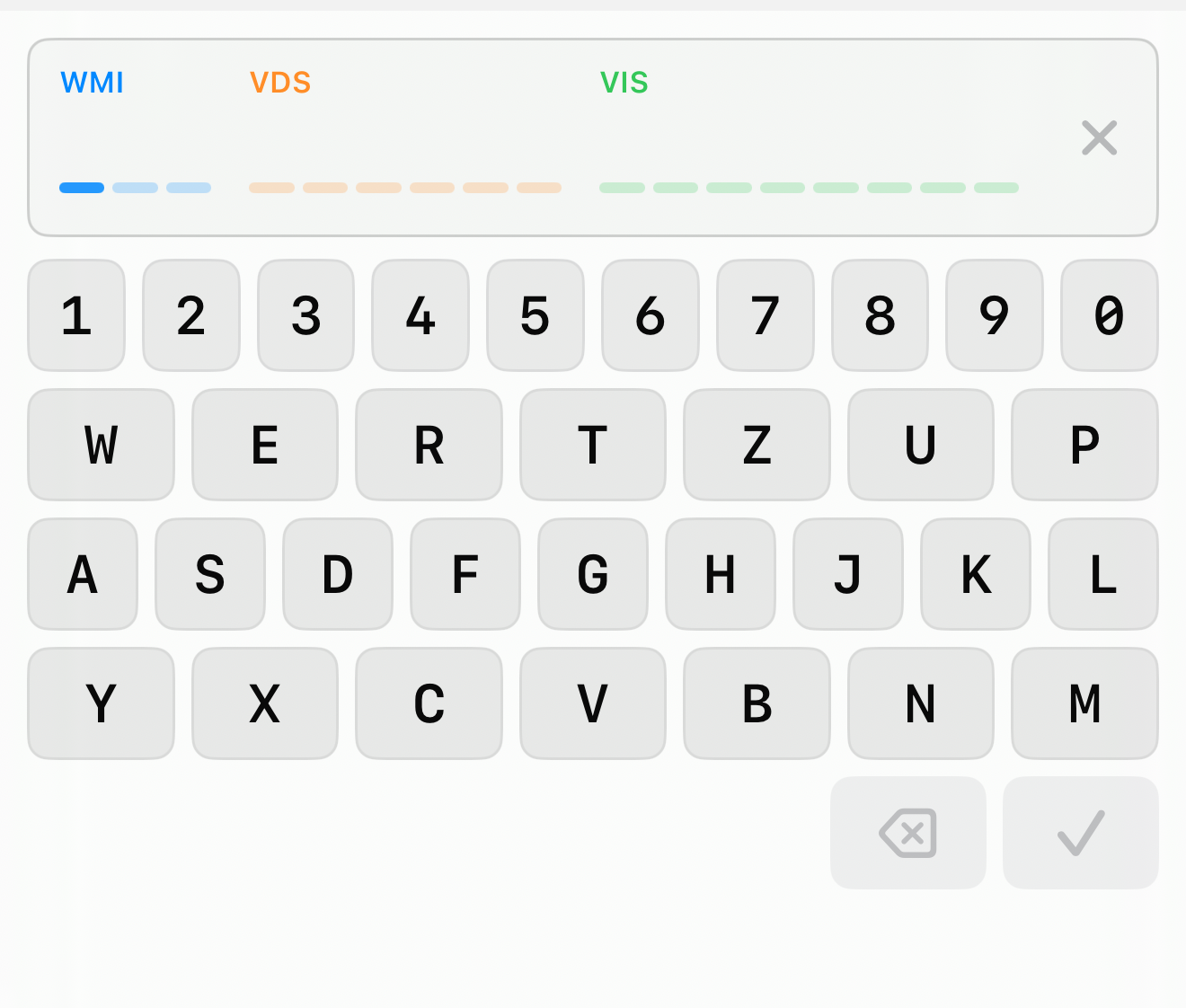
The display is no longer a line of text — it is seventeen fixed slots, grouped and tinted by section (WMI blue, VDS orange, VIS green). Every character you type lands directly on its slot, so the structure is visible as you type, not reconstructed afterwards. The next slot to be filled pulses quietly, so there is always an answer to “where am I?”
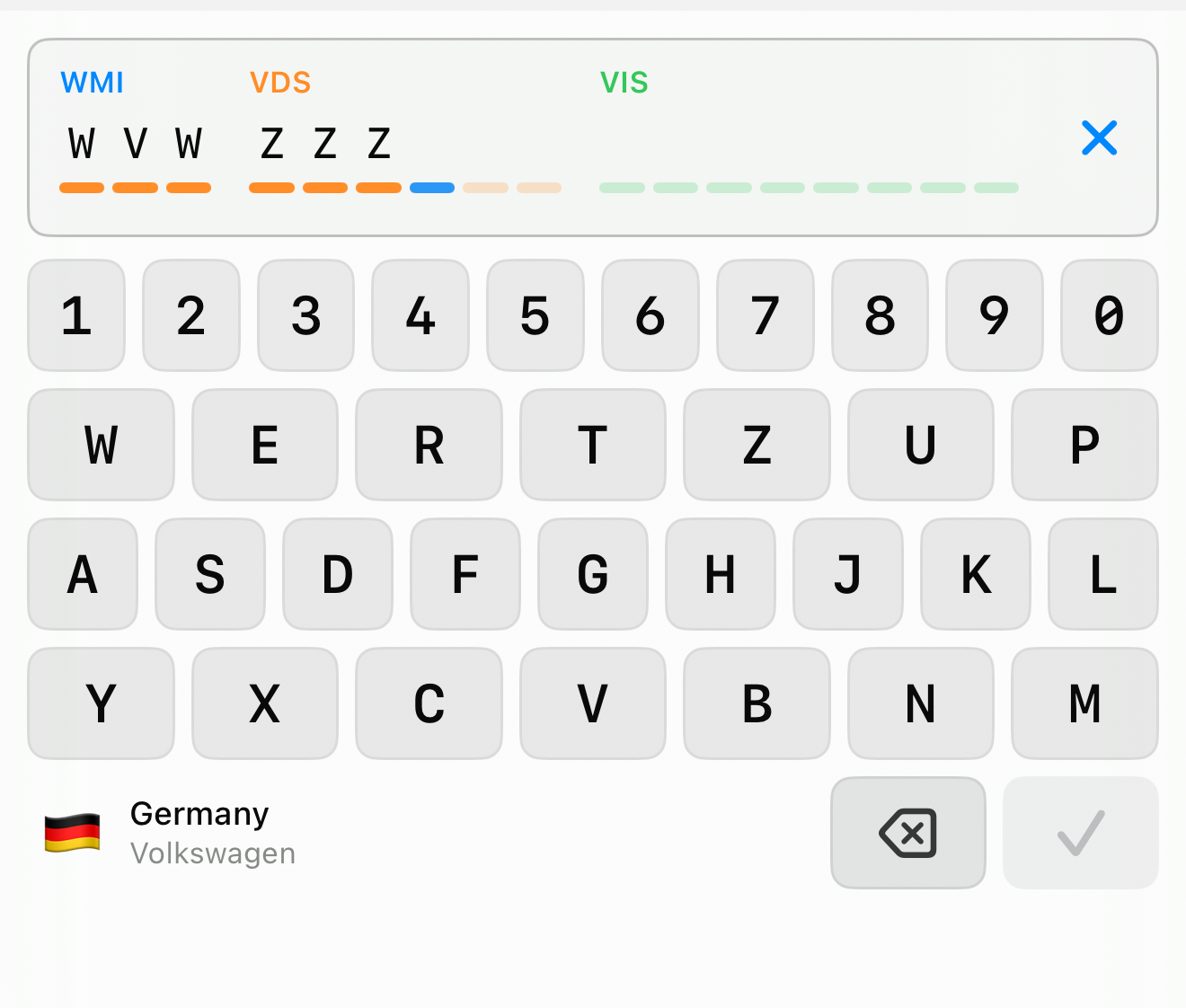
The control also moves position-specific rules onto the keys. When you reach position 9 — the check digit — the keyboard knows that only digits and the letter X are legal there, and everything else dims out. You cannot type an invalid check digit because, for that one keystroke, the invalid keys are gone.
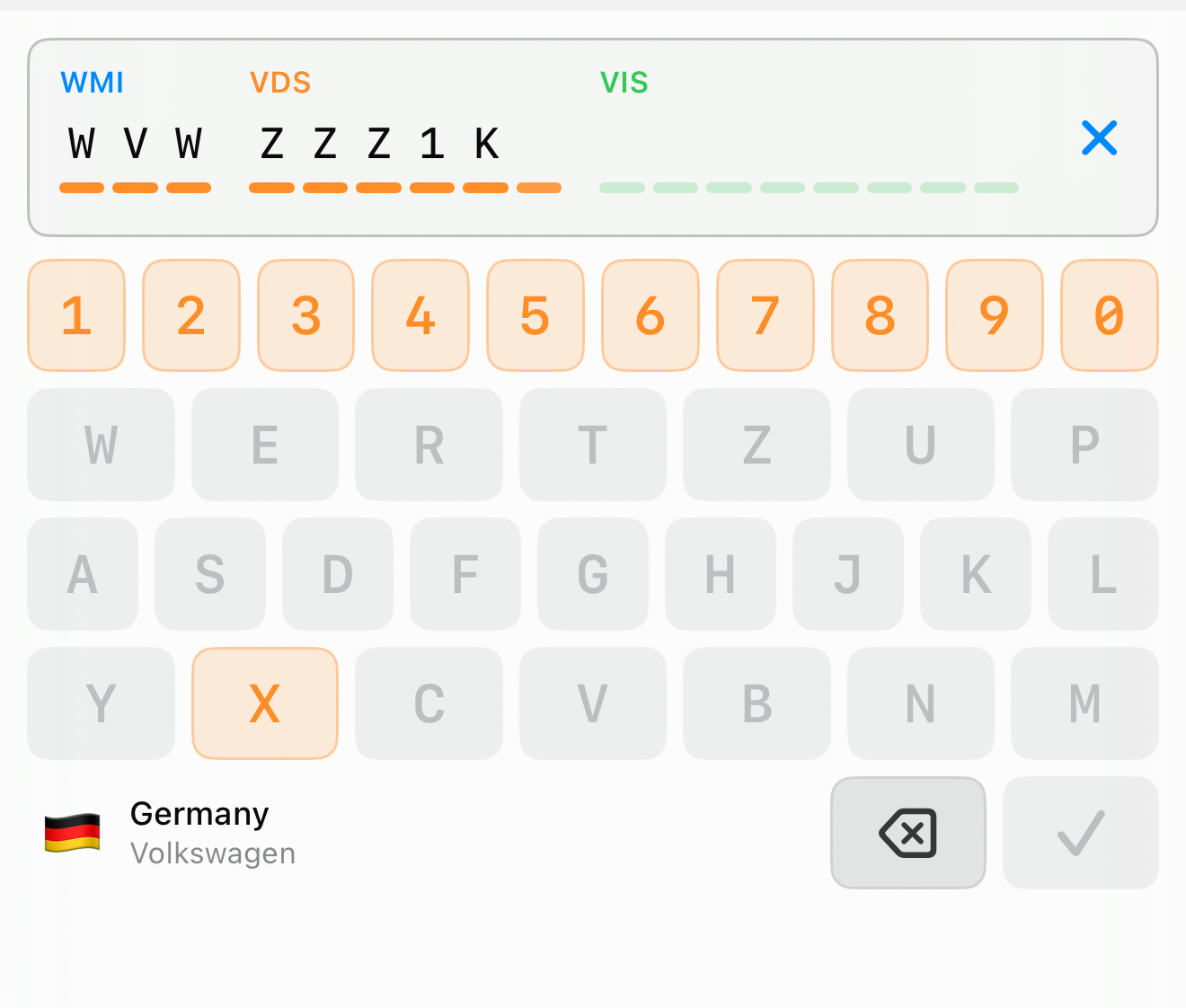
And because the first three characters already identify the manufacturer and its country of origin — that is exactly what the WMI is — the keyboard can show you who and where, live, the moment those characters exist. A flag, the country, the manufacturer, derived entirely from the standardized WMI tables. It’s a tiny thing, but it turns blind data entry into something you can sanity-check with your eyes: yes, that’s a German Volkswagen, that looks right.
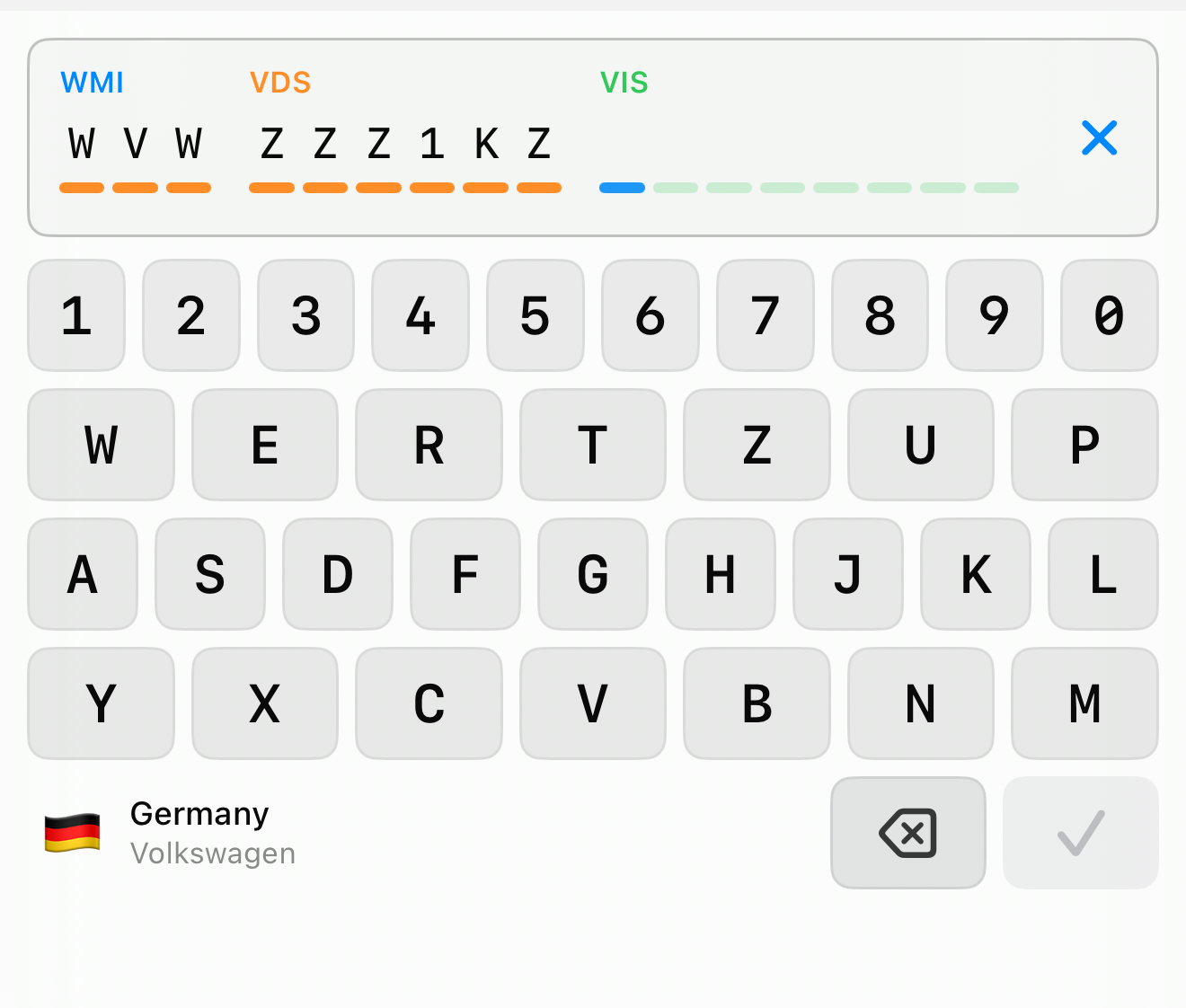
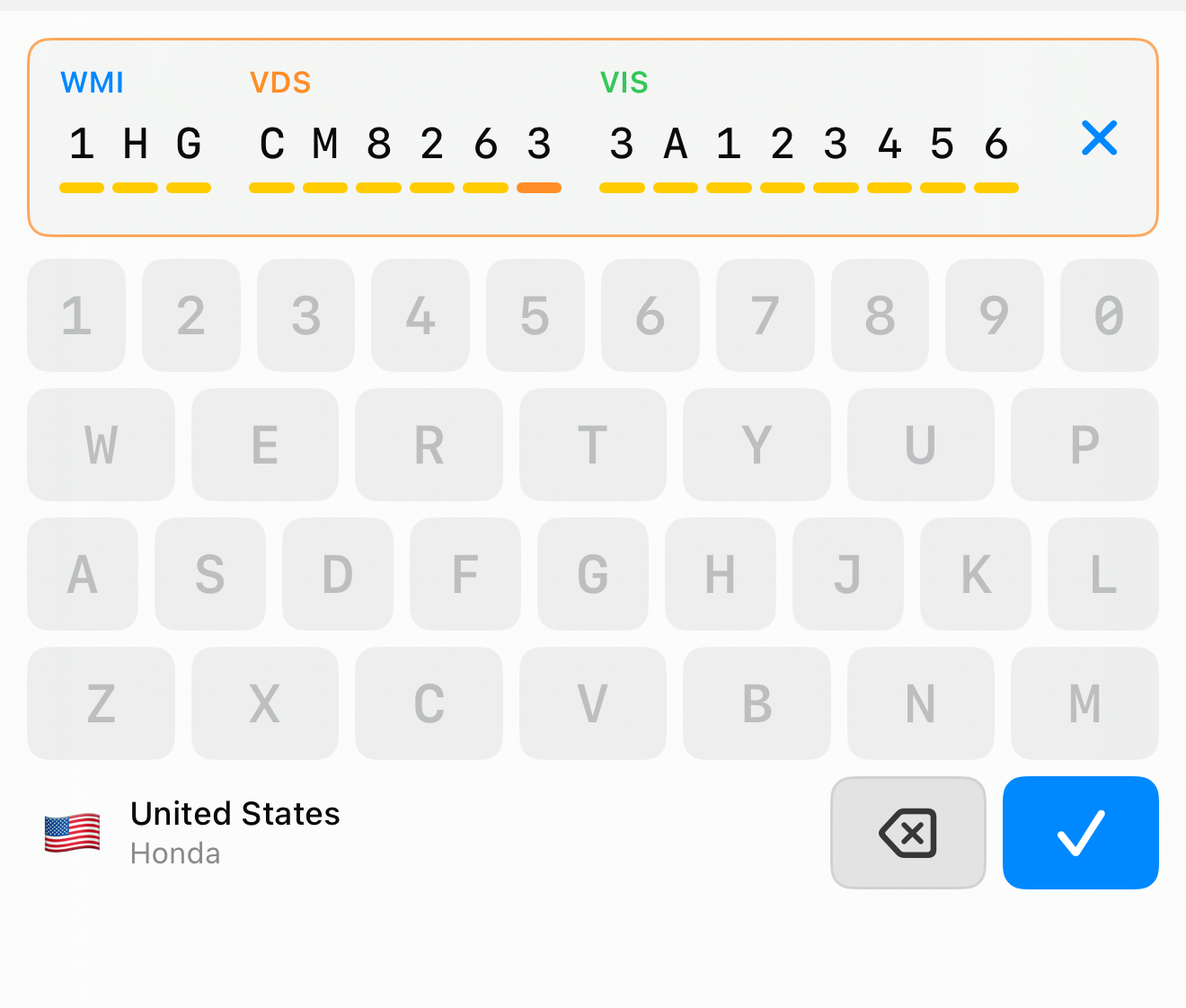
When all seventeen slots are full and the check digit agrees, the submit key lights up and every other key goes quiet. The control has guided the entry from the first keystroke to a value it is confident in.
When is this worth it?
Building a bespoke keyboard isn’t free, and most text inputs should never get one (please don’t). The plain field is the right default; reaching past it needs a reason. The rule of thumb I settled on: build a domain control when at least two of these are true.
- The input has hard syntax rules.
- Mistakes are expensive, common, or disruptive.
- Users enter this kind of value repeatedly.
- The displayed form differs from the stored value.
- There is a natural keypad, grouping, or action layout.
- Validity directly gates an action — Send, Connect, Save.
A VIN ticks almost all of them, which is why it was worth three iterations. (In 2013 I complained about clients wanting to discuss button placements with someone holding a Ph.D. Here I am, thirteen years later, spending three iterations on a single text field. The difference: nobody asked me to, and I enjoyed every minute of it.) The same reasoning applies to a whole family of inputs in the automotive and diagnostics apps I work on: CAN identifiers, UDS service payloads, IP and MAC addresses, BLE UUIDs. None of them are free text, and all of them deserve a control that knows it.
The thread through all three
The progression from a plain field to a domain keyboard is really one idea applied harder and harder: move the rules of the domain into the moment of input. The plain field knows nothing and tells you nothing. The smart field knows the rules and explains itself. The keyboard goes furthest — it makes the invalid states unreachable, so there is less to validate because there was less that could go wrong.
That’s the same promise as the scanner, just without a camera. You’re still asking the user to trust that the app is doing the right thing. The difference is that here, instead of trusting a recognizer, they can watch the structure assemble itself, character by character, and see that it is right.
All three controls live in CornucopiaSUI, the SwiftUI half of the Cornucopia toolbox, and ship in CarLab.
By the way, if you know of other inputs that deserve this kind of treatment, tell me about them.